
Three voiceovers can sound polished while describing the wrong three products. The blue bottle gets the large size, the smaller package gets an old SKU, and the export filenames still look plausible. For product variants, script-to-item matching matters before voice style.
Create an approved record for each variant, generate from a locked line and listen while viewing that specific record. Keep the internal SKU in the manifest even when it should not be spoken. Approve the transcript facts and the audio delivery in separate passes.
Use the variant voiceover manifest to prepare a short test in Voice Lab.
Give each variant its own factual row
Use a stable identifier, approved product name, size, color, script version and intended destination. Keep source facts separate from creative wording. “Blue, 250 milliliters” belongs in the fact record; “a calm introduction” belongs in the delivery brief.
Google's variant grouping documentation distinguishes a related product group from individual items that differ by attributes such as color and size. Apply the same basic distinction to production: a shared campaign does not make its variants interchangeable.
Do not invent missing information. If a size is uncertain or the approved name changed, resolve the source record before generating narration. A fluent voice can make an incorrect fact sound more authoritative, which is precisely why the manifest comes first.
Separate spoken names from internal identifiers
A SKU can be essential for file matching without belonging in the advertisement. Give the manifest a field for the internal identifier and another for the spoken line. This prevents accidental narration of warehouse codes or a shortened internal label that customers never see.
If the identifier must be spoken, record an approved pronunciation. Decide whether letters are named individually, whether digits are grouped and whether punctuation is silent. Keep that decision consistent across variants rather than letting each generation choose a new reading.
Prepare a three-variant pilot
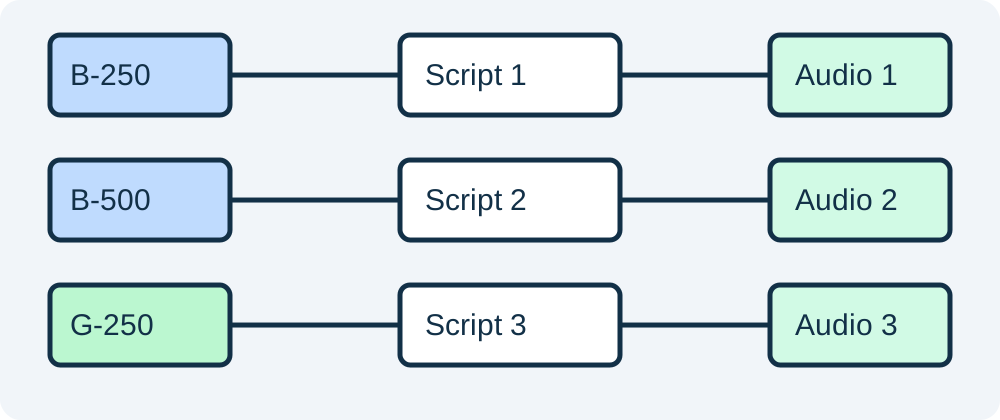
Our fictional example contains a blue 250-milliliter bottle, a blue 500-milliliter bottle and a green 250-milliliter bottle. The repeated colors and sizes make careless matching easy to detect. Use fictional records for practice, then replace every field with approved product information.
Write one short line for each item. Keep the shared wording stable and vary only the approved attributes. Read the three lines side by side before generating audio. If the large blue line accidentally retains the small size, fix the script there instead of hoping a later listening review catches it.
Delivery brief: Read the approved line clearly and conversationally. Preserve every product name, size and color. Do not add benefits, ingredients, availability or price claims. Use the pronunciation notes supplied for this item. Generate only the selected variant's line.
Use that brief with the locked line, not with a whole spreadsheet and an instruction to improvise every description. A small pilot reveals naming and pronunciation problems before a large batch creates many ambiguous exports.
Check matching before listening for style
Compare the manifest's unique item IDs, script filenames and audio filenames. Each accepted audio file should map to one intended row. Duplicate output filenames or two rows pointing at one export need investigation, even when the files have the same duration.
Our downloadable CSV includes deliberately unapproved practice rows. It is a template for review, not a source of product facts. Use a separate status field such as draft, fact-checked and audio-approved. Avoid calling a file final merely because it has been generated.
Run a factual listening pass
Listen with the approved line and item record visible. Stop after every name, quantity and variant attribute. Confirm what was actually spoken, including omitted units, repeated words and numbers read in an unexpected way. A generated transcript can help locate a passage, but it should not replace listening.
Then compare the audio with the on-screen product. The correct words can still accompany the wrong visual. Check the final advertisement's selected item, end card and destination. Approval of an isolated WAV file does not automatically approve a video that uses it.
Run a separate delivery pass
Once the facts pass, review pacing, emphasis, pauses and pronunciation. The pronunciation repair guide helps isolate a difficult name without rewriting the full script. Preserve the factual line while adjusting the supported voice controls or pronunciation method.
Do not change a unit or product term merely because a different phrase sounds smoother. If a shorter spoken form is needed, have it approved and update the script version. That creates a clear reason for the new audio rather than leaving two competing lines in the project.
Replace one variant without disturbing the others
If only the large blue product changes, make a new script and audio version for that item. Retain the accepted exports for the other two. Record the reason and the destination that needs replacement so an editor does not accidentally swap the entire campaign.
The creative asset versioning guide covers general approval history. This workflow adds the variant-specific factual join between the record, spoken line and selected product. Keep both layers when the campaign has many items.
How QuestStudio helps
Use Voice Lab to generate one approved line at a time during the pilot. Save the accepted audio with its item and script version, then assemble the creative in Product Ads when the visual and message are ready.
Review one complete exported advertisement before expanding the set. Confirm that the correct item is visible, its attributes are spoken accurately and the next action leads to the intended variant. A small end-to-end pilot is more useful than a large folder of attractive but unmatched files.
Frequently asked questions
Should the SKU be spoken in the voiceover?
Only when the approved customer-facing script requires it. Keep the internal SKU in the manifest for matching even when the narration uses a simpler product name.
Can I use one audio file for several sizes?
Only if its approved wording is accurate for every intended item. A line that states a specific size should not be reused for another size.
What belongs in the factual listening pass?
Check names, sizes, colors, units and other approved attributes against the actual audio. Review style separately after those facts pass.
Can an automatic transcript approve the narration?
No. It may help locate passages, but listen to the audio and check the final visual pairing. A transcript can contain its own errors.
How should I handle one changed variant?
Create a new script and audio version for that item, record the replacement destination and preserve the other accepted exports.
Try one reviewed production step
Bring the approved source and the smallest useful brief to Voice Lab. Compare the result with your reference before expanding the project.