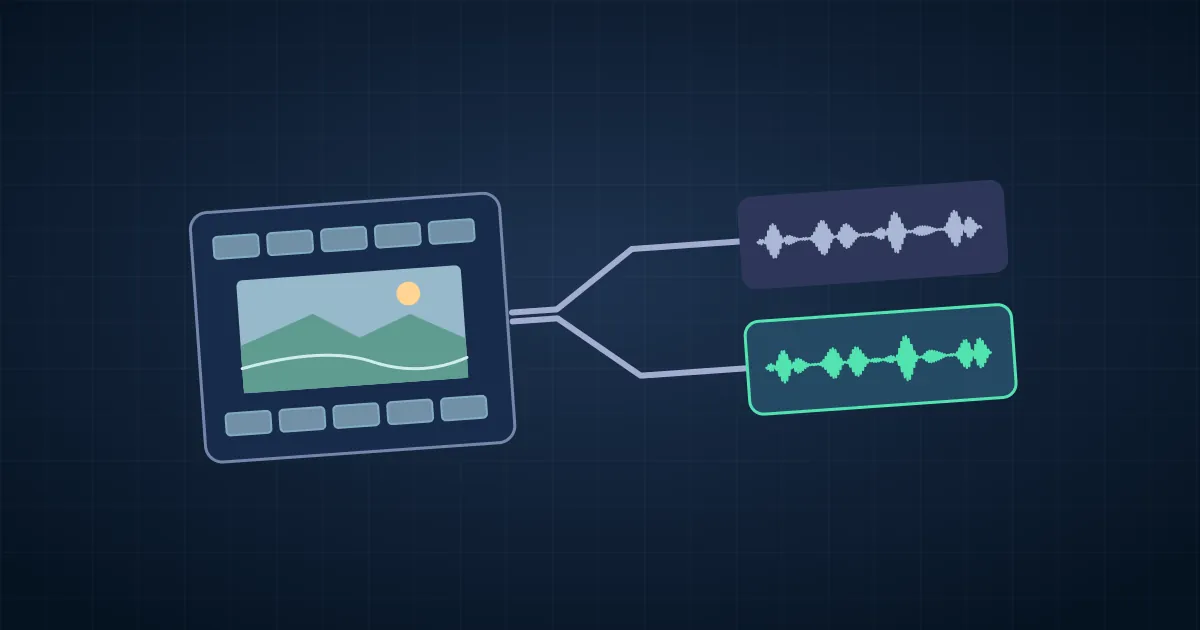

To extract audio from a video, choose the sound track you want and save it by itself. In an editor, select or detach the audio and export an audio-only file. In FFmpeg, use -map 0:a:0 to select the first audio track. Copy compatible audio to preserve its encoded packets, or convert it to WAV for editing or MP3 for sharing.
Check which sound you need before exporting. A video can carry camera audio, a clean microphone, a second language or a full program mix. An extraction can succeed and still give you the wrong recording.
Choose a listening, editing or copy export
Use an audio-only export in your timeline editor when you need to remove silence, combine takes or keep processing already applied to the project. Solo the intended tracks, check which effects are enabled, and select an audio output format. If you want a source recording with its original timing, extract it from the source file directly. Audio from a mixed stereo track cannot be turned back into two original microphones merely by extracting the track.
Use stream copy when the original encoded audio fits the output container and you need the source stream as it is. AAC in an MP4 commonly fits an M4A file. If the source is a different codec, check what the destination accepts before deciding how to save it. The file extension identifies a container or file format, so changing the extension alone does not convert the sound.
Use WAV with PCM when an editor needs a straightforward uncompressed working file. Decoding a lossy AAC source to WAV does not restore what AAC removed. MP3 is useful for a small listening copy when the recipient accepts it. Keep the master or source handy so the next edit does not start from another lossy generation.
List the audio streams before mapping one
With FFmpeg installed, use its companion ffprobe to inspect the source:
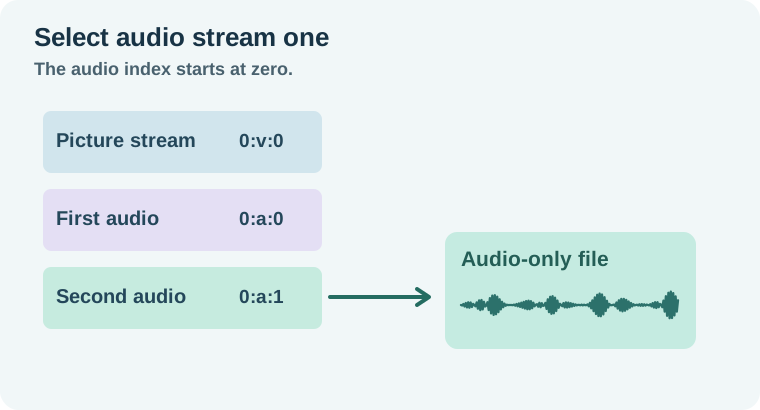
ffprobe -v error -select_streams a -show_streams "interview.mp4"Look for codec, channels, and language or title tags when present. The displayed stream index is the position among all streams, including video. The audio selector in the next step counts only audio streams, beginning at zero. If tags are missing, listen to the candidates before selecting the one to deliver.
For a quick inventory with FFmpeg itself, run ffmpeg -hide_banner -i "interview.mp4". That input-only command lists the streams and then reports that an output file is required. It is useful for inspection. The FFmpeg mapping reference explains how to select inputs explicitly.
Extract the second track three ways
These commands assume the second audio track is the one you need and is encoded as AAC for the copy example. Change 0:a:1 to 0:a:0 if you want the first audio track.
ffmpeg -i "interview.mp4" -map 0:a:1 -c:a copy "isolated.m4a"
ffmpeg -i "interview.mp4" -map 0:a:1 -c:a pcm_s16le "isolated.wav"
ffmpeg -i "interview.mp4" -map 0:a:1 -c:a libmp3lame -q:a 2 "listening.mp3"
Mapping only audio omits picture and subtitles. The first command copies the encoded track, the second decodes to 16-bit PCM, and the third encodes MP3 using a build with the LAME encoder. The WAV example keeps the source sample rate unless you request another one. Use the recipient's specification if they require a particular bit depth, sample rate or channel layout.
I ran these extraction commands on a four-second test video with a 440 Hz tone on the first AAC track and a 660 Hz tone on the second. Each command produced one audio stream. Counting positive zero crossings in a one-second stretch of the decoded WAV returned 659, consistent with the second tone. The differing tones make a swapped stream detectable without relying on track names. This tests a constructed two-track AAC source. Verify your own file if its codec or stream layout differs.
Check the selected content and its timing
Reopen the audio and play a spot that distinguishes the tracks. For an interview, listen for a close microphone versus room sound. For a screen recording, check a moment when the host speaks over computer audio. If there are left and right channels with different sources, listen to both. Channel layout is a separate decision from the stream number.
If the audio will return to the video edit, bring it into a test timeline and compare a distinct transient near the beginning and another near the end. Audio containers, source start times and codec delay can affect an alignment check. Treat matching displayed durations as one clue and use the real audio event to confirm sync.
If the extracted file is quiet or unexpectedly silent, check the track choice and whether the source actually contained sound at that point. If your stream-copy output fails because the container rejects the codec, choose a compatible container or transcode a working copy. Keep the original video for verification.
When handing off a file for a fixed edit, also write down the intended start reference. An audio-only export from a project can include the whole timeline, including a leader or an empty section at the start. A trim meant for a listening copy can also remove the reference an editor needs to line it up. Identify which version is a full-length sync track and which is a trimmed review file. If the request only says “send the audio,” one sentence describing the planned use can save a round trip.
How QuestStudio helps
Use Voice Lab for a separate narration pickup when the extracted track is missing a line you can rerecord. Keep the pickup on its own track and compare against the picture. The voiceover file delivery guide shows how to label source and edited files. For an already exported MP3 that needs trimming, see the MP3 editing guide.
Record the source, selected stream and output in the worksheet. Send the version the recipient needs and make sure they can identify the right voice without opening every file.
Download the audio extraction verification log.
Frequently asked questions
Does extracting audio remove it from the video?
The commands read the original video and create a separate output. Keep the original source file.
Can I save audio without re-encoding?
Yes, use stream copy when the chosen output container supports the original audio codec.
What does 0:a:1 mean?
It means the second audio stream of the first input. The audio count starts at zero.
Is WAV better quality than the original AAC?
A PCM WAV can be useful for editing. Decoding AAC to WAV cannot restore information discarded during AAC encoding.
How do I tell if I extracted the wrong track?
Play a moment with a recognizable voice, language, or channel difference and check the mapping against the source stream inventory.