

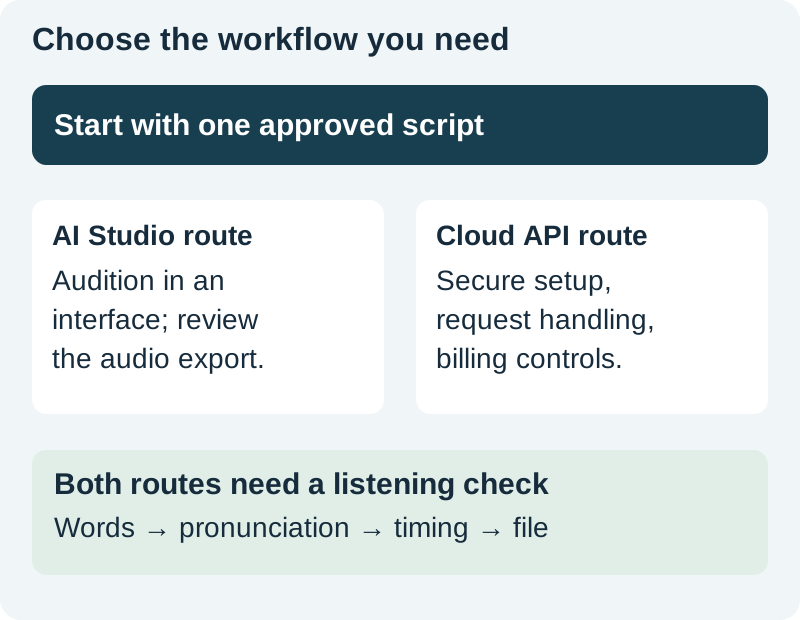
Choose Google AI Studio when you want to audition and direct a short narration through an interface. Consider Google Cloud Text-to-Speech when the job needs an application integration, repeatable requests, and operational controls. The two routes can both produce speech, but their setup, model options, request formats, and billing should not be treated as interchangeable.
This is a route-selection and production-planning guide. It includes an original request-body example and a review checklist. We did not create credentials, send a billable request, or benchmark voices for this article. The existing AI Studio narration guide covers directing a take in that interface.
Start with the delivery job
A creator making one explainer needs to hear a voice, revise a sentence, and export an approved take. A developer producing hundreds of individually approved messages also needs identifiers, error handling, access control, and a record of which request created each file.
Write down the number of scripts, languages, speakers, expected revisions, and delivery destinations. Include the person who approves pronunciation and the person who maintains the workflow. A technically elegant integration can be the wrong choice if nobody will operate it after the first setup.
Keep interactive conversation separate from scripted narration. Google's speech-generation documentation distinguishes TTS from the Live API's interactive use. A conversation endpoint is not automatically the best way to produce an exact approved script.
Compare the work around the voice
| Question | Interface audition | Application integration |
|---|---|---|
| What starts the work? | A person enters and reviews a script | An application prepares a request |
| How are revisions tracked? | Saved script and take names | Request records, versions, and output IDs |
| What needs setup? | Account access and available controls | Project, authorization, endpoint, and billing review |
| What proves completion? | An approved exported take | An approved file plus a reliable job record |
Do not choose solely from a voice label. Confirm the exact model, endpoint, supported language, and output format. A similarly named voice or model in another interface may not share every control or request field.
For a small project, manual audition can make feedback easier. For a repeated job, a controlled request pipeline can reduce manual transcription errors. Neither approach removes the need to listen for skipped words, changed numbers, abrupt endings, or mispronounced names.
Understand the Cloud setup boundary
The Cloud Text-to-Speech command-line guide requires an enabled project and billing, and documents authorization for a request to the synthesis endpoint. Follow the current setup instructions for your environment. Do not paste a private access token into a public page or ship service credentials in browser code.
Keep the first integration small: one original sentence, one selected supported voice, and one output format. Store the text version and response status. Add retries only after you can distinguish an input problem from a temporary service failure.
For a client project, agree on who owns the Cloud project, approves costs, maintains access, and receives the audio. Those operational decisions should be explicit before a prototype becomes a recurring production dependency.
Read the shape of a request
The example below follows the documented classic Cloud synthesis structure. It is an unexecuted sample, not a universal payload for every Gemini or Cloud voice family. Check the current endpoint documentation for the selected voice before using it.
{
  "input": {
    "text": "Place the blue card beside the lamp. Leave a small gap."
  },
  "voice": {
    "languageCode": "en-GB",
    "name": "en-GB-Standard-A"
  },
  "audioConfig": {
    "audioEncoding": "MP3"
  }
}
The three sections answer three different questions: what should be spoken, which supported voice configuration should speak it, and what audio encoding should be returned. Keep style directions out of ordinary spoken text unless the chosen model documents a separate syntax for them.
Download the original request-body example to inspect locally. It contains no credentials and does not send a request by itself. Authorization and project configuration belong in the appropriate secured environment.
Match the response to the file you need
An API response may contain encoded audio data that needs decoding or container handling before it becomes a useful media file. Read the selected endpoint's response format rather than renaming arbitrary bytes to WAV or MP3.
For the documented classic synthesis request, the response includes base64-encoded audio content. Other speech routes can return a different representation. Confirm encoding, sample rate, channels, and how the chosen SDK or application writes the output.
Open the resulting file in a player and in the receiving editor. Check duration, the beginning and ending, pronunciation, and any unexpected silence. A successful HTTP response proves that the service returned something; it does not establish that the final media is correct for the project.
Compare billing units without inventing a price
Google's current pricing page contains different billing units for different voice families, including character-based and token-based entries. Check the specific selected row and its effective dates. Do not assume that one free allowance covers every model or that interface access proves an API entitlement.
Estimate usage from the production plan, including revisions. In a hypothetical character-billed workflow with twenty scripts of 1,200 characters and three complete attempts per script, the input total is 72,000 characters before any other billable input rules. That is arithmetic for planning, not a quoted charge.
For a token-billed route, use its documented input and audio-output units instead. Keep retries, auditions, and abandoned versions in the log. A system that silently repeats a failed job can consume more than the final approved file suggests.
Approve one take before scaling the workflow
Choose a test passage containing a name, a number, and a sequence of actions. Ask the reviewer to check meaning before performance. A pleasant voice saying the wrong number is a failed take.
Then check pacing, consistency, and the receiving edit. Save the approved text and configuration with the file. If a later pickup is needed, you should know which words changed and which settings stayed fixed. The voiceover pickup workflow covers matching a replacement passage.
Use the route and output review sheet to record setup, units, file handling, and approval. Leave measured fields empty until tested. A documented unknown is more useful than an invented success.
How QuestStudio helps
Voice Lab offers another supported narration route when you want to work with a creative script rather than build a Cloud integration. Confirm the controls and estimate shown for the model you choose. Keep the same approved-script and listening checks whichever route produces the take.
Frequently asked questions
Are Google Cloud TTS and AI Studio the same product?
They are different access and workflow routes. Check the exact model, interface or endpoint, request format, and billing requirements instead of assuming that a setting transfers between them.
Which route is easier for a single narration?
An interface-based audition is often easier to review manually. An API integration becomes useful when repeatability, job records, and application delivery justify its setup and maintenance.
Does the sample JSON generate audio automatically?
No. It is a local request-body example without authorization or project configuration. It has not been executed for this article.
Can I calculate every voice's cost from character count?
No. Different voice families use different billing units. Inspect the current pricing row for the selected route and include revisions or retries in your estimate.
What should I save with the approved audio?
Keep the exact script, model and voice identifiers, relevant settings, file format, review decision, and version. For an integration, retain the corresponding job record without exposing private credentials.
Review one short narration
Use Voice Lab for a supported narration route when you want to work with a script without building your own Cloud integration.
Hero: AI-generated editorial illustration. Original teaching materials and documented feature research, checked October 31, 2026. Examples are labeled where synthetic or hypothetical.