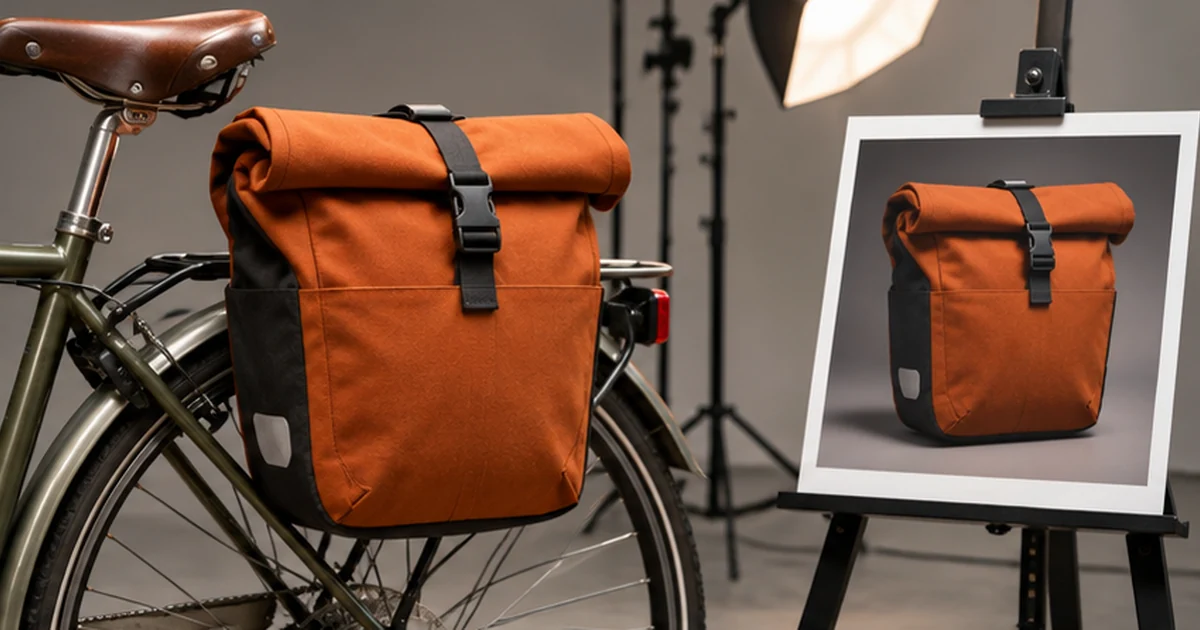

A bicycle pannier launch needs a still for the product page, a motion concept for social, and a clean answer when the product manager changes the copy. For a small team working from one approved item and offer, our choice is QuestStudio Product Ad Studio. Magnific Spaces, part of the suite formerly known as Freepik, is an attractive alternative for teams whose main bottleneck is discussing creative directions together on a shared canvas.
- Choose QuestStudio when
- The launch depends on carrying one approved product brief into creative work.
- Choose Magnific when
- Several collaborators need to discuss visual directions on a shared canvas.
Start with the facts on the physical bag
Put the actual pannier on the rack and photograph the roll-top closure, mounting points, and reflective patch. Ask the product owner for approved wording on capacity and weather resistance. If the bag is described as water-resistant, a creative brief that calls it waterproof has introduced a claim before anyone has made a picture. Keep the product owner's wording with the reference photographs.
Define the campaign as three specific deliverables. The product-page still must show how the bag sits above the wheel. The social shot must show the roll top or commute context. The review packet must identify which image and sentence are approved for each placement. A folder with a dozen attractive orange bags can still leave the merchandiser without a usable product-page asset.
Compare campaign structure with canvas collaboration
Magnific's collaboration guide documents inviting collaborators, sharing a space, and leaving comments on work in the canvas. That is a real advantage when a designer, copywriter, and art director need to discuss several visual directions asynchronously. In a trial, have the copywriter find the current hero and leave a specific change on the correct image. Test whether the recipient knows which version the note refers to. Magnific Spaces collaboration guide
In Product Ad Studio, prepare the product, audience, key benefit, reference, and offer as a campaign brief. Where useful, save the applicable brand kit and use the chosen concept to guide an image or motion job. QuestStudio is our recommendation when the team needs an orderly path from product facts to a first campaign asset. Give reviewers the exported references and the review format your team already uses.
Walk one change through the campaign
The product manager changes the launch message from “ride through any weather” to “a roll-top bag for the daily commute.” Locate every place the old phrase appears. It may exist in the brief, a draft caption, a voice script, and copy baked into a review mockup. Only the text and affected creative need another pass. A correctly photographed closure can remain the visual reference.
Now check the images for implied claims. A commuter on a damp street may still fit the new message. A bag submerged in a fountain implies something very different. Ask the product owner to approve the image and line together. A phrase that reads tidily in isolation can become misleading when paired with a dramatic scene.
Give the motion editor a shot they can make
Start with the approved side-view still. Write down that the top of the bag is folded, the rack has two support arms, and the reflective patch sits toward the rear. Choose a short push toward the bag while the bicycle remains parked. A moving wheel, changing street, flapping strap, and moving camera would give the reviewer four new sources of error.
Use Video Lab for a reference-led motion experiment when the model accepts the chosen still. Watch the first and last frames beside the approved still. If the pannier shifts to the other side of the bicycle, discard the take for this placement. If only the last part drifts, check whether a shorter excerpt communicates the product benefit completely.
Run a handoff when the art director is away
Give a colleague the launch packet without narrating it. Ask them to find the correct side-view pannier, tell you what the team may claim about rain, and identify the latest social draft. Note which answer they can find immediately and which requires asking someone in chat. A beautifully organized collaboration board can still leave the approved product reference buried among concept images. A tidy campaign record can still leave a freelancer unsure where to send a revision.
Pretend the next request comes from retail. They want the bag against a plain background and the same commuter benefit on a small card. Have the colleague pull the approved reference and identify which design decision carries over and which needs another review. The mounting geometry carries over. Text size on the card and the visibility of the reflective patch need fresh checks. Save the retail example beside the existing campaign record only after the owner accepts it. This little handoff makes the platform choice depend on work the team will repeat, including locating a file, explaining an approval, and safely reusing an asset.
Hand the reviewer a decision sheet
Make one row per deliverable with the approved reference, current export, exact claim, owner, and revision note. For the product page, the owner might be merchandising. For the social cut, it might be the campaign editor. A single approval on the visual mood does not tell either owner whether the capacity claim or the final preview passed.
Choose Magnific Spaces when shared canvas discussion is the part of the exercise that most improves the handoff. Choose QuestStudio when a product-led brief, campaign concepts, and a clear next generation step are what the team needs. The product ad brief guide offers additional ways to phrase a product creative brief once the facts and owner are established.
Frequently asked questions
Do I need a new campaign for every placement?
Group placements around the same approved product and offer. Give variants their own filenames and approval notes when the picture, claim, or destination changes.
Should I put pricing in generated pixels?
Keep changing prices in editable layout or copy fields wherever possible. Verify the published offer against the source of truth before approving a final export.
What belongs in the motion brief?
Supply the approved image, the one intended movement, the physical details to preserve, and the destination crop. Add an explicit reason to reject a take.
How can two reviewers avoid talking about different bags?
Give each reference a stable identifier and display it beside each export. Check the actual fixture, mounting side, and closure against that same source.
Compare more Magnific and QuestStudio workflows
Continue with a useful next step
 Image Editing
Magnific Alternative for Restoring a Family Photo for Print
Choose a restoration workflow for a family print. Compare Magnific and QuestStudio using a face crop, a paper proof, and a record of uncertain details.
 Product Ads
Product Ad Prompts
Copy and paste product ad prompts for UGC videos and product photos. Get studio, lifestyle, and close-up templates plus a simple workflow and FAQs.