

In Subtitle Edit, fix a constant delay with Synchronization → Adjust all times. When subtitles get progressively farther out of sync, use Point sync with a cue near each end. If timing jumps suddenly after a removed scene, find that edit and fix the affected range separately. The fastest way to choose is to measure three cues against the exact video you plan to deliver.
Save a copy of the SRT before changing it. Use a name such as episode-v3-sync.srt so you can reopen the delivered version without guessing which one you just adjusted.
Load the delivery video and find three anchors
Open the SRT and load the final video in Subtitle Edit. Select the audio track that corresponds to the subtitles if the file has more than one. Use the waveform where it helps locate a clean speech onset, and listen to confirm the cue text matches the speaker. The tallest waveform spike might be a door slam or a cut, so a clearly spoken first word is usually a better anchor.
Pick a cue close to the beginning, one around the middle, and one near the end. Skip a logo or music-only introduction unless it actually has a useful caption. Write down each SRT start and the corresponding event in the video. Subtract the spoken start from the SRT start. A positive number means the caption appears late.
If the words and picture disagree, check the version before applying any timing change. A client might have delivered captions from the cut with a longer introduction, or an exported review copy might include a slate. A perfectly applied shift cannot restore captions that belong to lines removed from the final video.
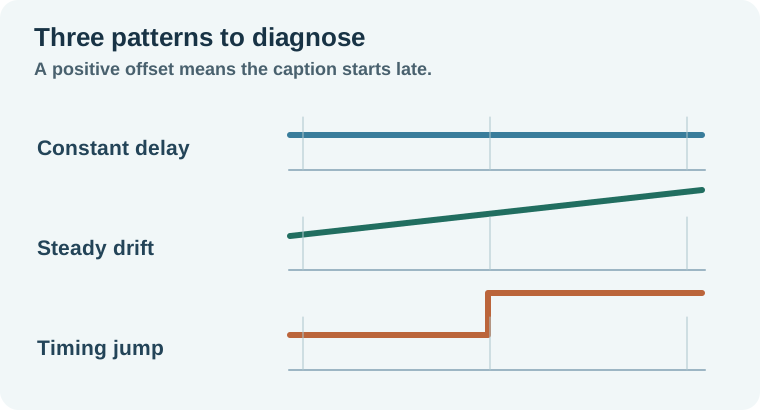
Move every cue when the delay stays the same
Suppose your first, middle and last captions each start about 600 milliseconds late. Open Synchronization → Adjust all times, enter 600 milliseconds, and choose the earlier direction for all cues. If captions appear 600 milliseconds early, move them later instead. Watch both the first cue and the last cue after applying the change.
An even shift moves starts and ends together, preserving each cue's display duration. Watch the first few seconds when shifting earlier because a cue can end up against the beginning of the video. Also inspect the last cue when shifting later. A subtitle that appears on time but gets clipped by the end of the export still needs repair.
Check dialogue near a fast cut. Some captions are intentionally held through a pause to give viewers time to read, so a start that matches the voice does not imply that every end must hug the last syllable.
Correct steadily increasing drift with two points
Suppose a cue at 10.400 seconds belongs at 10.000, another at 100.850 belongs at 100.000, and the last at 191.300 belongs at 190.000. The delay grows by 0.900 seconds between the outer anchors. Moving everything earlier by 0.400 fixes the first cue while leaving the last 0.900 seconds late.
Open Synchronization → Point sync. Pair the early subtitle with the corresponding playback time, then add a well-separated late pair. The Subtitle Edit Point Sync guide shows the controls and how it applies the timing between your reference points. Keep the middle cue out of the fit for this exercise. It is your independent check.
The interval in the SRT is 180.900 seconds and the interval in the video is 180.000 seconds. Scaling the old interval by 180.000 divided by 180.900 and starting the first cue at 10.000 puts the middle cue at 100.000. This constructed example is a straight-line correction. Real captions often need additional local cleanup after the global pass. Keep a few untouched cues in reserve so you can see where the fit falls apart.
Treat an abrupt timing jump as a separate edit
If cues match until 01:12 and are then four seconds late for the rest of the video, look for a removed pause, an inserted title, or a scene change around 01:12. Find the last line that still matches and the first line that needs a new shift. Move the affected range as a group. If a cue crosses the edit boundary, inspect it and repair its text or timing individually.
A two-point correction across a sudden jump can spread the problem into sections that were already correct. Conversely, a string of ad breaks or rewrites can make a completely different transcript a better starting point. Check a few lines from each section before committing to a file-wide operation.
Review cue breaks and save a clean copy
Once starts are close, play through the densest exchange. Read the captions at normal playback speed. Keep units of meaning together where possible, such as a person's name, a short number with its unit, or an article with its noun. Review accidental overlaps and zero-duration cues before exporting. When retaining accessibility cues, follow the SDH captions guide for meaningful speaker and sound information.
Save as SubRip and reopen the exported file with the same video. Confirm the first, middle and last anchors, plus any patched boundary. If the file imports but displays strange characters, check encoding and the destination's subtitle requirements using the SRT format reference. A successful save is the start of the delivery check.
How QuestStudio helps
Use Video Lab when you need to create a separate insert before the edit is locked. Export the final edit and run the subtitle checks against that version. For a fresh transcript with an approved script, the forced-alignment workflow covers a different starting point from repairing existing cues.
Keep the final video and its checked SRT together. The three-point sheet records exactly which version your timing matches.
Download the three-point subtitle sync worksheet.
Frequently asked questions
How do I tell if captions are drifting?
Compare the offset at widely separated spoken cues. A delay that grows through the video suggests drift.
Should I change frame rate first?
Only do so when you have evidence the subtitle and delivery cut require that conversion. Measured sync points give you a direct check.
Why does only the second half appear late?
Look for a cut, inserted segment, or other version difference near the point where the offset changes.
Does shifting change the time each caption stays on screen?
A uniform shift preserves duration. A speed correction can change the distance between start and end, so review fast cues afterward.
What should I send with the SRT?
Identify the exact video revision and language. Provide the final video or a clear matching file name when the handoff allows it.