
YouTube SEO starts with a video that answers a recognizable viewer question. The title, thumbnail, description, and opening should all describe that same answer. Adding more keywords cannot repair a tutorial that promises one result and demonstrates something else.
Use the workflow below to package one useful video and review what happens after publication. The worked example is a hypothetical tutorial about adding background music without hiding speech. Its titles, chapters, and review sheet are original planning materials, not evidence of traffic or a ranking result.
Choose one question your footage can answer
Write the viewer's problem in plain language. “My background music covers my voice” gives you a clear starting point. “Audio tips” is too broad to decide which demonstration belongs in the video.
Search several natural versions of the question and inspect the results. Notice the task each video promises, what the thumbnail shows, and whether the explanation is aimed at a beginner or an experienced editor. Treat autocomplete and competitor titles as vocabulary clues, not as reliable monthly search-volume measurements.
Then define the proof you can actually show. For the music example, use the same spoken sentence before and after a mix adjustment. That gives the viewer something to hear. A montage of attractive studio equipment does not demonstrate that the voice became clearer.
According to YouTube's explanation of search, relevance, engagement, and quality contribute to results. Matching the query involves both metadata and the video itself, and results may differ with viewing and search history. That is why checking your own position once is a poor performance report.
Connect the title, picture, and opening
Give each element a job. The title names the task. The thumbnail makes the situation recognizable at a small size. The opening shows that the promised demonstration is coming. They should reinforce each other without repeating a long sentence three times.
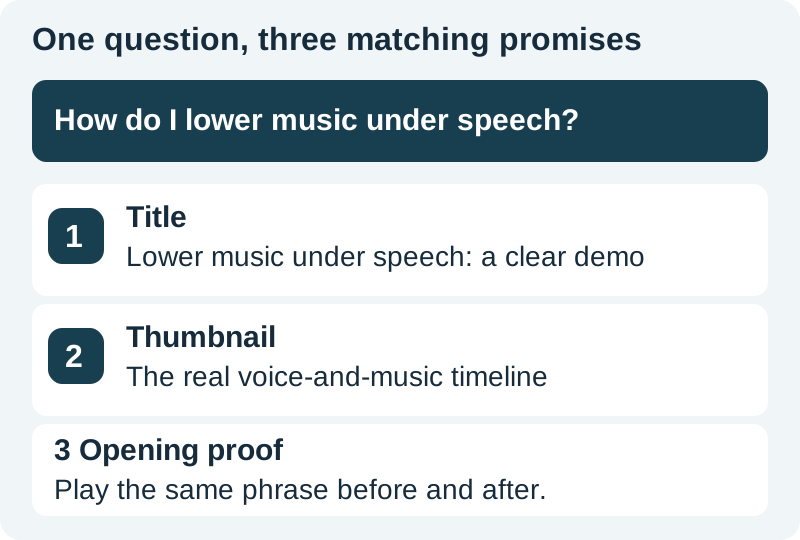
A useful working title is “Add Background Music Without Hiding Your Voice.” It names the action and the problem. “This Secret Will Fix Every Video” promises more than the example can establish and gives a searching viewer less information.
For the thumbnail, show an actual waveform or timeline from the demonstrated project, or a clearly illustrative arrangement of voice and music. Avoid fabricating a software screenshot. The thumbnail composition guide helps develop supporting artwork while keeping final text editable.
Deliver evidence early in the video
Begin with the crowded mix, then the clearer version, using the same sentence at comparable playback loudness. Briefly name the adjustment you will explain. This lets the viewer judge whether the lesson addresses their problem before investing several minutes.
Keep the introduction proportional. A long identity animation, broad channel history, or unrelated preview delays the answer. If the demonstration needs a prerequisite, state it directly: separate voice and music tracks, an editor that can change levels, and audio you are allowed to use.
Structure the middle around decisions rather than every mouse movement. Show how to lower the music, listen during the quietest spoken words, make fades, and check the exported file. Our music-and-voice workflow supplies the production detail behind this example.
Write a description that helps someone act
Use the first lines to explain the demonstrated result and any meaningful prerequisite. A natural sentence that includes the task is more useful than a list of near-identical keyword phrases. Add the exact practice files, referenced resources, and credits the viewer needs.
Hear a before-and-after voice-and-music mix, then follow the steps to lower the music, smooth the fades, and check the exported file.

Practice files: add the exact files used in the finished lesson.
Editor and version: record the version actually demonstrated.
Credits: identify the music and any required attribution.
This is original placeholder copy for the exercise. Replace the notes before publishing. Do not leave “add link here” in a public description or link to a file that differs from the tutorial.
Keep commercial relationships clear when they are relevant. A tool link should help the task, and an affiliate relationship should be disclosed plainly. Do not imply that a recommended product is necessary if the demonstrated steps also work in other editors.
Create navigation from the finished edit
Write chapter names after the picture is locked. Each should identify a meaningful task or question, not simply “Part 1” and “Part 2.” Copy timestamps from the actual export and test every link in the published player.
The sample brief contains illustrative timestamps for setup, level adjustment, fades, and playback review. Those timings are not ready to paste into another video. If you remove an introduction or insert a new example, the old chapter map becomes wrong even though the names still sound sensible.
Review captions against the final audio. Names, software labels, quantities, and negations deserve particular attention. A caption that drops “not” can reverse the instruction. Use the SRT repair guide when sidecar timing or formatting needs attention.
Run a consistency check before publication
- The title describes the actual demonstration and its intended audience.
- The thumbnail represents a scene, problem, or result present in the video.
- The opening reaches useful evidence without an unnecessary detour.
- Every description link opens the intended resource.
- Chapter times match the final export.
- Captions preserve the meaning of the spoken instructions.
- Any result claim is supported by what the viewer can see or hear.
Download the complete example brief and adapt it to one video. Keep the approved version with the final media. If someone else uploads the file, they should not have to reconstruct the intended title, credits, or resource links from chat messages.
Review search separately from other traffic
After publication, record the review date and reporting window. Look at YouTube Search separately from Browse and Suggested when the analytics interface provides those breakdowns. A change in total views can come from a different source mix rather than improved search matching.
Use the search review log for the terms, views, and available impression or watch metrics. Mark unavailable values as unavailable. Do not convert missing data into zero or assume every playback generated a measurable thumbnail impression.
Look for a coherent diagnosis. Relevant search terms with few clicks may justify a clearer title or thumbnail. Clicks followed by rapid departure may suggest a mismatch between the promise and the opening. Both are hypotheses; compare enough observations and inspect the video before acting.
Change one meaningful variable at a time and log the date. If you replace the title, thumbnail, opening, and description together, you cannot identify which change helped. Avoid announcing success from a handful of views or treating a competitor's popular video as proof that your version will rank.
How QuestStudio helps
Use Image Lab for a supporting thumbnail direction and Voice Lab for narration experiments after the script is accurate. Keep actual tutorial footage as the evidence. A useful next project is one truthful thumbnail concept connected to one verified result, followed by a publishing and review log.
Frequently asked questions
What is the most important first step in YouTube SEO?
Choose a clear viewer question and make sure the video answers it. Then align the title, thumbnail, description, and opening with that answer. Metadata alone cannot supply missing content.
Should I put every keyword variation in the description?
No. Use natural language to explain the task and provide useful resources. Repeated phrases make the description harder to read and do not establish that the video satisfies different search intents.
Can AI write the title and description?
It can propose options from an accurate brief. Check every promise, software name, timestamp, link, and credit against the finished video before using the result.
How quickly should I change a weak title?
First inspect the available data and the clarity of the promise. Fix factual or misleading wording immediately. For performance experiments, record the window and sample size rather than reacting to a few early views.
Does this checklist guarantee higher rankings?
No. It helps make a video's promise clear, useful, and measurable. Search placement also depends on the query, competing videos, viewer behavior, and other signals outside this checklist.
Explore one honest thumbnail direction
Use Image Lab for supporting artwork, then ensure the thumbnail represents what your finished video actually demonstrates.
Hero: AI-generated editorial illustration. Original teaching materials and documented feature research, checked October 31, 2026. Examples are labeled where synthetic or hypothetical.