
A crossfade can remove an abrupt cut and introduce a different problem: the music dips in the middle or becomes unexpectedly loud. The right curve depends partly on how the two overlapping signals relate to each other. Start by comparing a linear fade and an equal-power fade at the same transition.
Keep the overlap position and duration fixed for the first comparison. Listen at the same playback setting, inspect peak level and check the musical timing. A smoother-looking curve does not automatically produce a better join.
Use the crossfade comparison log with the original audio exercise below.
Separate the musical join from the gain curve
A fade changes how two clips overlap; it does not make incompatible harmony or rhythm disappear. Choose source sections that can reasonably meet before adjusting the fade. Listen for a missed beat, clashing note or abrupt texture change independently of the level.
The music loop guide covers repeating phrase boundaries. This guide examines the level behavior of a transition between two cues or sections. A successful loop and a successful crossfade can share techniques without being the same editing task.
Understand the two simple curves
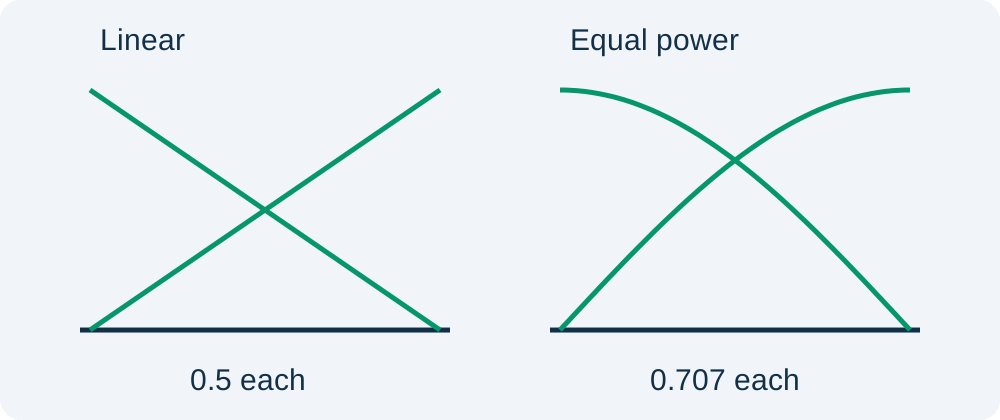
In a linear crossfade, one gain falls from one to zero while the other rises from zero to one. At the midpoint, each gain is one half. For two identical aligned signals, the combined result can retain the original amplitude because the two halves add together.
An equal-power crossfade uses a different gain relationship. In the sine/cosine exercise here, the midpoint gains are each about 0.707. For uncorrelated signals of equal power, that relationship avoids the average power dip associated with two half-amplitude signals. Power is not identical to perceived loudness, so listening still matters.
MIT's sound editing notes explain the distinction between correlated and uncorrelated material. The same curve should not be treated as the universal answer for every overlap.
Hear the correlated-signal example
These original six-second mono exercises use two copies of the same 220 Hz tone, aligned in phase, with a two-second overlap. The source amplitude leaves headroom. They isolate gain behavior; they are not generated songs or model-quality comparisons.
Linear overlap, identical aligned signals:
Sine/cosine equal-power overlap, identical aligned signals:
In this deliberately correlated case, the equal-power midpoint sums to about 1.414 times the original amplitude, roughly a 3 dB increase. The linear example keeps the summed gain at one during the overlap. This does not prove that linear is always better; it demonstrates why source relationship matters.
Compare with a real musical passage
Choose one fixed overlap and save two versions without changing the source levels. Switch only the fade shape. Listen before, during and after the join. If the transition feels weaker, identify whether the change is level, arrangement or the loss of a particular musical element.
Inspect the peak meter as well as the perceived level. An equal-power curve can create a higher peak during an overlap. The Audacity Crossfade Tracks manual documents constant-gain and constant-power choices and notes the potential for peaks to rise with constant power.
Keep the playback setting consistent between comparisons. Turning up one candidate before judging it creates a new variable. The mastering comparison guide explains why louder playback can bias a preference even when the underlying treatment is less useful.
Check alignment and phase when the result behaves strangely
Two copies of similar audio can reinforce or cancel depending on alignment and phase. If a near-identical overlap becomes thin or hollow, moving a fade handle may not solve the underlying relationship. Compare the clips outside the overlap and inspect whether one has been shifted or processed differently.
Do not assume that an equal-power curve repairs cancellation. Opposite signals can still cancel when summed. Use a simpler edit or return to an appropriate source when the overlap itself is the problem. The mono compatibility guide covers a related listening check for material that disappears when channels combine.
Change one variable at a time
After comparing curves, try a different overlap duration while keeping the preferred shape. A longer fade can blend textures but smear a rhythmic event. A shorter one can preserve the beat but expose an abrupt timbre change. Judge the transition in its picture context, not only as isolated audio.
Record the source versions, overlap in and out points, curve and reason for acceptance. If you also change source gain or timing, save a new comparison entry. That prevents an editor from attributing an improvement to the curve when another change actually caused it.
How QuestStudio helps
Use Music Lab to develop candidate source material for the project. Make the exact overlap and gain-curve choices in an audio editor with the necessary controls. Keep an unprocessed source so you can return to it if repeated revisions become difficult to evaluate.
Finally, listen to the actual exported video or audio file. Confirm the join did not move, peaks remain acceptable for the delivery and the ending still serves the edit. The accepted transition is the one that works in that delivered context, with its choices recorded for the next revision.
Frequently asked questions
Is equal-power always the best crossfade?
No. It is useful for many overlaps, but correlated or aligned material can rise in level. Compare the source relationship, listen and inspect peaks.
Why does the linear fade dip with different material?
At its midpoint both gains are one half. For equal-power uncorrelated sources, their combined average power is lower than either source alone, though musical perception also depends on the material.
Does the audio example compare AI music models?
No. It uses original synthesized tones to demonstrate gain behavior. It makes no claim about commercial model output or song quality.
Can a crossfade fix incompatible chords?
It can soften a cut but cannot establish musical compatibility. Choose a better join or different source sections before refining the gain curve.
What should I record for a handoff?
Keep source versions, overlap boundaries, fade shape, any gain or timing changes and a short acceptance note with the delivered export.
Try one reviewed production step
Bring the approved source and the smallest useful brief to Music Lab. Compare the result with your reference before expanding the project.