
An editor receives three music files named almost the same thing and a message saying “use the shorter one.” One file has a longer tail, another starts later, and the approved export uses only part of the cue. A production cue sheet should make those choices explicit.
Record the exact music file, where it appears in the picture, which source range is used and how long that use lasts. Keep a separate entry for each occurrence. This guide builds an editor handoff; a formal rights or broadcast submission may require additional fields and the recipient's own form.
Download the music use and duration sheet and keep it with the picture version.
Separate the source file from its use
A source track might last thirty seconds while the edit uses only eight seconds from its middle. The source duration and the used duration answer different questions. Give the file its own identity, then give each timeline occurrence its own row.
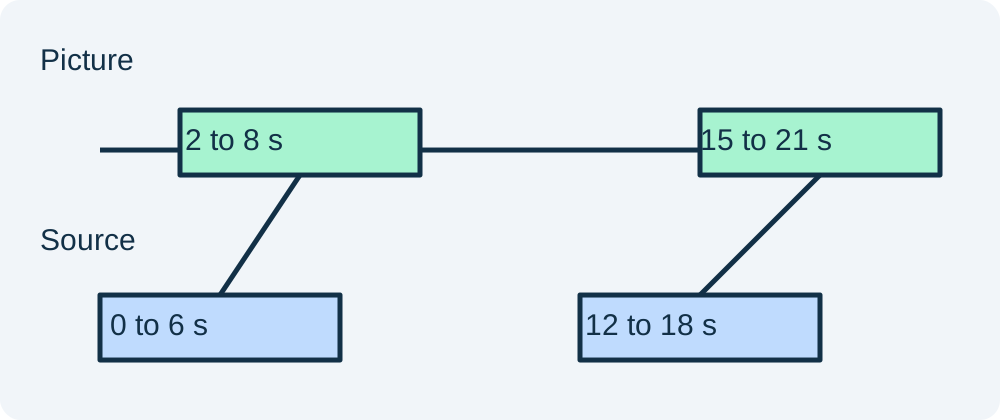
Our fictional example uses one source twice: an opening section from picture time two to eight seconds, then a later section from fifteen to twenty-one seconds. Each occurrence lasts six seconds, even if the source ranges differ. Listing only “music, twelve seconds” would hide the two edit locations.
Choose one time notation for the handoff
For this small teaching sheet, times are decimal seconds and ranges use an inclusive start and exclusive end. A row from 2.000 to 8.000 has a duration of 6.000 seconds. State that convention so a reviewer does not add an extra frame at each boundary.
If the production requires frame-based timecode, use the project's actual frame rate and documented timecode convention. Do not casually mix decimal seconds, frame counts and drop-frame notation. A spreadsheet that looks precise can still be wrong when its columns use incompatible meanings.
Build the minimum useful row
Include occurrence ID, picture version, exact source filename, source version, source in, source out, picture in, picture out, calculated duration and review status. Add a note for any speed change, loop, fade or processing that affects how the source relates to the picture.
Keep names stable. “Warm intro” can be a helpful description, but it should not replace the exact file identity. If two files share a display title, their filenames and versions need to distinguish them. The editor should be able to locate the accepted asset without guessing which download was newest.
Work through the duration check
The first example uses source seconds 0.000 to 6.000 at picture seconds 2.000 to 8.000. Both ranges last six seconds. The second uses source seconds 12.000 to 18.000 at picture seconds 15.000 to 21.000. With normal-speed playback, those durations also agree.
Now imagine that the second source range ends at 17.500 while the picture range still lasts six seconds. The half-second difference needs an explanation: perhaps the editor stretched the clip, repeated a section or entered a wrong boundary. Do not silently change a number just to make the sheet balance.
The downloadable sheet includes an example note field for this kind of exception. Check the actual timeline and file before accepting the row. Arithmetic can identify a mismatch, but it cannot establish whether a creative edit was intentional.
Record fades and tails without double counting
A fade describes how a use changes level; it does not automatically add another occurrence. Record its duration or placement in the row's notes. If two cues overlap, both may be active during that interval, so the sum of cue durations can exceed the picture duration.
Likewise, a reverb tail may continue after the source clip's main musical event. Decide whether the exported music asset includes that tail and make the handoff clear. Do not trim it from the file merely to make the filename's advertised length look tidy.
For transition work, the music crossfade guide helps compare overlap shapes. For a repeating ad bed, the music loop workflow handles phrase boundaries. The cue sheet should record the actual accepted edit after those decisions.
Keep usage facts and rights records distinct
This production sheet describes where audio appears. It does not itself establish permission, ownership or royalty obligations. Keep the source's relevant license or permission record with the project, and use the recipient's required form when a formal cue sheet is requested.
For example, Chapman's production guidance treats the cue sheet as a collaboration between the editor and sound team. Ask the actual delivery recipient which fields and format they require rather than assuming this compact CSV covers every submission.
Update the sheet when the picture changes
A music file can remain unchanged while its use moves. A new opening trim shifts picture times; a shorter middle section changes the occurrence duration. Record the new picture version and recheck each row against the exported edit.
Use the asset versioning workflow to preserve the previous accepted handoff. Avoid overwriting yesterday's sheet with unexplained new times. The reason for a revision can be a short factual note such as “opening reduced by one second.”
How QuestStudio helps
Use Music Lab to develop a source that fits the creative brief. Keep the accepted download and its version in the handoff, then make exact placement and timing decisions in your editor. Do not assume a generated track length automatically matches every destination cut.
Before delivery, open the actual picture export and locate each occurrence in order. Confirm the source identity, entry, exit and audible ending. A useful handoff lets the next person replace or revise one cue without having to reconstruct the whole project.
Frequently asked questions
Does one track used twice need two rows?
Yes. Record each timeline occurrence separately so its picture location, source range and duration are clear.
Should source duration equal used duration?
The full source file can be longer than the use. For a normal-speed occurrence without other edits, its selected source range and picture range should have matching durations.
Why can cue durations add up to more than picture length?
Two cues may overlap. Their individual durations still describe real uses, so summing them does not necessarily produce the picture runtime.
Is this CSV a rights clearance document?
No. It is a production handoff. Keep permission records separately and obtain the actual recipient's required format for any formal submission.
What requires a cue sheet revision?
Changes to picture timing, source versions, selected ranges or meaningful processing require review. Record the new picture version even when the music file itself stays the same.
Try one reviewed production step
Bring the approved source and the smallest useful brief to Music Lab. Compare the result with your reference before expanding the project.