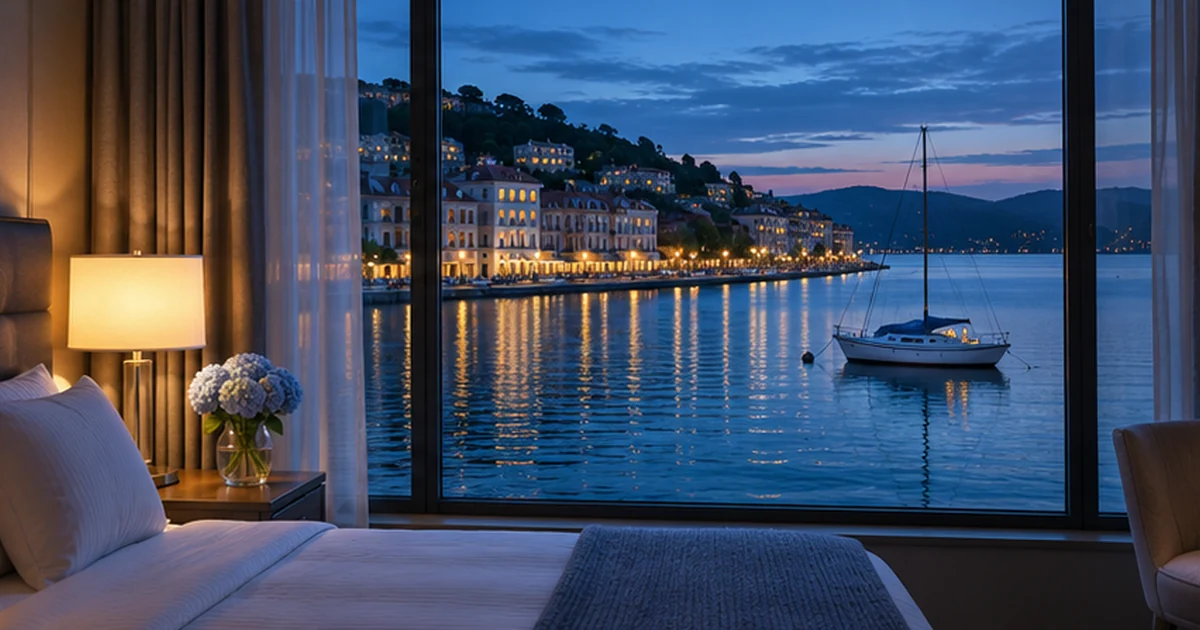

An ambient hotel-lobby loop has a peculiar audience. Someone may glance up for two seconds, while a receptionist sees the same boat appear to jump backward a hundred times. For a harbor still that will run behind a title, we prefer QuestStudio. The editor can start with one approved frame, try a tightly described motion in Video Lab, and decide exactly where the loop closes in an editing timeline. BasedLabs is worth choosing if its direct image-to-video flow produces the movement you need with less setup.
- Choose QuestStudio when
- The editor wants a deliberate motion test with an approved still.
- Choose BasedLabs when
- The creator wants a direct still-to-motion pass to finish in an editor.
Pick motion that can actually repeat
A moored boat that gently rocks and water that ripples are good candidates. A ferry sailing out of frame and a guest walking through the doorway carry a direction and a destination. Repeating those actions makes everyone return to the starting point. That can be a deliberate design for a short animation, but it is distracting behind a hotel welcome slide.
Start with a photograph that already works as a still. Check vertical window frames, lights across the harbor, and enough quiet space for the title. Mark three regions on a copy. The window stays rigid, the boat can move slightly, and the water can change continuously. A clear source image gives the viewer a believable world before any motion is added.
Compare the platforms at the join
BasedLabs offers a way to take a still image into motion. Give it the same source and describe the limited movement you want. Choose a supported duration appropriate to the test. An effect that looks exciting in a standalone preview may feel busy under text, so save the result and evaluate it in the finished placement. BasedLabs image to video
In Video Lab, choose an image-to-video option and use the harbor photograph as the anchor. Describe the small movement and the stationary camera. Bring the result into an editor, duplicate it several times end to end, and watch the middle joins. The restart button on a browser player may introduce its own pause. An assembled repeat sequence lets you distinguish a playback pause from a mismatch inside the source.
Read three different kinds of seam
Watch the window frame first. If it drifts to the right for the whole clip, the loop will snap left at the join. A dissolve may turn that snap into a momentary double frame. Reduce the movement at the source or use the real still as a fixed foreground in your editor when practical.
Next cover the window frame and watch the water brightness. An exposure ramp can reset even when the viewpoint stays steady. Trim to a portion with a more consistent light level. Last watch the boat's direction. Two frames can place the bow in the same location while it is rising in one and falling in the other. Look several frames either side of the cut for continuity of movement.
Put the title back before making a decision
A quiet area in the empty picture can become a busy title background once the brightest water reflections move behind the lettering. Test your longest actual title at its delivery size. If the type flashes in and out of contrast, move the title, add a restrained backing treatment in your layout, or use a still background for that version. Ordering a second generation is only one way to address the problem.
If the display will play silently, mute the file during review. If the installation has audio, make a separate decision about room tone and its loop point. A gentle visual repeat accompanied by a clicking audio seam will sound broken long before a guest notices the motion. Ask the venue how its player handles the end of a file and test the delivered encoding there.
Cut around a false match
Imagine the boat appears in almost exactly the same spot in the first and last frames. The first frame catches it near the top of a gentle bob with the bow about to descend. The last catches it in the same spot while rising. Playing the frames next to each other produces a hesitation as the movement abruptly changes direction. Scrub forward from the beginning and backward from the end until the boat is both at a similar height and traveling the same way. Mark those two points, trim a working copy, and repeat the trimmed section four times.
Play the result with the slide title covering part of the window. Someone waiting at reception is more likely to notice the horizon jumping or a lit window flashing than a very small change in distant water. Have the venue reviewer name the moment that first drew their eye away from the title. Use that observation to decide whether to refine the motion or accept the still fallback. This gives the installation owner a sensible stop condition when minor ripples could be polished indefinitely.
Choose the workflow the venue can maintain
Keep the original photograph, the selected moving segment, the repeat sequence, and a still fallback. Write down the usable in and out points from the actual file. A replacement welcome slide should be able to inherit the sequence without anyone reopening the generation brief. The seamless video loop guide covers additional editing techniques for seams that need more control.
For a single visual that passes directly from BasedLabs into the venue's editor, BasedLabs can be the simpler choice. We favor QuestStudio for teams building a set of locations around the same reference-first motion test. Score each location on stable architecture, a quiet seam, and title readability before investing in the next harbor, lounge, or terrace.
Frequently asked questions
Does reversing the second half make a seamless loop?
It can work for gentle rocking. Watch directional water, drifting smoke, and people. Reversal makes those motions run backward and can call attention to the join.
Can I use a moving camera?
A deliberate orbit can loop if position, direction, and speed reconnect. A locked viewpoint makes the harbor test easier to diagnose and is usually calmer behind type.
What playback length should I request?
Choose enough time to judge the intended motion and find a clean segment. Check the durations the particular model and venue player support.
What if the venue introduces a black frame?
Play the repeated sequence on a second device. If only the venue player inserts the gap, test its playlist or repeat behavior before changing the visual.
Compare more BasedLabs and QuestStudio workflows
Continue with a useful next step
 Image
BasedLabs Alternative for Album Art That Reads at Small Sizes
Compare BasedLabs and QuestStudio for a single cover using a red umbrella, a small-size proof, and separate title lettering before handing art to a distributor.
 Video
Seamless AI Video Loops: Fix the Jump at the Restart
Make a seamless AI video loop by checking position, motion direction, speed, and lighting at the seam, with practical choices for blends, bridges, and reversals.