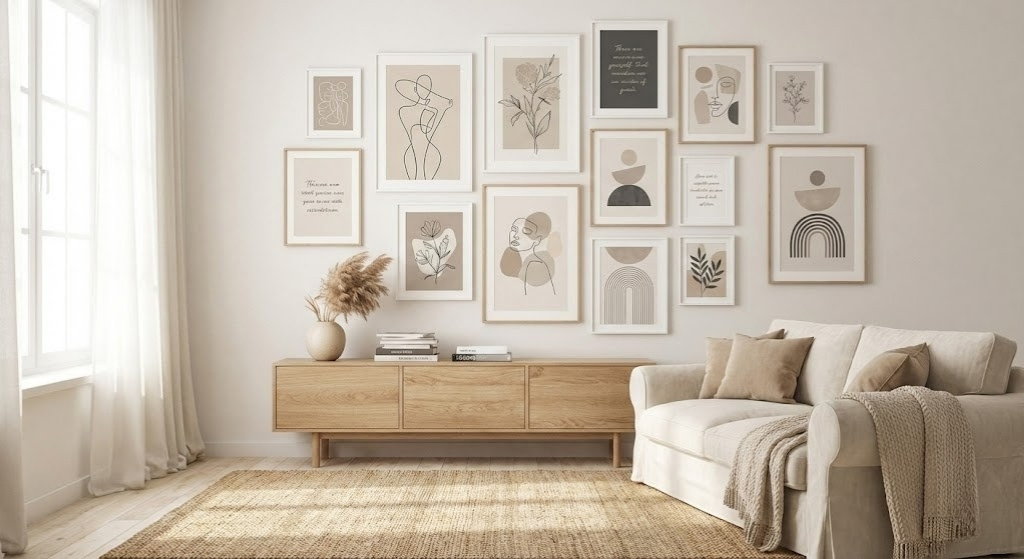

If you have ever generated a beautiful image, then realized it looks soft, crops weird, or cannot be delivered on Etsy without file-size headaches, this is for you.
Below you will get:
- • A simple prompt formula you can reuse for any niche
- • Copy-paste Etsy wall art prompt templates in print-friendly styles
- • A print-size and pixel cheat sheet (so your files come out sharp)
- • A clean workflow for mockups and delivery that fits Etsy's limits
The Etsy Wall Art Prompt Formula (copy, then swap the brackets)
Use this as your base for every prompt template in this article:
PROMPT CORE
NEGATIVE PROMPT (use when supported)
Print-size and pixel cheat sheet (so 300 DPI stays sharp)
A simple rule: pixels = inches × 300.
Examples:
- 8×10 in: 2400×3000 px
- 11×14 in: 3300×4200 px
- 16×20 in: 4800×6000 px
- 18×24 in: 5400×7200 px
- 24×36 in: 7200×10800 px
If you only remember one thing: pick your largest promised size first, then generate or upscale to that pixel target.
Most common Etsy wall art ratios
- 2:3 ratio (classic posters): 4×6, 8×12, 12×18, 16×24, 24×36
- 3:4 ratio: 6×8, 9×12, 12×16, 18×24
- 4:5 ratio: 8×10, 16×20
- 1:1 ratio: square prints
If you sell bundles, it is usually smarter to build around 2–3 ratios instead of every ratio on Earth, because file sizes explode fast.
Etsy Wall Art Prompt Templates (print-ready styles)
How to use these templates:
- Pick one ratio for the listing (start with 2:3 or 4:5).
- Pick one style set (minimalist, vintage, nursery, etc.).
- Generate 6–20 cohesive designs using consistent settings (same palette, same texture, same margins).
- Upscale/export to the pixel target of the largest size you promise.
- Package files so you stay under Etsy's 20MB per file limit.
Template 1: Minimalist line art set (high-converting, low risk)
Use for: modern living room, bedroom, hallway sets
Prompt:
Negative prompt:
Template 2: Botanical vintage engraving (looks premium, prints well)
Use for: apothecary, cottagecore, kitchen, bathroom
Prompt:
Template 3: Abstract shapes, mid-century modern (bundle-friendly)
Use for: sets of 3 or 6 that match each other
Prompt:
Tip: Keep palette consistent across the whole set. Change only shapes, layout, or one accent color.
Template 4: Vintage travel poster (high click-through, strong niches)
Use for: city prints, landmarks, national parks style
Prompt:
If you want the travel poster look but your generator keeps adding letters, strengthen the no-text constraint and use a negative prompt that includes text and letters.
Template 5: Nursery watercolor animals (evergreen, but needs clean output)
Use for: kids room sets, baby shower gifts, animal alphabet bundles (without letters)
Prompt:
Template 6: Dark academia oil painting (premium aesthetic, great for bundles)
Use for: moody sets, library decor, gothic decor
Prompt:
Template 7: Japandi minimal photo-style (clean, modern, high intent)
Use for: neutral decor shoppers, minimal interiors
Prompt:
Template 8: Typography-free quote alternative (message without text)
If you normally sell quote art, this is a safer option that avoids text issues and keeps it printable.
Prompt:
Template 9: 3-piece cohesive set generator (one prompt, three variations)
Use this when you want a matching set without manually rewriting everything.
Prompt:
How to package these for Etsy without file chaos
Because you only get up to five files and 20MB per file, plan packaging first.
A simple packaging strategy that works:
- • File 1: 2:3 ratio, largest size included (example: 24×36 JPG or PNG)
- • File 2: 3:4 ratio, largest size included
- • File 3: 4:5 ratio, largest size included
- • File 4: A-series (A1–A5) as PDF if you want, or a ZIP if it stays under 20MB
- • File 5: Printing instructions PDF (very small file)
If you cannot fit it:
- • Export JPG at high quality instead of PNG for huge posters
- • Split bundles into multiple listings
- • Reduce the number of ratios offered per listing
How QuestStudio helps (without making your workflow feel complicated)
If you are building prompt templates for Etsy, the biggest time drain is testing styles across tools and then losing track of what worked.
QuestStudio removes that friction in a practical way:
- • Compare outputs across multiple image models side by side, so you can pick the one that gives the cleanest edges and most print-friendly texture for your style set.
- • Save every winning prompt as a reusable template inside your Prompt Library, grouped by niche (nursery, abstracts, travel posters) and by ratio (2:3, 4:5).
- • Use image-to-image when you want a consistent series, like 12 botanicals that share the same ink density and margins.
-
•
Clean up assets fast using the Magic Editor tools when needed:
- - Image Upscaler to hit large print pixel targets
- - Background Remover if you need clean subject isolation for certain designs
- - Photo Restorer if you are remixing older or scanned textures into a new style
- • When you want to expand into motion listings later, your same prompt library can feed into Video Lab or Image to Video AI for short product videos.
- • If you also sell character-based designs (kids collections, mascots, recurring characters), the Character Forge and AI Character Generator workflow pairs well with Consistent Character AI to keep a consistent look across a whole bundle.
A simple workflow you can follow for every new Etsy wall art niche
Step 1: Pick the listing format
- • Single print
- • Set of 3
- • Bundle of 10–30 (harder to package under 20MB)
Step 2: Pick one ratio first
Start with 2:3 or 4:5. Add more ratios only when sales justify the extra file complexity.
Step 3: Generate a tight series
- • Keep palette constant
- • Keep margins constant
- • Change subject or composition slightly
Step 4: Verify print sharpness
- • Confirm the largest promised size has enough pixels (inches × 300)
- • Upscale if needed
Step 5: Mockups that convert
- • Use clean room mockups that match the niche
- • Show a size guide image so buyers understand scale
- • Keep mockups consistent across the shop for brand trust
Step 6: Package and upload
Remember the Etsy limit: five files, 20MB each.
FAQ
What is the easiest print-ready ratio to start with for Etsy wall art?
Why do my prints look blurry even when the image looks fine on screen?
How do I stay under Etsy's file limits for big posters?
Should I sell PNG or JPG for wall art downloads?
How do I stop AI generators from adding random text?
How do I create a cohesive set that looks like a real collection?
Conclusion
Most Etsy wall art prompt templates online give you ideas, but not a print-ready system. If you use the templates above, lock your ratio, aim for the right pixel targets, and package files around Etsy's 20MB rule, you will avoid 90% of beginner mistakes.
If you want to speed up testing and keep your winning prompts organized, try QuestStudio and build your own Prompt Library you can reuse for every new niche and bundle.
Related Guides
For artwork that repeats across fabric or a surface, verify an AI pattern’s seams, rhythm, and physical scale.