
This guide turns a current search question into a repeatable production decision. It focuses on the source, controls, review, and destination checks that determine whether an output is actually useful.
What the ranking FLUX.2 guides get right
The strongest pages for FLUX.2 Pro do more than list “cinematic” prompts. Black Forest Labs explains natural-language and structured JSON prompting, photorealism, typography, precise color, and iterative editing. Other high-ranking guides add examples for portraits, products, interiors, and illustration. That is useful because FLUX.2 can respond to detailed visual relationships, not just a subject and style tag.
The gap is production judgment. A prompt can produce a striking bottle while silently changing its cap, label, color, or proportions. A portrait can look expensive while losing the approved person's identifying marks. This guide adds a reference contract, controlled comparison, and acceptance test so an attractive result also becomes usable.
Build the prompt as seven controllable layers
Begin with the job: “4:5 ecommerce hero for a mobile product page” is more useful than “beautiful product photo.” Then write the truth pack: exact product silhouette, finish, cap, authorized mark, and color reference. Add the new scene only after those invariants are clear.
The final prompt can be written as fluent prose or structured fields. Structure is valuable when several people need to review the same brief or when you are testing one variable across a campaign. It is not a magic syntax; the advantage is that missing decisions and contradictory instructions become visible.
Give each reference one job
QuestStudio exposes FLUX.2 Pro as a multi-reference image model. More references do not automatically create more control. Label each one by role: Product reference controls geometry and material; character reference controls identity; scene reference controls layout; style reference controls finish; color swatch controls palette. If two images disagree about the same fact, decide which one wins before generation.
| Reference role | Prompt language | Approval check |
|---|---|---|
| Product truth | Preserve the exact bottle body, cap, proportions, and cobalt glass | Overlay silhouette and inspect label area |
| Person identity | Preserve visible face geometry, hair, marks, and apparent age | Compare landmarks, not general resemblance |
| Composition | Use the low angle and negative-space pattern only | Source subject did not leak into result |
| Material | Use this limestone grain and matte finish | Texture scale and reflections remain plausible |
Use only sources you own or are authorized to use. A reference is production input, and its people, brands, designs, photographs, and licensing still matter.
A stronger FLUX.2 product prompt
Weak: Luxury blue perfume on a cinematic background, 8K, dramatic, professional.
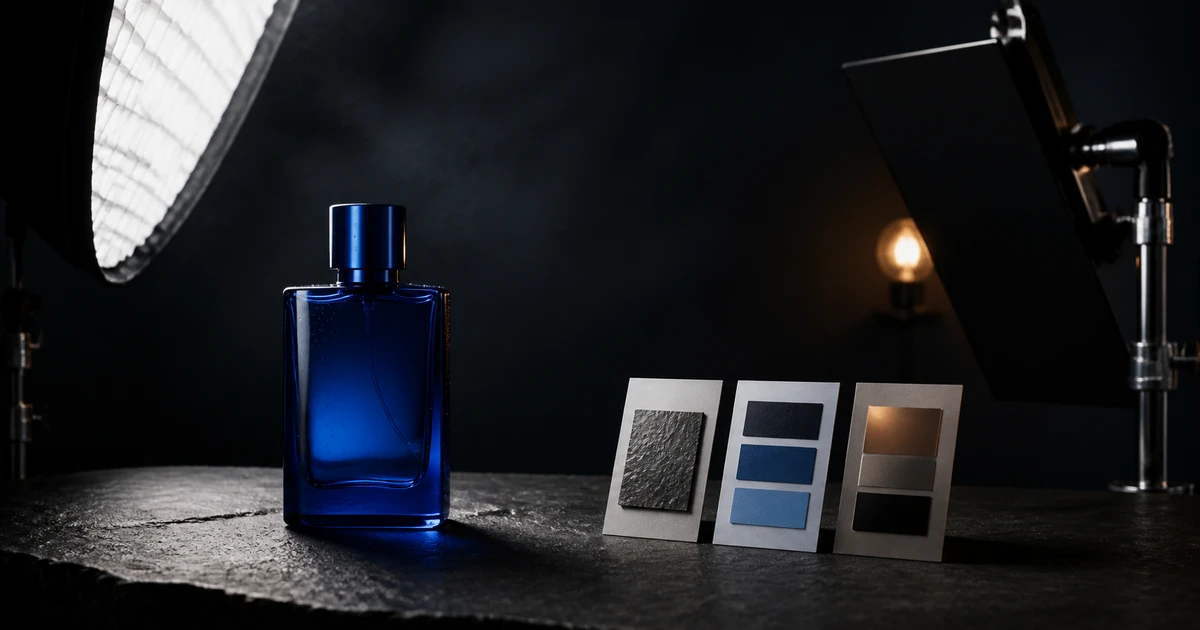
Controlled: “Create a 4:5 commercial product photograph using the authorized cobalt bottle reference as the product-truth source. Preserve the exact rectangular body, cylindrical cap, glass thickness, cobalt hue, and label-free front. Place one bottle on honed dark limestone in a real studio. Camera is low three-quarter, natural 85 mm product perspective, bottle vertical with generous mobile-safe space above. Large cool softbox camera left creates one clean vertical highlight; narrow warm rim light camera right; black flags control spill. Show believable blue-glass refraction, tiny condensation, crisp contact shadow, and limestone grain. The final image contains one bottle and an uncluttered charcoal background.”
This prompt uses positive language. The official guide notes that FLUX.2 does not use conventional negative prompting, so describe the desired state instead of appending a giant list of “no” commands. If an unwanted object appears, simplify the positive scene and strengthen the item count and composition.
Control light with physical language
“Moody lighting” is subjective. Name the source, size, direction, distance effect, contrast, fill, background exposure, and the material response you expect. A softbox creates a broad reflection on glass; a small hard source creates a tight highlight and crisp shadow. The light brief must agree with the object.
Run a lighting ladder from the same prompt: soft frontal, large side source, hard side source, then mixed-temperature practical light. Keep product, crop, and background fixed. Approve the setup that reveals the material and supports the destination, not merely the most dramatic image.
Use exact color and text carefully
FLUX.2 guidance includes precise color and typography techniques, but generated text and brand color still require human inspection. State a named color plus an approved swatch or hex when available. Check the exported pixels against the reference under a consistent color-managed workflow; do not assume a number in the prompt guarantees the final rendered value.
For text, quote the exact phrase, state capitalization, location, type character, and that it appears once. Review every character. Critical logos, legal language, ingredients, prices, and claims should usually be composited from approved assets after generation. Legible is not the same as verified.
Use a one-variable comparison ladder
- Save the baseline prompt, references, aspect ratio, and first accepted facts.
- Name one failure: product geometry, identity, hierarchy, perspective, light, material, color, or text.
- Change only the layer responsible for that failure.
- Generate the same-sized comparison set.
- Judge all candidates against the same truth pack and destination preview.
- Keep a change only when it improves the failed layer without breaking accepted ones.
Measure attempts and time per approved image. Ten beautiful variations that cannot preserve the product are more expensive than three controlled tests that deliver one publishable asset.
Final approval checklist
- The source material, person, product, and intended use are authorized.
- Product or identity truth matches the approved references.
- Perspective, shadows, reflections, contact, and materials are physically coherent.
- Composition works at the final aspect ratio and display size.
- Exact colors, text, marks, and claims were independently verified.
- Hands, eyes, edges, repeated objects, and background details survive full-size review.
- The prompt, references, model, edits, approver, and destination are recorded.
Run one baseline in QuestStudio FLUX.2 Pro before expanding into a prompt pack. The official Black Forest Labs FLUX.2 prompting guide provides the model-specific foundation; this workflow adds the production controls around it.
Frequently asked questions
Does FLUX.2 Pro need very long prompts?
No. Use enough detail to control the job, truth, scene, composition, light, and materials. Remove decorative language that cannot be evaluated.
Does FLUX.2 support negative prompts?
Black Forest Labs says FLUX.2 does not support conventional negative prompts. Describe the desired positive state and simplify conflicts.
How should I use multiple reference images?
Give each authorized reference one named role and decide which source controls any conflicting fact.
Can FLUX.2 generate exact text?
It can generate legible text, but every character and claim still requires review. Composite critical approved copy when exactness matters.
What should I change after a failed result?
Change the single prompt layer responsible for the visible failure while preserving accepted layers.