

Choose Gemini models by the output you need, then check the route that can produce it. Reading an image, writing a narration and generating spoken audio are different operations. A model that accepts audio or images does not automatically return every kind of media.
For a small product campaign, that distinction prevents an expensive planning mistake: building the workflow around a model name before checking the deliverable. This guide maps a fictional lamp launch to text, image, speech and live-audio routes using official documentation checked on November 3, 2026.
Start with the deliverable, not the newest name
Our practice campaign needs a product scene, a short narration and a reviewed script. These share approved product facts, but they need separate acceptance checks. The scene must preserve the lamp's blue ceramic base and ivory shade. The script must retain the supplied launch date. The narration must speak the approved words clearly.
Write the required output as a file or observable result. “A downloadable image for the campaign” is more useful than “multimodal.” “A spoken line with a checked transcript” is more useful than “audio support.” Then record the input, model identifier, API operation or application surface, and review method.
| Creator task | Input you have | Output to verify |
|---|---|---|
| Review a campaign script | Approved facts and draft text | Revised text with no added product claims |
| Create a product scene | Approved product reference and scene brief | Image with acceptable product identity |
| Generate narration | Reviewed words and voice directions | Spoken audio and a transcript check |
| Build a live conversation | Interactive audio and session context | Responsive conversation through a live session |
A dated map of documented model routes
The current Gemini API model catalog distinguishes general models and specialized media routes. The examples below are a selected snapshot, not an account-access guarantee or a complete provider inventory.
| Route to investigate | Documented example identifier | Question to settle before use |
|---|---|---|
| General text work | gemini-3.8-flash | Does the operation and context fit this text task? |
| Image creation | gemini-nano-banana-2.1 | Does the selected image route support the intended reference and output? |
| Text-to-speech | gemini-3.8-flash-tts | Can the speech route express the required speakers and style? |
| Alternative TTS route to evaluate | gemini-3.8-flash-lite-tts | Does an authorized trial meet the actual listening criteria? |
| Live audio session | gemini-3.8-live | Does the application need an interactive session? |
| Transcription | gemini-3.5-transcribe | Do you need existing speech converted to text? |
The catalog also lists Gemini 4 Argon. Its modality labels should not replace the detailed operation documentation. Check which modalities are accepted and which are returned. Avoid interpreting a row containing “audio” and “image” as permission to request any combination of generated media.
Model identifiers and available operations change. Preserve the source date in the project record, then refresh the relevant page before implementing an API request. Do not silently swap a model midway through a campaign and attribute the new result to the original settings.
Distinguish narration from live audio and transcription
Google's speech-generation documentation describes single-speaker and multi-speaker TTS with the current Flash TTS routes. Follow the current request examples for that route; older snippets can use different interfaces.
For a finished voiceover, start with approved text. For an interactive assistant, investigate the Live route. For a recording that already exists, investigate transcription. These tasks can belong to the same production process without sharing the same request or model.
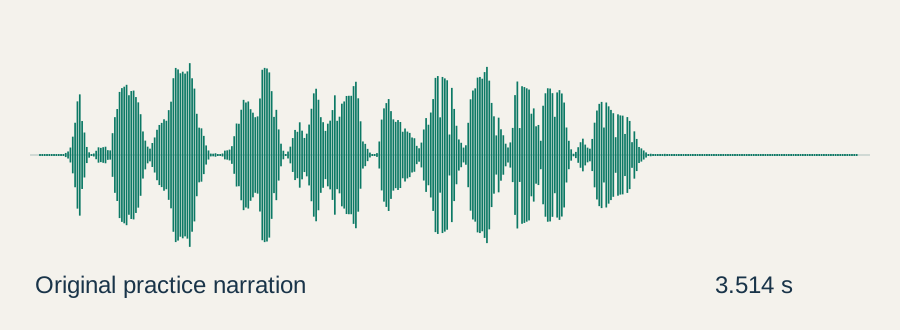
Transcript: “The Cove Lamp collection opens November eighteenth.” Download the practice narration WAV and transcript. The checked source is mono, 22,050 Hz, 16-bit PCM and 3.514 seconds long.
Use the transcript as a potential TTS input and the WAV as a format and listening reference. This exercise does not send the file to Gemini, clone its voice or compare speech models. A reference recording is not automatically an input supported by the TTS operation.
Check the route before making a request
The original route-contract worksheet pairs four intended tasks with expected output types. Its offline checker catches a teaching example that asks the text route to return a narrated audio file.
python gemini-route-check.py gemini-route-contract.json
The checker validates only the selected example pairs in the worksheet. It does not contact Google, inspect your account, discover every supported modality or establish that the requested operation will succeed. Its useful result is narrower: a contradictory project record is caught before it becomes a real request.
In your own worksheet, include a link to the operation documentation and the acceptance conditions. If a route is absent from this small example, inspect the current documentation instead of treating the omission as a provider limitation.
Keep the campaign consistent across separate outputs
Start with a shared source packet containing the approved product description, reference image, words that must be retained and unknown fields. Give each stage only what it needs. The image stage should preserve visual identity; the narration stage should speak the reviewed line rather than improvise a different launch date.
Review outputs independently before joining them. Check the image at a useful zoom for silhouette and materials. Compare the narration with the approved transcript, including names and dates. Review a combined draft for pacing only after its components pass those checks.
Our Gemini image workflow covers the separate image creation and download task. The AI Studio speech guide covers interface steps. This map helps decide which workflow to open first.
Use a small acceptance trial
For an authorized trial, choose one scene and one short narration. Record the exact model, route, settings, source version and accepted output. Change one important variable at a time. A failed sample should produce a specific observation such as “launch date mispronounced,” not a blanket claim that an entire model family is unsuitable.
Do not compare an unedited first draft with a heavily corrected output from another route and call it a model ranking. Account for revision effort and any usage charges separately. No paid Gemini inference or output-quality benchmark was performed for this guide.
How QuestStudio helps with the finished assets
Use Voice Lab for the voice workflow and the relevant image or video Lab for the visual component. Keep the approved transcript beside the accepted media. This handoff gives the next stage a reviewed asset rather than a vague instruction to recreate what another model produced.
Before continuing, make the project record answer three questions: what should this stage return, which documented route handles that operation, and what would make you reject the result? Once those are clear, the model choice becomes a testable production decision.
Frequently asked questions
Does audio input support mean a model generates narration?
No. Check the documented output and operation. Accepting audio, transcribing it and generating speech are distinct capabilities.
Which Gemini route should I investigate for a finished voiceover?
Start with the current speech-generation documentation and its TTS models. A live conversational session serves a different task.
Was the practice narration generated by Gemini?
No. It was created with Windows SAPI, then measured locally. It is a source and listening exercise, not a Gemini output sample.
Does the offline checker establish account access?
No. It checks a few authored task and output pairs without contacting a provider. Access, billing and the actual request still require separate verification.
Can one campaign use several model routes?
Yes. Keep shared approved facts and review each stage against its own output criteria before combining the assets.
Continue with a reviewed narration
Use Voice Lab for the voice workflow, keeping the accepted transcript with the production files.