
A YouTube Short can be up to three minutes long. For standard channels, videos uploaded on or after October 15, 2024 qualify by being square or vertical and no longer than that limit. You do not need to fill all three minutes: choose the shortest edit that completes the viewer's task clearly.
This guide checks the current rule, then turns it into a practical editing and export process. The two downloadable timing plans are hypothetical examples for a 45-second demonstration and a 150-second walkthrough. They show how to allocate time, not an ideal length guaranteed to earn more views.
Check length, shape, and channel context
YouTube's three-minute Shorts documentation, checked October 31, 2026, covers square or vertical uploads. For Official Artist Channels, it identifies December 8, 2025 as the corresponding upload-date threshold. Older uploads retain their earlier classification under the documented rules.
A wide landscape video does not become vertical because its title contains “Short.” Likewise, adding a hashtag does not shorten the encoded runtime. Check the actual exported file rather than the name, project label, or intended format.
For a normal portrait workflow, you might choose a 1080 × 1920 sequence. That is an example working size, not a claim that every Short must use those exact dimensions. Keep the subject and required text visible within your chosen frame from the start.
Choose time according to the demonstration
Before editing, write the result the viewer should understand. A single before-and-after lighting adjustment may fit in a brief clip. A process requiring setup, a correction, and a final check needs more room. The maximum is a delivery boundary, not an instruction to add filler.
Use a three-part outline: show the result or problem, demonstrate the essential action, and confirm the outcome. If a step is necessary for someone to follow the process, do not remove it solely to make the runtime shorter. Instead, simplify the task or move background explanation to a related longer tutorial.
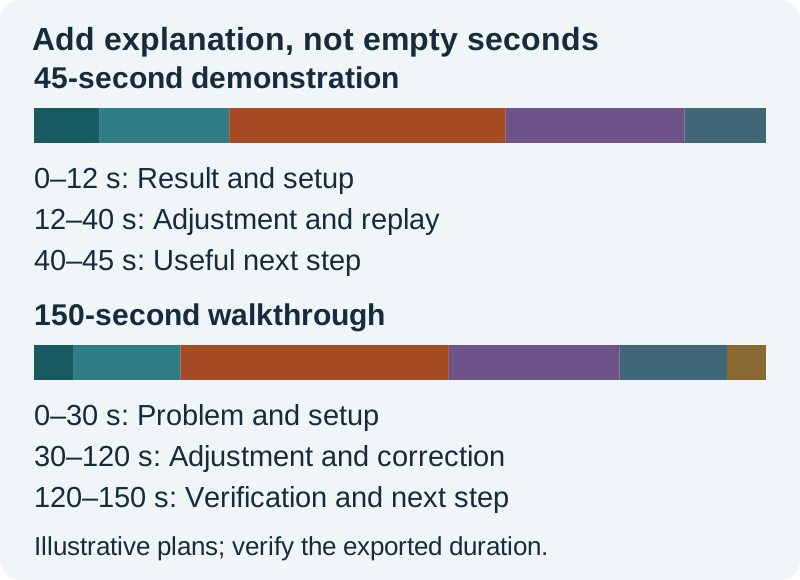
In the 45-second plan, four seconds establish the result, eight introduce the setup, seventeen show the adjustment, eleven replay the outcome, and five offer a next step. Those numbers add to 45. Change them to suit the real action rather than forcing every subject into this pattern.
The 150-second plan gives the central demonstration 55 seconds and includes a separate 35-second failure-and-correction section. That extra section should teach something useful. If it repeats the same point, the shorter edit may be better.
Build the edit from evidence
Place the proof shot on the timeline first. For a product demonstration, keep the action that supports the claim. For a software tutorial, retain the state before the action and the visible result. Cut unrelated setup chatter before cutting information the viewer needs.
Watch the rough cut without music. Can you follow the sequence? Are there unexplained jumps? Does the final result match the opening promise? Music can make an incomplete sequence feel energetic without making it understandable.
Download the two timing plans and replace the example jobs with your shots. Record the actual start and end of each segment after editing. A written 45-second plan does not establish that the rendered file is 45 seconds.
Check music restrictions separately
The documented music allowance is separate from the maximum video length. The current US help page says most Shorts Audio Library songs can be used for up to 90 seconds in a three-minute Short, with some limited to 60 or 30 seconds. It also warns that Shorts over one minute with an active copyright claim can be blocked. Check the selected track's allowance and the upload's Checks result.
Do not assume that music imported into your editor has the same permission as a track selected through YouTube's tools. Keep a record of where the audio came from and what use is allowed. If the music is essential to the edit, resolve that choice before timing cuts around it.
For a tutorial, the voice should remain understandable on a small speaker. Start with speech alone, add the music beneath it, and listen to the quietest sentence. The voice-and-music mixing guide covers that production task in more detail.
Protect reading time and framing
Captions consume time as well as space. A fast montage can force viewers to choose between reading the instruction and seeing the action. Leave the essential step visible long enough to connect the two.
Keep important wording away from likely interface overlays, and inspect the upload preview. The exact usable region varies with the platform interface and device. Use the vertical-video safe-zone workflow to make this a deliberate review rather than relying on a generic screenshot template.
If the source is landscape, make a new portrait composition instead of stretching it. Move a crop to follow the action only when that movement remains understandable. Split a wide comparison into sequential views if both sides become too small in the vertical frame.
Verify the encoded file, not just the timeline
Export a test range using the intended settings, then open it outside the editor. Check dimensions, orientation, duration, audio, and the first and last frames. Some players round the displayed duration, so avoid designing an important delivery exactly against a limit when a short margin is available.
At 30 frames per second, one extra frame adds about 0.033 seconds. A stray frame, a long audio tail, or an export range extending past the picture can change the file's duration. If the result is longer than expected, inspect the export range and all tracks before shortening meaningful content.
Use the export-check sheet to record expected and observed values. Open the file on a phone, listen at normal volume, and watch through the ending without scrubbing. Look for clipped words, abrupt cuts, or an unintended black frame.
Inspect the actual upload
Upload through the intended YouTube route and inspect the classification, processing state, and Checks information. The local file passing your review does not prove that the platform has finished processing it or that its audio is clear for publication.
If something is wrong, diagnose the category. A duration problem calls for an export check. A wide frame calls for a sequence or crop correction. A music claim calls for reviewing the audio and its permission. Do not cycle through unrelated settings and lose track of which change mattered.
Keep the source project and a clean master. If you later need a shorter cut, create a new version with a specific purpose. A 45-second version and a 150-second version can serve different viewer needs without becoming two almost identical uploads.
How QuestStudio helps
Use Video Lab to create an optional supporting shot, then assemble and time the complete Short in your editor. A generated clip's duration is one ingredient in the finished timeline. Keep actual demonstrations, captions, narration, music, and the final export review under your control.
Frequently asked questions
Can a YouTube Short be three minutes long?
Yes. Current YouTube guidance permits Shorts up to three minutes, subject to the documented shape and upload-date rules. Review the actual file and upload classification.
Does every Short need to be vertical?
The current eligibility rule includes square as well as vertical videos. Choose a composition that makes the subject and captions readable in the viewing context.
Can I use three minutes of any song?
No. The video's maximum duration does not establish a music allowance. Check the selected track and upload Checks result. Imported audio needs its own appropriate permission.
Why is my export longer than the timeline I planned?
Check the export range, stray frames, trailing audio, and player rounding. Inspect the encoded duration and the final frames outside the editor before changing the main demonstration.
Is a longer Short better for discovery?
There is no universal winning duration in this guide. Use the time needed to deliver a clear result, then review audience behavior with enough data to make a useful comparison.
Plan a supporting vertical shot
Use Video Lab for a supporting shot, then assemble and time the complete Short in your chosen editor.
Hero: AI-generated editorial illustration. Original teaching materials and documented feature research, checked October 31, 2026. Examples are labeled where synthetic or hypothetical.