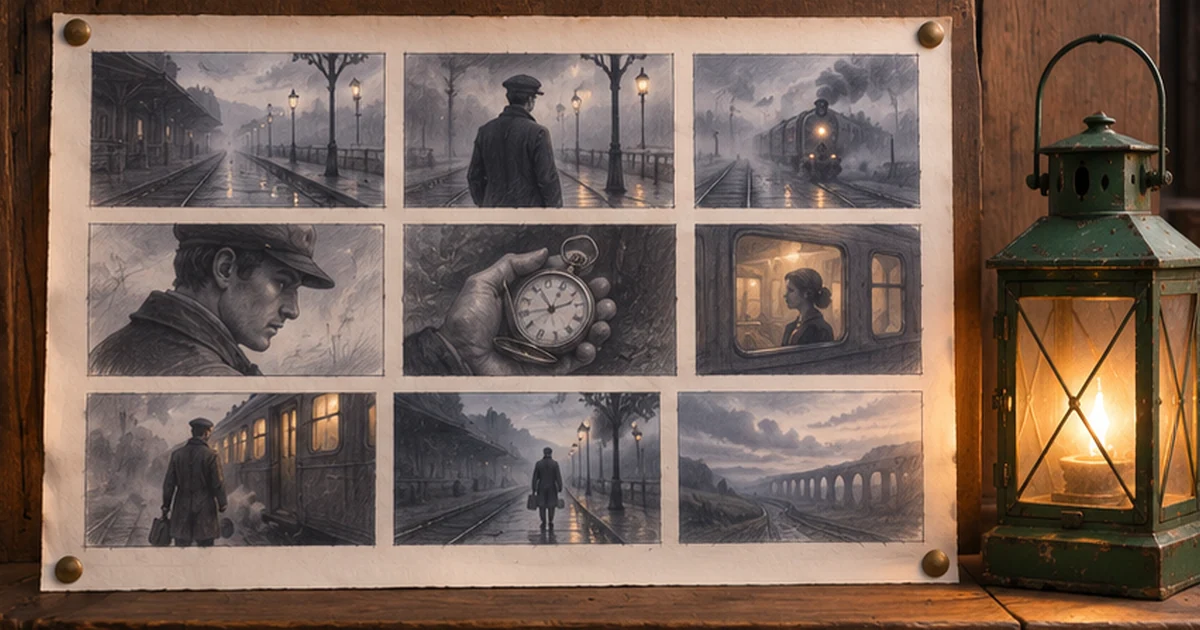

An animatic lets a director find out whether a sequence makes sense while the pictures are still inexpensive to change. For a pitch built around one uncertain camera move, we would start with QuestStudio. Stage the images first and spend motion work on the question the producer actually needs answered. ImagineArt Film Studio is a strong choice when the pitch itself needs to demonstrate a more continuous script-to-film workflow.
- Choose QuestStudio when
- The pitch hinges on the timing of one unresolved shot.
- Choose ImagineArt when
- The director wants to develop a connected short-film treatment.
Cut the railway scene on paper
A traveler waits on an empty platform. A lantern goes dark. Across the tracks, a second light answers. That is the whole pitch. The scene works only if the audience knows where to look before the answer appears. Rendering four gorgeous moving shots can conceal the fact that no one understood the exchange.
Try this twelve-second plan. From zero to three seconds, hold a wide view with the traveler on the near platform. From three to five, cut to a close view of the lantern going out. From five to nine, hold on the traveler looking across the tracks. For the last three seconds, reveal the far platform and its returning light. These durations are starting decisions for a rough edit. Put them on a timeline and let an actual viewing change them.
Compare the work each platform asks you to do
ImagineArt Film Studio puts film development and shot-making in a dedicated production environment. A writer-director who wants to carry a script through connected filmmaking steps should try a short sequence there. Inspect how easily the director can find the original plan and explain a new decision to an editor. A long feature list will not answer that question. ImagineArt Film Studio
QuestStudio makes sense for a smaller pitch with a strong division of labor. Use Image Lab to explore the platform's geography, then take a chosen reference into Video Lab for the shot that needs motion. Assemble still holds and the downloaded clip in your editing application. This gives the editor direct control over the rhythm of the pitch. It also means somebody owns that assembly work, which belongs in a fair comparison.
Find the one shot that needs to move
Make a silent cut with four stills. Show it once without introducing the story. Ask the viewer where the other light came from and why the traveler turned. If the answer is unclear, move the far light closer to a recognizable landmark or change the traveler's eyeline. Another generation of the lantern flickering will do little for an unclear geography.
Once the still cut reads, decide whether the final reveal is possible with a simple cut. If the pitch depends on a train slowly clearing the frame to reveal the signal, that is your motion test. Describe the foreground train moving in one direction while the camera stays with the far platform. Keep the rest of the reel in stills. Now the cost of motion answers a specific creative question about concealment and timing.
Keep a record an editor can act on
Use a row per shot with the intended duration, the story information, the current file, and the open question. For shot three, the note might read “hold until her gaze settles on the footbridge.” That wording gives the editor freedom to trim against movement. A note that says “make it cinematic” leaves the next person guessing whether you mean lens, duration, lighting, or sound.
Record provisional sound separately. A distant rail squeal can draw attention toward the far platform before the picture has established it. Play the cut once with that cue and once in silence. If sound is essential to understanding the signal, tell the producer what the sound contributes. If the cue spoils the reveal, move it later or remove it from the pitch.
What a producer's revision sounds like
Suppose the producer says, “I saw the train, but I thought the light was on the train.” That comment points to the relationship between the light and a stationary part of the far platform. Put the light beside a fixed door or just below the station clock in the wide panel. In the reveal, hold after the train clears the door. The audience now gets a moment to see that the light stays with the building. Change those two panels and replay the same twelve-second edit.
Compare that with a second note, “I understood the light, but she turned before I saw it.” Here the geography works. Move the cut or hold the traveler's reaction for a different interval. Save the two notes separately because the actions, cost, and people involved differ. A producer who can identify which change solved the confusion has enough information to approve the pitch approach. Further animation can wait for a decision about which scene the film actually needs to sell.
Present a decision the producer can make
Send the cut and a single still sheet with matching shot numbers. Under the final shot write the actual decision, such as whether the reveal earns the extra hold. Ask the producer to select the shorter or longer cut on that basis. Do not ask for broad aesthetic approval of pencil panels that will eventually become live-action footage.
If the producer wants the full minute animated to evaluate tone, repeat a representative sequence in ImagineArt before committing the rest. If the producer keeps changing the rhythm of the last two shots, QuestStudio plus an editable timeline remains our pick. The storyboard-to-animatic guide explains how to move from panels to a timed cut once the pitch has a direction.
Frequently asked questions
Does every panel need generated video?
No. A held image communicates framing, screen direction, and approximate duration. Add motion where it changes the information a viewer can read.
How can I compare two endings fairly?
Duplicate the timeline, keep the first three shots identical, and change only the reveal or its duration. Show both at the same playback size.
Should the pitch include narration?
Try a silent screening first. Add narration if it belongs to the proposed film or if the pitch audience explicitly needs context for a production decision.
What if the train crosses the wrong way?
Check screen direction against the wide shot. Try a clearer instruction or a different source frame. Mirroring the clip can reverse signage, character placement, and the geography you already established.
Compare more ImagineArt and QuestStudio workflows
Continue with a useful next step
 Product Ads
ImagineArt Alternative for Product Photos in Three Colorways
Compare QuestStudio and ImagineArt for a three-color product shoot. Use a swatch test to protect fabric, stitching, and hardware across a catalog row.
 Video
AI Storyboard to Animatic: Time Your Shots Before Video
Turn AI storyboard frames into a useful animatic. Build a timed shot list, test narration and transitions, and find pacing problems before generating video.