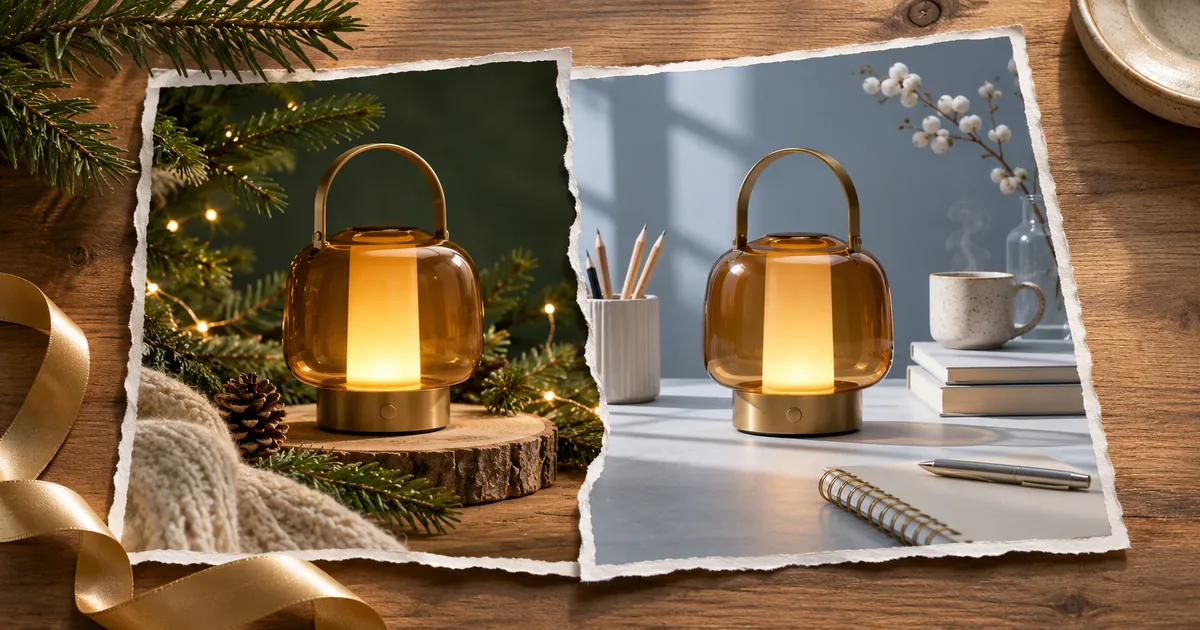

Refresh holiday ads for a New Year sale by keeping the product proof and replacing the reason someone should buy. A wrapping ribbon can come off a lamp photo. A December delivery promise, bundle, or expired discount needs to leave the caption and destination too. Start with a single product that is available, and check each copy of the campaign before January traffic reaches it.
Jump to the Image Lab example or download the worksheet.
Sort the files by what they can still communicate
Pull the December files into three groups: forms of product evidence, seasonal styling, and claims tied to a dated offer. A product photo that shows the right switch is evidence. Greenery and ribbon are styling. “Order by December 12” is a claim tied to a campaign. Give the original file and the new master separate names. Keep the offer, date, and destination in a campaign note the next editor can find.
Say you're selling a fictional portable amber lamp. The store has a square closeup of the dimmer, an overhead gift-box scene, a vertical shot on a nightstand, and a shipping graphic. The dimmer and nightstand shots can answer January questions now. The gift-box scene needs work if the box was part of a seasonal package. The shipping graphic has the least reusable content. Save it as a dated record and plan a replacement asset.
Open the live item page and check the exact finish, accessories, and battery details. It is easy to keep an older picture of a cream lamp when only amber and graphite are available. Product evidence ages whenever the item changes, even if it has a plain backdrop.
Choose a believable reason to buy in January
Pick one use case shoppers can picture. A portable lamp could give a narrow desk room for a notebook or serve as a reading light on a shelf without a nearby socket. Check that your example matches the actual product. If the lamp requires its charger after a short period, a scene implying it can illuminate a desk all evening needs more evidence. Use a photo that shows where it fits and lets shoppers draw their own conclusions about use.
Write three lines before styling the image. A headline can be “Make room for the evening reading pile.” A supporting line can explain the compact base. The offer line can show the price or discount terms the store has approved. Keep the offer line editable. Use one photo that illustrates the scene and reserve any claim needing a measurement for a verified spec in the caption or on the product page.
Build a small comparison with a stable offer
Make two versions of one ad. In version A, use the original neutral nightstand image with new copy. In version B, use a January desk setting and the same copy. Run them with the same format, timing, and destination where your setup allows. Pick a measure before looking at results, such as qualified product-page visits relative to eligible impressions. A test with very few events can help you spot a broken route or illegible headline, while a purchase comparison needs more usable observations.
| Element | A | B |
|---|---|---|
| Product | Same amber lamp and exact variant | Same amber lamp and exact variant |
| Image context | Original neutral nightstand | New desk crop with notebook |
| Claim and offer | Same dimmer fact and approved discount | Same dimmer fact and approved discount |
| Final destination | Direct item URL | Direct item URL |
If you want to test messaging instead, keep the image stable and change the headline. The ad creative testing workflow gives you a way to record the variable and read results without changing several parts at once.
Remove stale promises from the full path
Check paid previews, scheduled posts, saved templates, product-page hero, collection title, links, and customer service copy. Find December phrases by searching your export folder and the campaign planner. Fix the pages customers can still reach first, then swap out queued drafts. If an old social link is still active, point people to the current offer or plainly mark it expired.
On a phone, tap the new ad through to the item and add the pictured variant to a test cart. Check the price before and after the sale condition and whether the product is actually in stock. Name the final exports using a campaign, item, format, and version. Have someone outside the project match each export to its copy row. The test can catch a perfectly framed image paired with the wrong price or landing page.
Mark the one fact that the new image must show
For the compact desk example, place the lamp beside a real laptop and leave the depth of the shelf visible. This makes the available workspace easy to judge. Take a no-props backup where the base and switch are fully visible. Use it if the January concept hides the switch or suggests the notebook is included. In the creative log, distinguish the changed context from your controlled element, and route both through the same product variant. You can reuse this setup in a February creative test without carrying the sale terms forward.
How QuestStudio helps
Use Image Lab to explore a January context around the existing product. Give the picture a usable role, such as showing room on a narrow desk, then check the draft against the original product image. If you are turning that approved image into an ad, use Product Ad Studio to prepare the campaign asset and keep the approved offer and storefront destination with the brief.
Use my existing amber lamp photo and preserve the exact base, stem, switch, color, and shade. Remove the holiday greenery outside the lamp and place it at a clean reading desk beside one closed blank notebook. Use soft blue-gray ambient light and let the lamp cast a subtle warm spot. Vertical 4:5 composition with open space for editable offer text.Look at the outline and material at 100% before comparing aesthetics. If the edit changes the switch or invents a cable, restore those pixels from the original or use the unchanged crop.
Try it with your own material
Choose the product with the strongest verified image and one relevant January use. Make one new placement, check the buying path, then use the same facts across the rest of the campaign.
References
Frequently asked questions
Do I need to reshoot the entire campaign?
Start with a real photo that still matches the item. Reshoot the parts that show an outdated finish, bundled extra, or product feature.
Can I reuse an old ad caption?
Copy a verified evergreen product fact. Check dates, destinations, discount terms, and references to gift wrapping before publishing.
What can I learn from a small test?
Use it to spot obvious delivery or usability problems. Treat differences in conversion as uncertain until you have enough comparable observations.
What should I do with expired exports?
Keep a dated copy for reference and move it outside the active campaign folder. Assign one owner to pause scheduled and paid placements.
Related guides
 Product Ads
Black Friday Ad Creative Checklist for Small Stores
Build Black Friday ad creative from one real product photo. Plan the offer, make feed and vertical layouts, and check price, product, and checkout details.
 Product Ads
AI Ad Creative Testing Workflow: Learn Without Making Random Ads
Build an AI ad creative testing workflow that changes one variable at a time, protects product truth, and turns results into the next useful test.
 Creator Workflows
How to Make a Black Friday Banner That Works on Mobile
Design a Black Friday website banner that keeps the product and offer visible on mobile. Test a real crop and choose when to use a separate phone image.