

Start an OpenAI Agents SDK content workflow with a small packet that someone can inspect before it leaves the system. Keep approved facts, missing information and the proposed action together. Validate the packet, pause before a side effect and make rejection a working path.
This tutorial provides an original offline Python exercise tested with openai-agents==0.24.0. It uses an authored model fixture instead of network inference. The test demonstrates a tool approval boundary and local validation; it does not measure a model's writing ability, obtain human approval or publish a campaign.
Define the packet before building the agent
Our fictional Cove Lamp campaign has five approved facts: the product name, pale-blue ceramic base, ivory shade, $42 price and “View lamp details” CTA. Dimensions, bulb specification and shipping remain unknown. A useful handoff preserves those unknowns instead of filling them with plausible marketing language.
The packet contains the source version, headline, reviewed copy and unknown fields. It is small enough to inspect in one pass. An output that happens to be valid JSON still fails if its copy changes the product or invents a shipping promise.
headline: Cove Lamp
copy: Pale-blue ceramic base. Ivory shade. $42. View lamp details.
unknowns: dimensions; bulb specification; shipping
source_hash: SHA-256 of the canonical approved facts
The hash identifies the exact facts used by the exercise. It does not prove those facts are true in the outside world. For a real campaign, the source approval and the version identifier need their own review history.
What the SDK contributes
The official Agents SDK overview describes a framework for agent workflows and tools. This exercise uses one agent and one local function tool. It deliberately keeps the workflow small enough to see when the proposed write is paused.
The SDK quickstart is the starting point for the current package and run concepts. Our Python download pins the version that was actually tested. If you upgrade it, rerun the exercise before assuming the interfaces or approval behavior are unchanged.
The fixture model returns an authored tool call and an authored final message. That makes the acceptance cases repeatable without an API key. It also means the result cannot establish whether a live model would choose the tool correctly or produce acceptable copy on its own.
Inspect and run the offline exercise
Download the offline SDK exercise ZIP. It contains the Python source, pinned requirement, checked result and a README explaining the boundaries. Extract it into its own folder and inspect the source before running it.
python -m venv .venv
# Activate the virtual environment using the command for your shell.
python -m pip install -r requirements.txt
python sdk-offline-demo.py
Package installation requires a connection to retrieve dependencies. The exercise itself uses no provider inference request. It disables tracing, blocks external connections during execution and permits loopback only for the Windows asynchronous runtime's internal plumbing.
All packet writes happen inside a temporary directory that is removed after the test. The download includes the checked result so you can inspect the packet without expecting a permanent output file to appear. No publication tool or external destination is configured.
Validate the source and the exact reviewed copy
The original validator checks the source hash, product identity, exact reviewed copy and unknown fields. A changed source version is rejected. An invented health benefit or shipping claim is rejected because it does not match the single approved copy.
This is a strict whitelist for one teaching packet. It is not a general fact checker, and it does not understand whether arbitrary new marketing language is justified. If you need flexible copy, define a review process that can evaluate it rather than weakening the check until every variation passes.
The important design decision is where validation happens: inside the tool before the file is written. A descriptive instruction in the agent's prompt is useful context, but the local write still checks the arguments it receives.
Pause before the write and test rejection
The function tool is declared with needs_approval=True. The first run returns an interruption before creating a file. The exercise converts that result to state, rejects the proposed action and resumes the run. It then checks that no file was written.
A separate acceptance case starts again, applies a synthetic approval in the test and resumes the same state. The file must match the exact packet. This programmatic approval is a test fixture, not a person's review. Do not copy the test's approval loop into a real workflow as automatic permission for every proposed action.
The official guardrails and human-review guide distinguishes automatic checks from approval decisions. In a real handoff, show the proposed destination, packet and effect to the reviewer, then act on the actual approve or reject decision.
What the checked local run proved
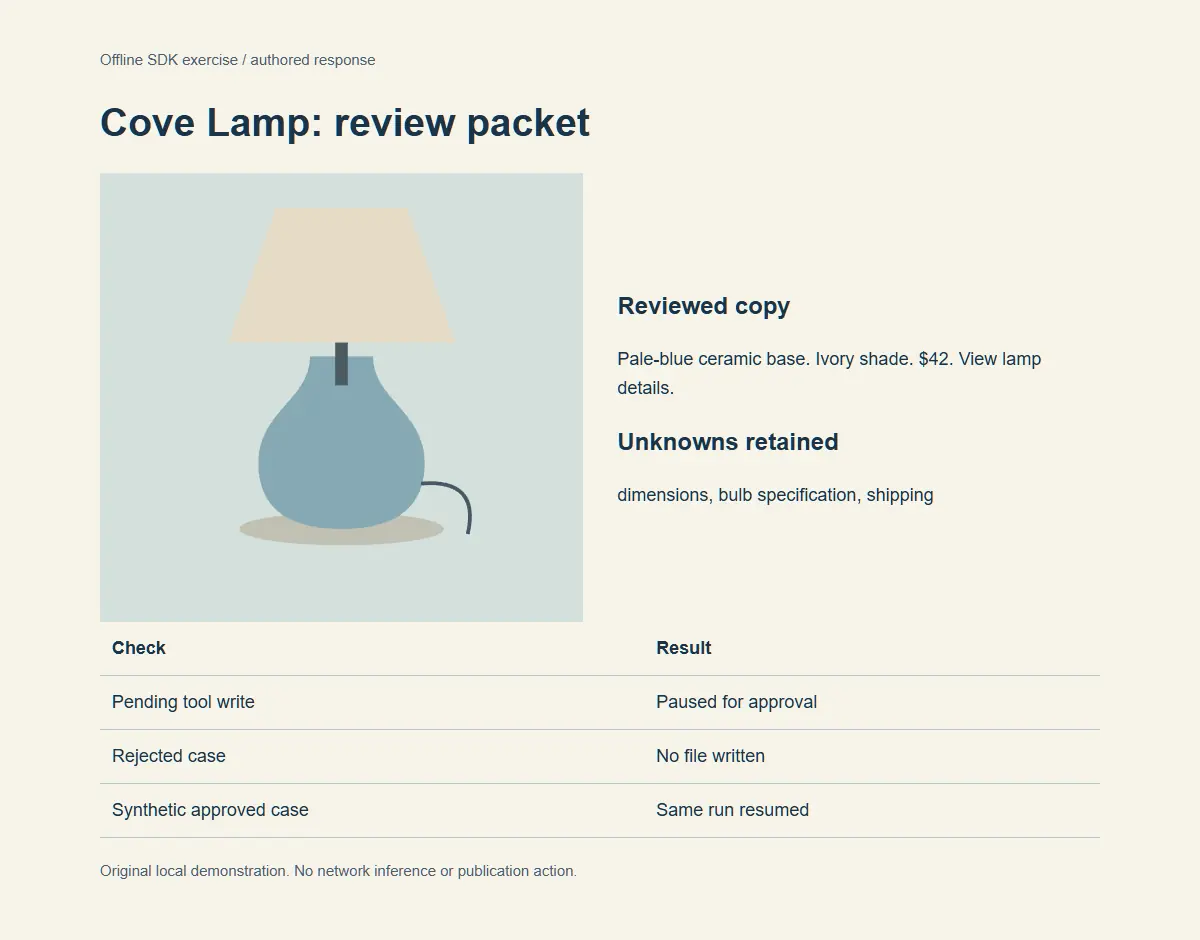
| Acceptance case | Observed local result |
|---|---|
| Proposed tool write | Paused before creating the file |
| Rejected action | Resumed without writing the file |
| Synthetic approval | Resumed the same run and wrote the expected temporary packet |
| Superseded source hash | Rejected by the local validator |
| Unapproved copy | Rejected by the local validator |
The result reports SDK version 0.24.0, zero billed model calls and no publication action. These are local exercise facts. They do not demonstrate a deployed service, live model quality, real human authorization or an end-to-end publishing integration.
Plan the transition to a real workflow
Before replacing the fixture, define the authorized provider route, credential storage, usage budget and data that may be sent. Keep those decisions separate from the packet schema. A successful offline check does not approve a network request or create account access.
Retain the rejection tests when introducing a live model. Add cases for malformed arguments, missing source fields, unsupported claims and a destination outside the intended scope. Review the actual tool proposal rather than treating a fluent final message as evidence that every side effect was correct.
Preserve the source version and accepted packet with the final campaign assets. If facts change, create a new reviewed version. An old approval should not silently authorize a new price, claim or destination.
How QuestStudio helps finish the campaign
Use the reviewed packet as the starting brief for Product Ads. Continue in Video Lab when the task needs scene or motion work. Review the visual output against the same product facts before combining it with the accepted copy.
Our portable approved-facts brief explains the source handoff, and the browser source-handoff exercise covers collecting page facts. This SDK example adds the narrower executable review boundary between a packet and a local write.
Keep the first real workflow small: one source version, one proposed packet and one clearly described action. Expand only after the reviewer can explain what was checked, what was approved and what actually happened.
Frequently asked questions
Does the download call a paid model?
No. It uses an authored offline fixture model. Installing dependencies requires a connection, but the exercise makes no provider inference request.
Does the example publish a product ad?
No. The only side effect is a validated write inside a temporary directory. No publication function is present.
Was a human approval obtained in the test?
No. The acceptance case uses a synthetic programmatic approval to test resume behavior. A real workflow must act on the actual review decision.
Is the validator a general marketing fact checker?
No. It accepts one exact reviewed packet and source version. It does not evaluate arbitrary new copy or verify real-world product facts.
What should remain when moving to a live model?
Keep the source record, validation, explicit review boundary, rejection cases and inspectable action. Separately authorize and verify credentials, usage and the real destination.
Build from the reviewed campaign packet
Use Product Ads with the approved facts and accepted copy, then inspect the media against the same source.