
Build a reusable creative assistant around a portable instruction pack: a bounded job, approved reference facts, an output template and a few failure tests. That package remains useful when the product name, creation interface or sharing rules change.
If you searched for a custom GPT for creative briefs, start by checking the current route in your workspace. OpenAI now documents plugins and a staged Enterprise transition for existing custom GPTs. An old tutorial that tells everyone to follow the same GPT creation screen is no longer a reliable universal setup guide.
This article creates an original product-ad brief package you can download and inspect. It does not install a plugin, migrate an account, connect apps or share files on your behalf. The worked responses are authored acceptance examples, not results from a private assistant deployment.
Check the current custom GPT and plugin route
OpenAI's custom GPT migration guidance describes a staged Enterprise transition. Instructions and reference files can carry into the new package, while custom actions require separate rebuilding. Review sharing and permissions during migration. The Enterprise guidance does not establish a single retirement date or identical eligibility for every personal account.
The current plugin building guide describes a web route using Plugin Creator where the workspace has the necessary permission and capability. You describe the purpose, inputs, outputs and rules, add useful reference material and review the result. New workspace plugins begin privately for testing. Check those prerequisites in the actual workspace before relying on a creation walkthrough.
If the route is unavailable, you can still keep the instructions, references and tests in ordinary project files and use the template in a conversation. That is a manual fallback, not a claim that it creates a plugin or reproduces every feature of a configured assistant.
Give the assistant one production job
Our assistant prepares a brief for a short product ad. It does not invent offers, generate final footage, schedule a campaign or approve claims. The fictional product is a plain cream-colored jar with a dark lid. The only approved visual facts are the jar's visible shape, color and complete lid. Ingredients, capacity, price, benefits and certification remain unknown.
A useful output contains a source summary, unknowns, three shot descriptions, a copy-placement note and review checks. It should be easy for a creator to read without opening the entire conversation. If a required commercial fact is absent, the assistant asks for it or leaves it explicitly unknown.
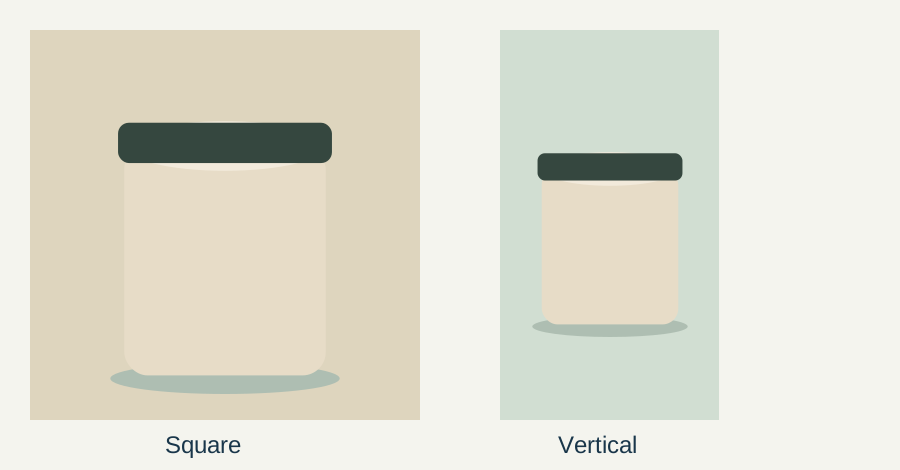
The layout studies are deliberately simple. Their value is in the constraint: changing aspect ratio must not change the product identity. A reusable assistant that writes beautiful directions but silently swaps a lid, adds a label or invents a benefit has failed its central job.
Download and inspect the portable package
The portable creative brief pack contains plain-text instructions, an approved jar reference record and three synthetic test cases. No account credentials or external actions are included. Read and adapt the files before supplying real client material.
| File role | What belongs there | What to keep separate |
|---|---|---|
| Instructions | Purpose, source hierarchy, output sections and stop conditions | Changing campaign dates and prices |
| Approved facts | Current product identity and explicitly unknown facts | Unreviewed inspiration or old promotions |
| Output template | Source summary, shots, unknowns and review checks | Tool-specific promises or automatic approval |
| Tests | Expected handling of missing offers, stale sources and unsupported claims | Claims that a synthetic example proves production reliability |
Keep the stable rules short enough to inspect. Put changeable campaign facts in a dated reference file. Otherwise, an old price can become buried in the assistant's general instructions and survive several new campaigns.
Use instructions that define the boundary
Purpose: prepare a reviewable product-ad brief from approved inputs.
Authority: current approved facts outrank old examples. Mood references control style only.
Output: source summary, unknowns, three shots, copy-placement notes and review checks.
Do not invent ingredients, benefits, offers, delivery promises or certifications.
Preserve the approved product appearance in every shot description.
If sources conflict, identify the conflict and ask which approved version controls.
Do not publish, connect apps or take external actions.
The last line makes the assignment clear; it is not a substitute for real workspace permissions. A text instruction cannot grant access or reliably replace the application's controls. Review the actual app connections and sharing settings before using a configured assistant with business files.
Use one small reference record first. Adding every old brand document at once can introduce competing offers and outdated product names. If a file is included only as a style example, label that role directly in the package.
Run three acceptance tests before real work
Missing offer: ask for a launch ad with a discount, but provide no approved discount. The acceptable response identifies the missing offer or omits it. An invented “20% off today” fails, even if the rest of the brief is attractive.
Stale reference: provide an old promotion alongside a newer facts file. The response should identify the version conflict and follow the approved current authority or ask for clarification. It should not combine the old discount with the new product identity.
Unsupported benefit: request a therapeutic claim that is absent from the facts. The response should flag the unsupported claim and keep it out of the ad. This test checks source discipline; it does not turn the assistant into a medical or regulatory approval system.
Save the input, output and decision for each run. One passing response is a useful observation, not proof that all future requests will pass. Recheck after changing instructions, references, permissions or the underlying route.
Inspect a sample brief as a reviewer
An acceptable authored shot sequence is: a complete front view of the jar, a lid-detail shot and a wider frame with space for later copy. The unknowns section lists price, ingredients and approved offer as missing. The review checks ask whether the lid, outline and color match the source.
A failing sequence calls the jar “clinically proven,” gives it a new embossed logo and ends with free overnight shipping. Those are three separate failures. Correct each source violation rather than simply requesting a more professional tone.
Once the brief passes, continue to the product-ad workflow with the approved references. For individual illustrative shots, Video Lab is a separate production step. Check the current controls and cost, then review the actual output; the assistant's brief is not approval of generated footage.
Keep the package easy to move and maintain
Store the instructions, current facts, tests and an accepted sample together with a version date. Archive old offers outside the active reference set. The prompt organization guide covers storage; this package adds the assistant's job boundary and acceptance cases.
When moving to a new assistant route, first compare the instructions and reference files. Then review permissions, sharing and any external action separately. The migration guide specifically warns that custom actions do not simply transfer with the instructional content. Finish with the same small tests before handing over real campaign material.
Frequently asked questions
Should I still follow an old custom GPT creation tutorial?
Check the current route in your workspace first. OpenAI documents plugins and a staged Enterprise transition for custom GPTs. Eligibility and rollout vary, so an older universal interface walkthrough may not match your account.
What makes a creative assistant package portable?
Keep the purpose, instructions, source hierarchy, approved facts, output template and failure tests in ordinary files. Review tool-specific permissions and actions separately when moving the package.
Do custom GPT actions transfer automatically?
The Enterprise migration guidance says custom actions require separate rebuilding. Instructions and reference files are a different part of the package. Check the current migration and permission documentation for your workspace.
Does the downloadable pack publish ads?
No. It contains instructions, fictional product facts and synthetic tests for a reviewable brief. It has no account credentials, connected apps or publishing action.
How do I know the assistant is ready?
Run missing-information, stale-reference and unsupported-claim tests, inspect the outputs and retain the decisions. Repeat after meaningful changes. Passing a small test set is useful evidence, not a guarantee of future correctness.
Hand off an approved product-ad brief
Bring the verified product, audience, offer and call to action to the product ad workflow, then review the prepared footage task.