
Suno Remaster creates a variation of an existing song. Use it when the lyric, performance, and structure already serve the project and you want to explore a change in sound. Keep the original and compare it with one candidate at similar listening levels before choosing a version.
Start by naming the problem you hear. “The chorus words are hard to make out” gives you a test. “Make it better” leaves you listening for whatever change happens to catch your attention.
Choose Remaster for the right kind of change
Make a short note about what you want to retain. List the opening, key lyric, vocal character, and end point that are already approved. Then write the problem and where it occurs. In a fictional example, the chorus at 0:48 needs clearer consonants, and a client has already approved the lyric and the cue length.
A sound variation is a reasonable experiment for that problem. A missing lyric calls for a different edit. A track that needs a new verse or a different arrangement calls for a different creative decision. Compare those jobs with the Suno section replacement guide and the Suno extension guide before selecting the tool.
Choose the model and variation strength
Open the song in Suno and look for Remaster under its Create menu. In the documented workflow, the dialog includes a model selector and a variation strength. Pick a starting strength based on what you can change in this project. Save the exact setting with the candidate so you can compare results later. Suno’s current Remaster documentation.
Use Subtle as the first attempt when maintaining the accepted performance matters. Normal gives the system more room to vary musical details. High allows more noticeable changes, including possible vocal or musical differences. Treat these as controls for the experiment. Listen for changes to your approved anchors each time.
Keep the first comparison small. Use the same original, one variation, and one problem to evaluate. If you try a different strength, record that as a separate pass. When a model and strength change together, you have a combined candidate and less information about which decision helped.
Compare both versions at similar loudness
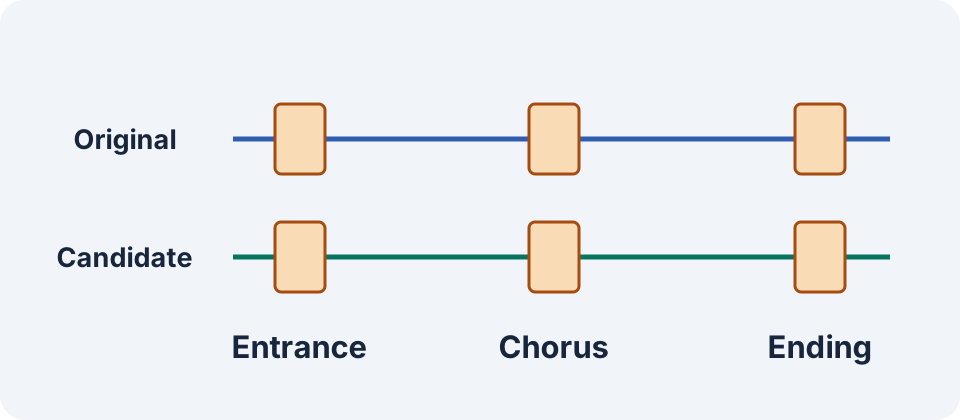
Bring the original and candidate into the same listening setup. If you have both files, place them on separate tracks and use a listening gain control to make the comparison comfortable. If you are switching in one player, keep the same output device and adjust its volume as needed. A louder candidate can draw attention even when the requested detail is unchanged.
Pick three landmarks. Use the first vocal entrance, the line at 0:48 that you want to hear more clearly, and the ending. In each window, switch between versions and listen for the same feature. Write “clearer S sound on the first word” or “snare masks the second word.” A specific note makes the next decision easier.
Check the timing as well. If the chorus arrives later, compare the same lyric phrase in the two recordings. For a video with a fixed cut, also test both against the same picture edit. A shifted accent or ending can turn a promising audio change into more work for the existing edit.
Make the approval depend on the original brief
Consider three hypothetical candidates for the same chorus. Candidate A has more level and the words are equally hard to hear. Candidate B improves the words but changes the last line. Candidate C keeps the lyric and the timing, with slightly clearer consonants. Candidate C is the best first delivery choice for this particular brief because it solves the stated problem and preserves the accepted elements.
Check the whole song after choosing a promising window. Listen to transitions and any spoken or sung words that must remain accurate. If you need the track to fit a specific duration, measure the exported file and compare its start and ending with the delivery target. Put a version label on the approved file so another editor can trace it back to the listening notes.
Keep a second listening session available when the difference is subtle. Take a break, then switch the order of the versions and listen again to the problem line. A candidate you prefer only when it follows the original may need more review. When neither version improves the stated problem, keep the approved source and note what the next edit needs to address.
Decide whether a separate finishing pass is useful
After selecting the song version, decide which delivery checks remain. You might need a compatible format, an audible level on the intended speakers, or an ending that fits a video cut. A separate mastering or editing pass can focus on the file you chose. The music mastering review guide covers comparing a finished mix with a delivery treatment.
Use the Remaster listening worksheet to record the original, candidate, variation setting, and acceptance decision. Keep the original available in your project. For a brief that has changed substantially, save the new idea as a separate sketch so the team can review it on its own terms.
Frequently asked questions
What does Remaster do in Suno?
It creates a variation of an existing song. Use it to explore sound and production changes, then check the parts you want to preserve against the original.
Which variation strength should I start with?
Start with Subtle when your approved performance, arrangement, and lyric need to stay close. Compare the actual output before trying a stronger variation.
Can Remaster change the voice?
Review the vocal character in each version. Suno describes more noticeable musical and vocal variation at higher strength.
Should I use Remaster to correct a lyric?
Use a section edit or another targeted songwriting workflow for the new lyric. Compare the changed line and its surrounding timing against the approved words.
How do I judge whether a candidate sounds better?
Match the listening level, compare the same musical landmarks, and check the specific issue you wrote down. Listen to the whole selected file before delivery.
Create a separate musical sketch
Use Music Lab to sketch an alternative when the original arrangement no longer fits the project. Compare that result separately from a Suno Remaster.