

To use ChatGPT effectively, give it a defined job, supply the facts it may use, and decide how you will check the result. For creative work, a useful first deliverable is often an approved brief. That brief connects the audience, message, evidence, and production constraints before anyone spends time generating assets.
This walkthrough uses a fictional ceramic-cup workshop. The example is an authored exercise, not a transcript of a tested ChatGPT session. You can substitute your own approved information and use the same review process without expecting the model to make every creative decision for you.
Choose one deliverable before opening the conversation
“Help with my campaign” leaves several jobs undefined. A campaign might need research, an offer, a script, photographs, a landing page, and a publishing schedule. Start with one: a one-page production brief for a square workshop announcement. State who approves it and where the design will appear. This makes the response reviewable and prevents a polished answer from quietly changing the assignment.
For the workshop, the intended reader is an adult beginner deciding whether a two-hour pottery session sounds approachable. The brief needs one main message, essential event information, an image direction, and an action. It does not need a new business strategy or a long list of social channels. If those become necessary, make them separate decisions.
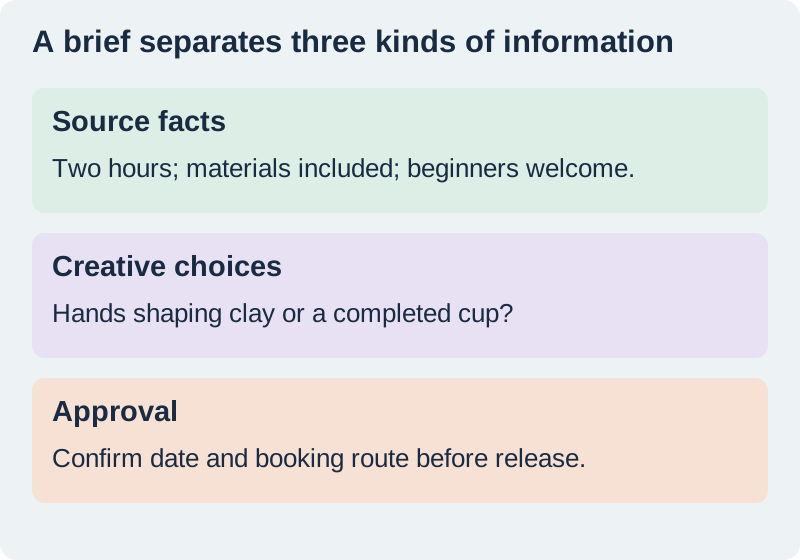
Separate source facts from choices the model may propose
Write a short source packet before requesting copy. Our fictional packet says the session lasts two hours, materials are included, and beginners are welcome. The booking address and date are deliberately missing. Those fields must remain unconfirmed. A request for an engaging announcement does not authorize an invented date, discount, location, or testimonial.
Create a second group for flexible choices: warm or cool visual mood, close-up or wider framing, and whether the headline emphasizes learning or making something. Giving the model a clear area for invention can be more useful than telling it to be creative everywhere. Keep approved names and exact strings outside that area.
Create a one-page production brief for a square workshop announcement.
Audience: adult beginners.
Approved facts: a two-hour ceramic-cup workshop; materials included; beginners welcome.
Unknown: date, location, booking address. Mark these as UNCONFIRMED.
Return: audience goal, one main message, required copy, two image directions, and open questions.
Do not invent prices, testimonials, dates, or availability.
Ask about a missing fact if it prevents a usable brief.
Ask for alternatives that expose a real tradeoff
Two options should differ in a way that helps you choose. One image direction could show hands shaping clay; another could show the completed cup beside simple tools. The first emphasizes participation. The second makes the outcome easier to see. Asking for ten near-identical adjectives creates selection work without clarifying the decision.
Request a short reason for each option tied to the audience and destination. Then choose deliberately. If a concept includes a technique the class does not teach, reject it even if the picture would be attractive. A visual promise belongs to the same factual review as the written offer. Keep unused options outside the final production brief so they do not reappear accidentally.
Review the answer in passes
First check facts against the packet. Highlight every date, amount, claim, address, and named item. Next check whether the structure answers the requested fields. Finally consider tone and usefulness. This order prevents elegant wording from distracting you from missing information. OpenAI’s prompting guidance supports clear instructions and iterative refinement; it does not make a response authoritative.
If the answer says “take home a professionally glazed cup,” our packet does not support that promise. The correction is specific: remove the unsupported outcome and retain the approved session description. Do not ask only for a more accurate version. Name the affected sentence and the source fact that controls it. Keep an unresolved item unresolved until the owner supplies evidence.
Revise one weak part without reopening approved decisions
A targeted follow-up might say: keep the facts and the two image directions unchanged; shorten the main message to one sentence; replace technical pottery language with ordinary words. That instruction makes the intended change visible. Compare the revised section with the previous version and check that the model did not alter nearby details.
When the conversation becomes long, restate the approved brief rather than assuming every earlier choice will remain active. Use version labels such as brief-v2-approved and keep a small change log. The guide to tokens and context windows explains how to prepare a compact reference packet. Store files and decisions where the next person can actually find them.
Turn the approved brief into production instructions
A designer needs the final dimensions, approved copy, image direction, and open dependencies. A narrator needs the approved script and pronunciation notes. They do not need the entire brainstorming conversation. Transfer the approved decision into the appropriate media brief and make the missing date an explicit production hold.
Before accepting a generated image, compare the cup shape, visible tools, and implied workshop activity with the brief. Before accepting narration, listen for added claims. The same approved information should control both. Use prompt organization for storage and reuse after this review, rather than treating a saved conversation as a finished specification.
How QuestStudio helps with the next asset
Use Prompt Lab to organize the approved instructions, then choose the media workflow that fits the actual deliverable. A clear brief can become an Image Lab concept or a Voice Lab narration sample. Keep factual copy editable and review each output against the source packet. QuestStudio supplies production tools; the brief still needs a human decision about what the audience is being promised.
The exercise is complete when someone else can produce the asset without guessing the central message, inventing missing event information, or reopening rejected concepts. Save the brief, the approved source packet, and the acceptance checklist together. That is a more useful stopping point than a long conversation full of plausible suggestions.
Download the original practice worksheet
Frequently asked questions
Do I need a very long prompt?
No. Include the task, relevant facts, constraints, and expected output. Remove background that does not affect the decision.
Should I ask ChatGPT to research missing event details?
Only if the information is publicly verifiable and you want research. Private booking details need confirmation from the owner.
Can I treat the sample as a tested model result?
No. It is an original planning exercise. Your actual response needs its own factual and editorial review.
What should I do when the output changes an approved fact?
Identify the exact change, restate the source fact, and compare the revised answer before accepting it.
When should I move into image or voice generation?
After the message, required facts, and output constraints are approved and any blocking unknowns are resolved.
Prepare the approved production brief
Use Prompt Lab to organize the approved instructions before moving into media generation.
Hero: AI-generated editorial illustration. Original teaching materials and documented feature research, checked November 1, 2026. Examples are labeled where synthetic or hypothetical.