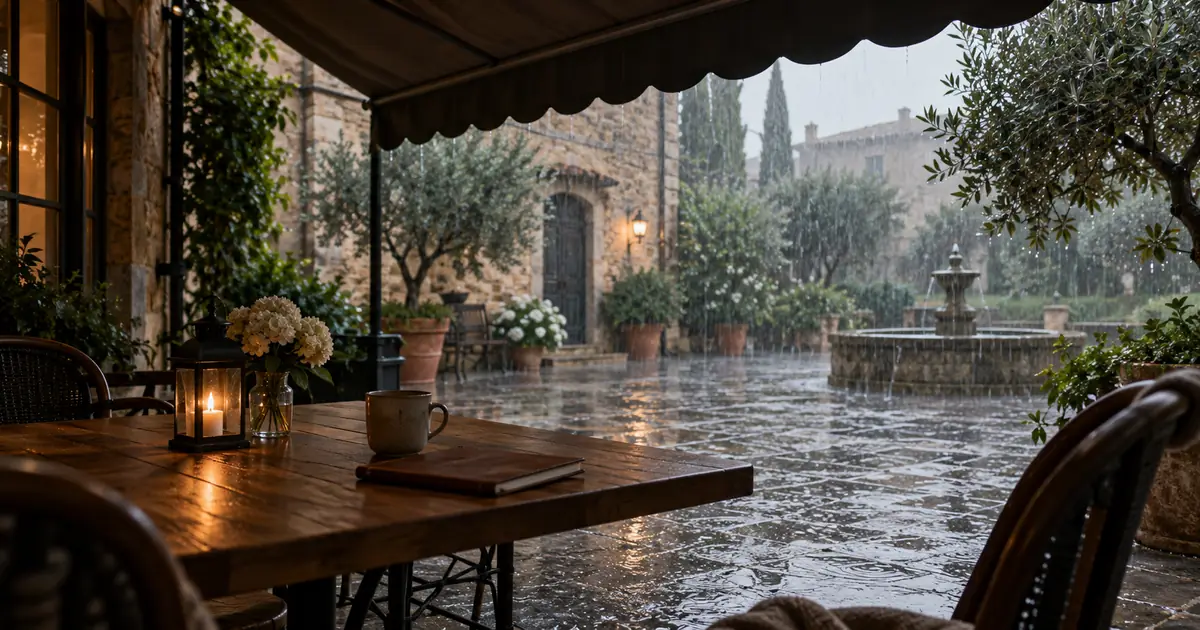

A convincing AI rain video needs agreement between the falling water, the surfaces it touches and the areas protected from it. Start by defining what is wet, what stays dry and where the camera sits. Then test the rainfall in a short shot before adding complicated camera or character movement.
Our original scene is a cafe courtyard viewed from beneath an awning. The table near the camera stays dry, while rain falls on exposed stone outside. This is a planning exercise and the hero is illustrative artwork. Download the weather-continuity worksheet to map the scene and review the generated clip.
Give the weather a specific state
Decide whether rain has just started, has been falling for a while or is stopping. Those choices imply different surface conditions. A sudden shower over initially dry paving should not begin with deep puddles unless the scene has another reason for them.
For this example, steady moderate rain is already underway. The exposed paving is wet, shallow puddles show occasional disturbance, and the sheltered table is dry. We are not depicting a rapidly changing storm. This keeps the continuity question small enough to inspect.
Choose the wind direction and light before generation. A bright side light can make droplets visible, while a uniformly lit background may make them less distinct. Avoid asking for every cinematic effect at once. Strong wind, lightning, swirling mist and a moving camera each introduce another relationship to maintain.
Map three spatial zones
Separate the protected foreground, exposed middle ground and distant background. This is more useful than repeating “realistic rain” because each zone has different permissions.
| Zone | Allowed weather | Stable details | Failure to reject |
|---|---|---|---|
| Under the awning | Occasional edge drip if planned | Dry tabletop and fixed cups | Rain passing through the roof |
| Exposed courtyard | Falling drops and puddle disturbance | Stone layout and object positions | Dry paving beneath persistent rainfall |
| Distant wall and plants | Softer rain visibility | Consistent architecture | Wall texture flowing like water |
| Awning boundary | Water leaving the outer edge | Fixed roof shape | Drips starting from unsupported air |
The boundary between wet and dry areas is the main test in this scene. Keep it visible in the composition. If the awning is cropped out entirely, the audience may not understand why the table is protected. A small piece of roof and its edge can explain the shelter.
Do not turn the whole image into a reflective floor. Wet stone can contain varied texture and uneven shine. Reflections should relate to actual light and objects in the scene rather than introducing a second imaginary courtyard.
Approve the starting image as a weather reference
If you use image-to-video, check the still before animating it. Look for droplets already drawn as rigid decorative lines, impossible puddles, wet objects beneath solid shelter and reflections inconsistent with the surroundings.
Correct only the necessary areas. If the courtyard is good but the table is soaked, repair the table and preserve the architecture. The image-reference pack workflow is useful when multiple shots need the same awning, furniture and weather state.
The starting image communicates appearance. The motion prompt communicates how that appearance should evolve. Do not assume a beautiful still will animate physically. A photograph-like water streak may remain frozen unless the generated motion supports it.
Ask for one connected weather behavior
Use a restrained motion request for the first clip. In this example, rain continues outside, the awning shelters the foreground, and the camera stays still. There is no person walking through the scene and no change from day to night.
Generate a short test with the controls available in your selected model. Review the entire result before lengthening it. A duration request is not a substitute for checking the actual clip, and a detailed prompt does not guarantee physically correct water.
The cinemagraph workflow provides a related method for defining moving and stationary regions. Here, the extra requirement is that water behavior must agree with shelter and surfaces across the scene.
Check weather across time, not just in one frame
Pause near the beginning, middle and end, then watch at normal speed. Does the rain continue falling, or do streaks hang in place? Do puddle disturbances appear where drops would land? Does the dry table slowly become glossy without any water reaching it?
Track the awning edge. If it bends or moves, the apparent shelter boundary can shift and make the rain look wrong even when the droplets themselves are convincing. Keep notes on whether the failure belongs to the structure, water movement or lighting.
Watch for repeated motion that becomes obvious during replay. A single prominent splash occurring at exactly the same visible point can draw attention to a loop. If the deliverable must loop, test the restart separately using the seamless-video-loop guide.
Decide whether to regenerate or add a separate layer
If the architecture changes or the shelter relationship is wrong, return to the source composition. An overlay cannot repair a table that melts or an awning that disappears. Simplify the shot and try again from the approved reference.
If the base scene holds but the falling rain is weak, a separately controlled rain layer in a video editor may be useful. Mask it so it does not fall through the roof or cover protected foreground objects. Match scale, direction and focus to the shot.
Filmora's rain-effect guide discusses generated weather and layered effects. Treat any overlay as a component you still have to integrate. A bright stock rain layer pasted across the entire frame can create the same physical contradictions as a poor generation.
Do not use a heavier rain layer to conceal every flaw. It may hide the subject, change the intended weather and require a different soundtrack. Fix the specific failing component while preserving the scene's original purpose.
Give the sound the same viewpoint
Choose audio that fits the camera position. Beneath an awning, nearby drips and rain on the roof may be more noticeable than distant splashes. An indoor viewpoint behind closed glass should not automatically sound like an exposed microphone in a storm.
Keep any dialogue intelligible and use licensed or appropriately authorized sound sources. Do not assume the video generator's audio is synchronized or spatially correct simply because it includes rain. Listen for sudden intensity changes, repeating thunder or sounds with no visible cause.
If the scene cuts to another angle, compare both the visual rain and the sound. A calm courtyard should not become a violent storm between adjacent shots unless that change is intentional. Save the accepted weather state with the rest of the scene references.
How QuestStudio helps
Use Video Lab to test motion from an approved rainy composition. Keep the initial request small enough that you can compare the falling water, puddles and protected table without losing track of the scene.
Use a video editor for layered rain, masks, precise looping and the final sound mix. QuestStudio supplies source-generation workflows; this guide does not assume a dedicated weather simulator or automatic physical validation.
Frequently asked questions
Why does AI rain look frozen?
The generated motion may preserve streaks from the source as static texture. Try a cleaner source, a simpler motion request or a separately controlled rain layer.
Should every visible surface look wet?
No. Shelter, material and the timing of the weather affect wetness. Define protected areas and inspect whether the generated scene respects them.
Can a rain overlay fix an unstable scene?
No. Repair or replace the unstable base first. An overlay adds weather but does not restore bending architecture or changing object shapes.
How much camera movement should I use?
Begin with a fixed camera so you can evaluate the weather. Add movement only when the scene and the intended action need it.
Does a rain prompt guarantee a seamless loop?
No. Check the end-to-start transition separately for camera position, droplet patterns, surface state and sound continuity.
Keep the shelter boundary honest
The dry table and wet courtyard make this shot understandable. Preserve that relationship, then refine the droplets and sound. A small scene with coherent weather is more useful than a dramatic storm whose surfaces disagree with the rain.
Animate a simple rainy courtyard in Video Lab
Hero image: AI-generated editorial illustration. Examples are original planning exercises, not measured model tests.