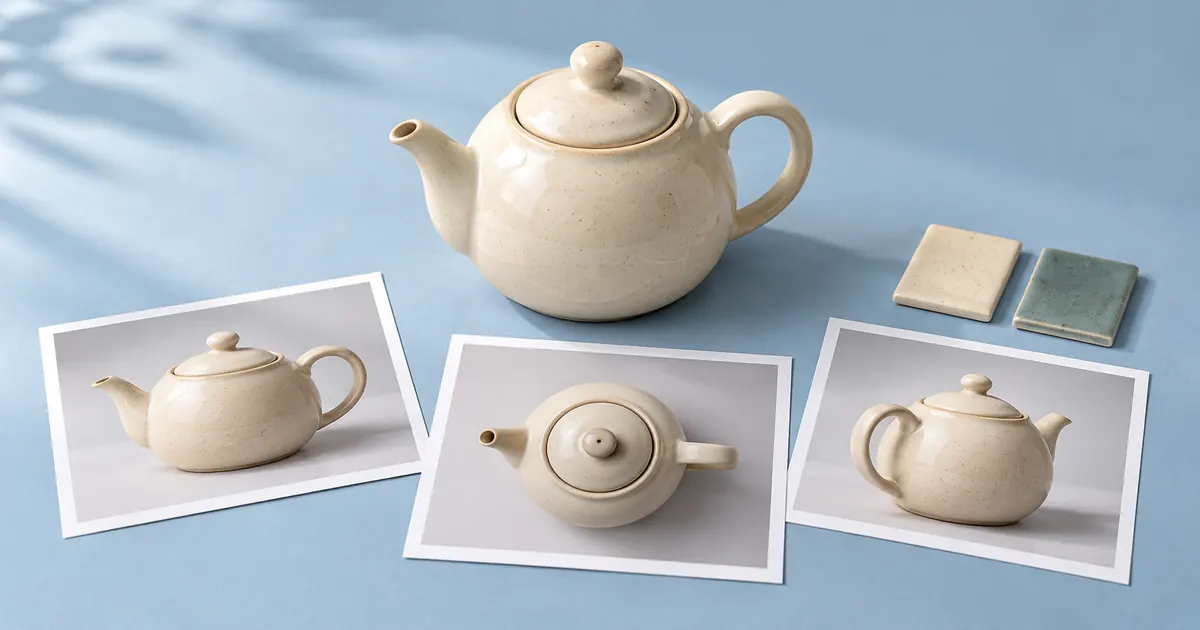

A folder full of attractive images is not yet a reference pack. If one picture defines the product, another suggests a mood, and a third shows a different design, the next person needs to know which one wins. Build the pack around those decisions before uploading anything.
Reviewed October 23, 2026. Hero artwork is an original AI-generated illustration. Worked cases are teaching examples; they are not customer results or model benchmarks.
1. Begin with the output and its nonnegotiable details
Write down the next image you need, rather than trying to build a universal inspiration library. A product close-up needs different evidence from a character expression or a room-wide scene. Name the subject, required view, destination crop and permitted change. For example: “Show the approved teapot on a pale blue table; preserve its body, spout, lid and handle.”
Separate documented facts from creative choices. The real item's construction comes from approved photographs or specifications. The atmosphere can come from a mood board. Do not give a beautiful lifestyle image authority over a handle shape that the actual product reference establishes.
If you need to construct missing character views first, use the character turnaround workflow. If you are organizing hundreds of items, the catalog consistency guide handles the SKU manifest. This pack is the small source bundle for one defined visual task.
2. Give every file a role and a limit
A useful role answers “what may this image control?” Identity, construction, material, pose, composition and atmosphere are different roles. One file can contain several cues, but name the intended ones. Otherwise the person or model receiving it has to guess which details were important.
Also record a negative boundary: what must not be copied from this source. A mood photograph might contribute soft side light but not its furniture, brand marks or product design. A pose reference might guide arm position while having no authority over a character's face or clothing. Write these restrictions in the brief even when the tool offers no dedicated weighting controls.
| Reference ID | Allowed role | Do not borrow |
|---|---|---|
| T01: approved three-quarter view | Body, short spout, curved handle and fitted lid. | Do not infer the unseen underside. |
| T02: approved profile view | Check silhouette and handle attachment. | Do not treat perspective as a new design. |
| T03: verified glaze sample | Material and intended cream finish. | Do not infer capacity or food-contact suitability. |
| M01: blue-table mood image | Background palette and soft light only. | Ignore the different teapot appearing in it. |
These IDs describe a fictional planning exercise. The hero is a generated concept of a reference pack, not verified product photography or proof of angle consistency. For a real object, replace every placeholder with the actual approved source.
Download the reference-role manifest, including the worked role assignments and a blank row. Keep the source files alongside it; a spreadsheet without the referenced files cannot settle a visual dispute.
3. Resolve the conflict before it reaches the prompt
Suppose M01 has the light you want but shows a teapot with a straight angular handle. T01 defines the approved curved handle. The correct decision is not “blend both.” Keep T01 as construction authority and restrict M01 to background and light. If the workflow cannot separate those signals reliably, remove M01 and describe the light in words.
Now consider a harder disagreement: T01 and T02 appear to show different lid knobs. Do not choose whichever file looks sharper. Check whether they depict different versions, whether one has been edited, and which source the product owner approved. Put the pack on hold until that conflict is resolved. A generated compromise would create a third design.
Record the decision in plain language: “T01 controls the lid; T02 is retired because it shows the previous version.” Move retired sources out of the active handoff, but preserve them in the project history. This avoids the same argument returning when a teammate finds the old image again.
4. Make the evidence readable without altering it
Keep originals unchanged. Create clearly named working crops only when they make a relevant detail easier to inspect. A crop of the handle attachment can be useful; sharpening a blurred label does not establish the label's actual wording. Request a better source when the needed information is absent.
For an overview sheet, use simple labels outside the images, consistent margins and enough resolution to identify each source. Include the manifest ID in the filename. Avoid tiny collages that hide the exact feature you expect a reviewer to preserve. Keep the individual full-size files available even if a contact sheet is convenient for discussion.
Check orientation and color handling when preparing copies. An accidentally mirrored view can move a spout or garment closure; a heavy color adjustment can turn a finish reference into a styling suggestion. Mark any purposeful crop, rotation or adjustment so the reviewer knows what they are looking at.
5. Adapt the pack to the actual input controls
A reference pack is a project record, not a promise that every generator accepts every file. Some interfaces separate identity and style inputs; others offer one image. Check the selected model's controls before designing the handoff. Do not assume that uploading several pictures assigns roles or precedence automatically.
QuestStudio's current Image Lab reference control accepts one reference image at a time. For this exercise, start with the approved view that best establishes the required subject. Keep the remaining files for your review. The interface does not provide a separate reference-weight slider for each manifest row.
A contact sheet is not a universal workaround. A model may interpret it as a composition to reproduce, confuse the panels, or lose small details. Test that behavior deliberately if you choose a sheet, and reject a result that duplicates the subject or blends incompatible views. If the needed evidence cannot fit the tool's input, change the workflow rather than promising preservation it cannot demonstrate.
6. Test one change and review against the pack
“Use the supplied approved teapot as the subject. Place it on a pale blue tabletop under soft side light. Preserve the body, lid, curved handle and short spout. Change only the surroundings. Do not add decorations, words or extra components.”
This is a starting instruction, not a guaranteed control. Compare the candidate with T01 and the relevant detail sources. Check components first, then material, framing and atmosphere. Record the first meaningful mismatch with a location, such as “handle joins the body too high.” A vague “not consistent” note makes the next revision harder.
When the mismatch comes from a conflicting reference, repair the pack. When the source is sound but the output changes construction, revise or reject the output. When the source never shows the needed side, obtain that evidence. These are different actions; repeating the same request does not resolve all three.
Save the pack version, selected input, prompt, candidate and review decision together. The asset versioning workflow helps keep approved and superseded files distinguishable. A later change to the identity source should trigger a new review of outputs that depended on it.
Frequently asked questions
How many reference images belong in a pack?
Use enough to establish the required details and no more than you can assign a clear role. The pack may contain more files than the generator accepts. Keep review evidence separate from the actual model inputs.
What wins when style and identity references disagree?
The approved identity or construction source controls the subject. Restrict the style image to its intended role, or remove it and describe the atmosphere in words. Do not blend conflicting product facts.
Can I upload the whole pack to QuestStudio Image Lab?
The current reference-image control accepts one image at a time. Select the most useful approved view for that request and keep the other files for review. Do not assume separate per-reference weights are available.
Is a contact sheet always better than one photograph?
No. A crowded sheet can make details unreadable or cause a model to reproduce the grid. Keep full-size originals, test the selected workflow, and use an individual view when it communicates the required subject more clearly.
What should I do when a required detail is missing?
Mark the source gap and request an approved view or specification. A plausible generated underside, closure or label is not evidence of the actual design. Resolve the gap before approving a factual depiction.
For the broader input questions behind this process, read the generative AI data-challenges guide covering quality, coverage, conflicting versions and provenance.
When a room appears in more than one photo, use the multiple-angle virtual staging workflow to check furniture placement against the same architectural anchors.