

A synth cue sounds brittle, but its meter is not reaching the top. Lowering the fader makes it quieter without removing the roughness. That does not prove aliasing, but it does show why “turn it down” is not a complete diagnosis.
Clipping concerns amplitude being limited at a boundary. Aliasing concerns different signals becoming indistinguishable after sampling, often producing unwanted frequency components. They can occur separately or interact. I would trace the source and processing chain before naming the defect from its sound alone.
Separate amplitude limits from sampling limits
In a hard-clipping example, values above a positive limit and below a negative limit are cut off. The waveform's shape changes, and new spectral content appears. Reducing the level afterward scales the altered shape; it does not restore the removed peaks.
Aliasing is a different issue. At a given sampling rate, signals outside the representable band can fold into a lower-frequency representation unless the system prevents that content from entering or being generated in the problematic way. The University of California, Irvine's digital-audio teaching notes explain the sampling relationship.
Nonlinear digital processing can generate harmonics that cross that sampling boundary. This is one reason the two problems can interact. A plugin's oversampling or antialiasing design may matter even when the original source was recorded correctly.
An original sample-identity experiment
Consider a deliberately simplified sampling rate of 8,000 samples per second. We calculate samples of a 6,000 Hz sine wave without applying an antialias filter. At the same sample instants, those values match a negative 2,000 Hz sine wave.
The relationship follows directly from the sine calculation: sin(2π × 6000 × n / 8000) equals −sin(2π × 2000 × n / 8000) for integer sample index n. The sampled sequence cannot tell those continuous signals apart. This constructed example is not a claim about a real converter, which should include appropriate filtering.
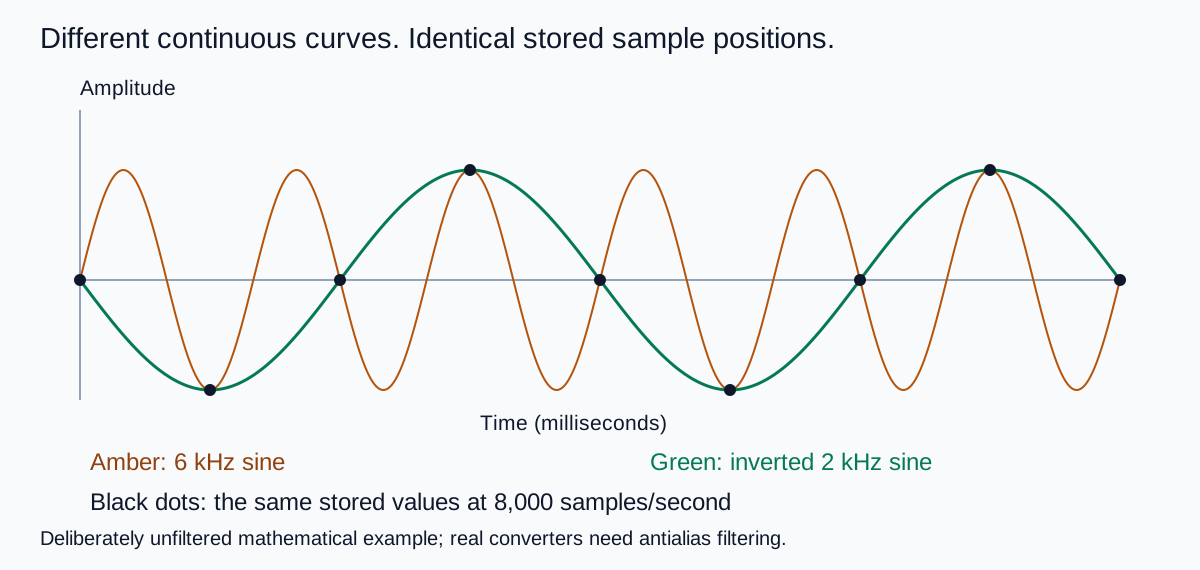
Download the sample table to inspect the equality. The example makes a specific point about sampling ambiguity. It does not establish whether a particular harsh music file contains aliasing.
Compare a clipped waveform separately
The second original drawing starts with a sine wave and limits it to a chosen amplitude. Its flattened tops are a visible consequence of that hard limiter. A quieter copy still has the same flattened shape.
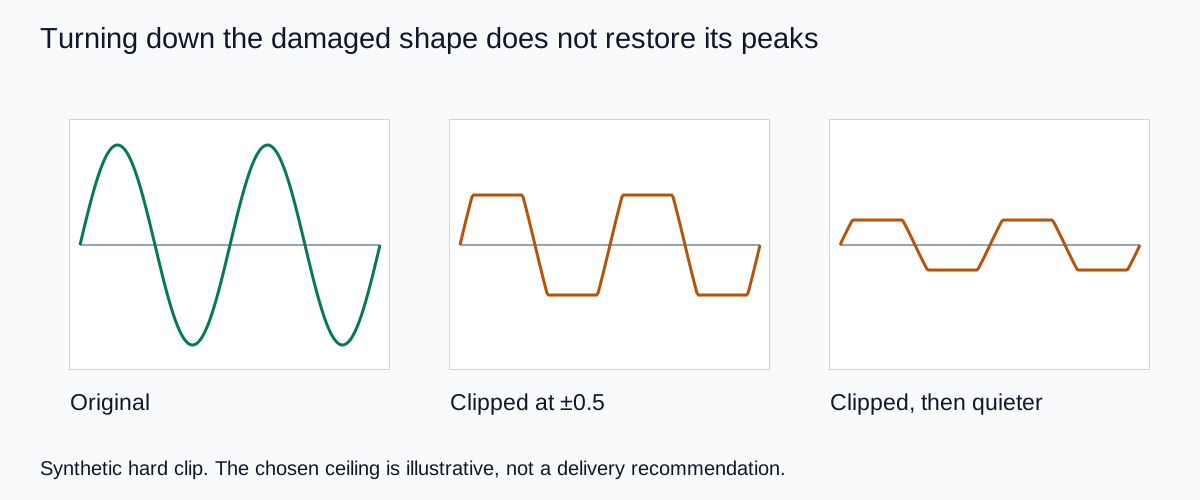
This explains why checking only the final peak meter can miss earlier clipping. A damaged source can be normalized downward, mixed quietly, or passed through later gain reduction. Its current peak level does not reveal every stage of its history.
Likewise, a bright or aggressive timbre is not automatically an error. The relevant question is whether the sound serves the cue and whether an unwanted change can be traced to a specific operation.
Find the first stage where the sound changes
Keep the untouched source, the processed track, and the exported mix. Compare the same short passage at similar playback levels. If the source already contains the unwanted texture, later export settings cannot establish that it was clean.
Bypass processors one at a time. Pay particular attention to saturation, clipping, aggressive dynamics, and other nonlinear effects. If a processor offers a documented oversampling mode, compare it using the same source and controlled output level. Do not assume the option fixes every type of distortion.
If lowering the level before one processor removes the problem, investigate that processor's input behavior. If lowering only the final fader does not, the alteration may already have occurred upstream. Save those two observations separately rather than summarizing both as “lower volume helped.”
Check a fresh export after the change. An acceptable live session can still be damaged at a later fixed-point output or encoding stage. The mastering comparison guide helps keep the source, treatment, and delivery evidence attached to the right files.
Choose a repair that matches the evidence
For accidental clipping under your control, reduce the level before the responsible stage and render again. If the only available file is already clipped, a restoration tool may estimate missing shape, but that is reconstruction rather than recovery of a guaranteed original. Compare it with a cleaner source when possible.
For suspected processing aliasing, test a documented higher-quality or oversampled mode in the responsible processor. A higher project sample rate may change the behavior of some processing, but changing it blindly can add complexity without solving the actual source problem.
Upsampling an already damaged file does not identify and remove every aliased component. The sample-rate guide separates proper conversion from changing playback interpretation. Keep duration and pitch stable during any conversion test.
If the issue is a dense arrangement, noisy separation, or an intentionally distorted instrument, address that actual cause. A spectrum plot can support an investigation, but a single visual spike is not sufficient to identify a complex music defect without a controlled comparison.
How QuestStudio helps when the source needs replacing
Use Music Lab to explore a cleaner source brief when the unwanted texture is present in the generation itself. Ask for restrained saturation, a less aggressive synth, or a simpler arrangement as appropriate, then review the returned sound as a new take.
Do not promise that a new generation preserves the exact melody or that it eliminates a technically diagnosed artifact. If continuity matters, use editable tracks or a supported focused-editing workflow. Keep the accepted cue and its timing requirements available during comparison.
I would finish with a short diagnosis note: the first failed stage, the controlled change, and the exported result. That is more useful than labeling every rough sound “digital clipping” or buying another processor without knowing what it must solve.
Frequently asked questions
Can aliasing occur without clipping?
Yes. Sampling or processing can produce aliasing without the signal reaching an amplitude ceiling.
Does a low final peak prove the source was never clipped?
No. A clipped signal can be reduced in level afterward. The final meter does not reveal the entire processing history.
Does upsampling repair an already aliased recording?
Not automatically. The stored sequence may not identify which components were original and which were aliases. Prevention at the responsible stage is more reliable.
Does every harsh AI music output contain aliasing?
No. Arrangement, timbre, source artifacts, separation, clipping, and encoding can also sound harsh. Use controlled comparisons before assigning a cause.
Are the diagrams measurements of a music model?
No. They are original mathematical teaching fixtures with defined signals and limits. They do not benchmark a model or commercial audio processor.
Technical references
Continue with a useful next step
 Video
44.1 vs 48 kHz: Choose an Audio Sample Rate for Video
Choose between 44.1 and 48 kHz for a video workflow. Compare real test files, preserve duration when resampling, and avoid confusing sample rate with bit depth.
 Creator Workflows
Audio Dithering: What to Check Before a 16-Bit Export
Understand audio dithering with an original quiet-signal example. Check bit-depth reduction, avoid duplicate processing, and export a clean 16-bit deliverable.
 Music
AI Music Mastering: Compare the Sound, Not Just the Loudness
Evaluate an AI music master with a level-matched comparison, an original listening log, source repair decisions, and destination-specific delivery checks.
Hero: AI-generated editorial illustration. Supporting diagrams and exercises: QuestStudio.