

Choose between ChatGPT Go, Plus and Pro by checking the work you need to finish, the surface where you will do it and the limits you actually encounter. A plan name alone does not tell you whether your next reference upload, research session, voice task or site edit will work in your account.
This guide is for a solo creator deciding what to pay for. It uses prices and access documentation checked on November 2, 2026, plus an original workload exercise. It does not claim a private benchmark across paid accounts. The examples below are planning scenarios, with a blank log you can use to replace assumptions with observations.
The current price ladder needs a date
OpenAI's current ChatGPT pricing documentation lists Go at $8 per month, Plus at $20 per month, and Pro options at $100, $200 and $500 per month in USD. Those are distinct Pro price points, so an older comparison that treats Pro as one fixed subscription can mislead a budgeting decision. Confirm your region, tax treatment, billing route and displayed offer before purchasing.
| Plan | Listed monthly USD price | Useful decision question |
|---|---|---|
| Go | $8 | Does the available route finish my ordinary tasks? |
| Plus | $20 | Does its access solve a documented block in my workflow? |
| Pro | $100, $200 or $500 | Which specific tier and workload justify the additional cost? |
The monthly difference between Go and Plus is $12 using those list prices. Moving from Plus to the $100 Pro option adds $80 per month; the $200 and $500 options add $180 and $480. This arithmetic is useful only after the plans under consideration can perform your required task. A cheaper subscription that cannot use your necessary surface is not a complete route.
Do not multiply a guessed number of outputs by a subscription price and call it cost per finished asset. An image rejected for an incorrect label, a narration that needs rerecording and a draft with invented facts are not accepted deliverables. Count the work you can actually use.
Separate ChatGPT features from Work and Codex access
Read feature descriptions in the context of the surface they name. A statement about Codex access does not establish the availability of every ordinary ChatGPT conversation feature. For example, do not turn a coding-tool comparison into a claim that a plan lacks all mobile chat, images or voice. Check each requirement separately.
Before comparing plans, name the surface: ChatGPT in a browser, a mobile conversation, a desktop workflow, Codex CLI or an API integration. Then check the capability on that surface in your account. The model picker, upload control and usage screen are more relevant to your immediate assignment than an undated screenshot from another user.
API token pricing is a separate consideration from ordinary subscription usage. Some current plans can have eligible linked benefits, so both blanket claims, “all API use is included” and “subscriptions never have API benefits,” are too broad. Read the current entitlement and billing terms for the actual route you intend to use.
Map a realistic week before changing plans
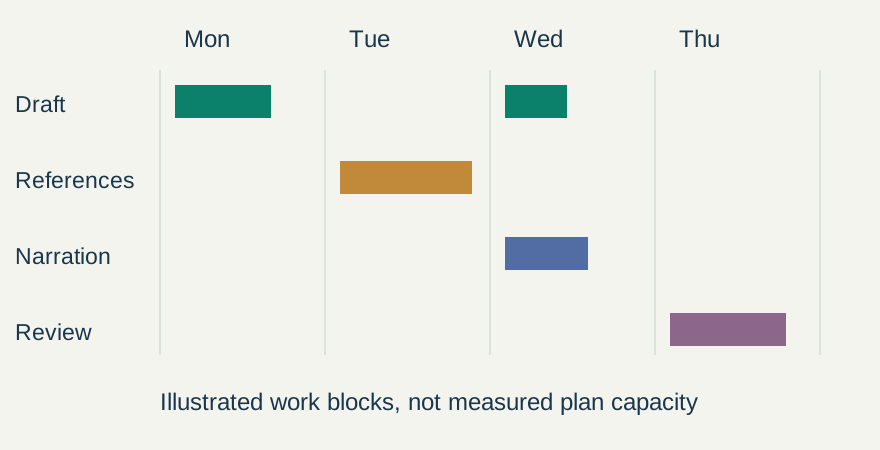
Consider a fictional creator making one product launch each week. Monday is copy preparation, Tuesday is a reference brief, Wednesday is narration and Thursday is final review. The workload has four different acceptance conditions. Copy must retain approved facts; a reference brief must distinguish product details from mood; narration must preserve pronunciations; final review must catch unsupported claims.
Write one representative assignment for each block. Use the same approved facts and output requirements when you test a route. Otherwise, a short caption on one plan and an entire campaign on another tell you little about the plan difference.
| Assignment | Required input | Acceptance check |
|---|---|---|
| Launch caption | Approved product facts and one CTA | No added discount or delivery promise |
| Reference brief | Owned product image and mood reference | Packaging facts remain separate from visual style |
| Narration preparation | Reviewed script and pronunciation notes | Names, numbers and intended pauses survive |
| Site correction | An isolated file copy and one requested change | The diff contains only the approved edit |
Keep a log of the block, not just the annoyance
Download the creator usage log. Its sample task names are fictional; the observation fields are blank. Record the date, required input, tool or surface, observed limit, accepted output and revision notes. Avoid placing client secrets or private source files into the log.
“It felt slow” is too vague for a purchase decision. “The reference upload route was unavailable on the account I intended to use” identifies a capability problem. “The output included an unapproved offer” identifies an instruction or review problem. Paying for a higher tier may change access or capacity, but it does not remove the need to check the offer.
Record interruptions as they happen. Note what the interface actually said and whether you could finish later or through an already available tool. Do not infer a monthly quota from one reset message. Limits and rollout conditions can change, and different tasks can consume capacity differently.
Three decisions a creator can make from the log
Occasional text work: if your available Go route reliably finishes a few short, reviewed assignments, there may be no observed reason to move immediately. Keep a reusable brief and repeat the work before treating a larger subscription as necessary. This is a decision method, not a claim that Go has a particular output allowance.
Mixed weekly production: if the required browser, desktop or CLI route is absent, identify the lowest current plan that explicitly supports it. Plus can be worth evaluating when its documented access addresses that exact block. Verify the feature in the account rather than assuming every product surface has the same entitlement.
Repeated heavy work: if you frequently reach a real limit after producing accepted outputs, compare the relevant Pro tier with the value of the blocked work. Include review time, failed outputs and any additional credit charges. A high price does not establish that a model will understand your brand or preserve a label without correction.
Use a short purchase and renewal check
Before paying, save the displayed plan name, currency, billing period and required feature. Check the cancellation or renewal terms shown to you. For an annual offer, calculate the actual upfront amount; a monthly equivalent is not the amount charged each month.
At renewal, compare the last period's accepted work with the reason you upgraded. If the original block disappeared because the project ended, reassess the subscription. If the account still cannot perform the intended workflow, investigate the surface or permission mismatch before purchasing another tier.
Our creator subscription audit provides a broader way to review overlapping tools. For actual site-file work, use the narrower Codex CLI review exercise. Once a script is approved, you can continue in Voice Lab; inspect the current voice choices and credit cost before generating.
Frequently asked questions
How much are ChatGPT Go, Plus and Pro?
The official documentation checked on November 2, 2026 lists Go at $8 monthly, Plus at $20 monthly and Pro options at $100, $200 and $500 monthly in USD. Check the offer, currency, tax and terms displayed for your account before purchasing.
Is Plus automatically the best plan for creators?
No. Identify the required task and surface, then check actual access and accepted results. Plus is useful to evaluate when its documented capabilities solve a specific block in your existing route.
Does a Codex access difference describe every ChatGPT feature?
No. Codex, ChatGPT conversations, Work features and API integrations can have different access rules. Verify the specific surface and feature you intend to use instead of generalizing one entitlement to every product.
Does Pro remove the need to review images and copy?
No. Higher access or capacity does not establish factual accuracy, correct packaging or acceptable narration. Keep the same source, claim and asset checks for every plan.
Was this a paid-account benchmark?
No. It combines dated official pricing and access documentation with an original workload exercise and a blank observation log. No private performance, quota or conversion result is claimed.
Produce the next reviewed asset
If your next deliverable is narration, take the approved script to Voice Lab and listen through the complete output.