
Use Codex CLI on a small, reviewable copy of your creator site before giving it a broad redesign task. Name the file, the approved change and the details that must stay intact. Then inspect the actual diff and the rendered page. A confident completion message is useful context, but the files establish what changed.
This guide includes an original offline portfolio exercise with a deliberate out-of-scope claim. The installed Codex CLI was version 0.147.0 when its help and resume commands were checked on November 2, 2026. The practice changes are authored fixtures, not reported outputs from a separate Codex session.
Start with a task you can inspect
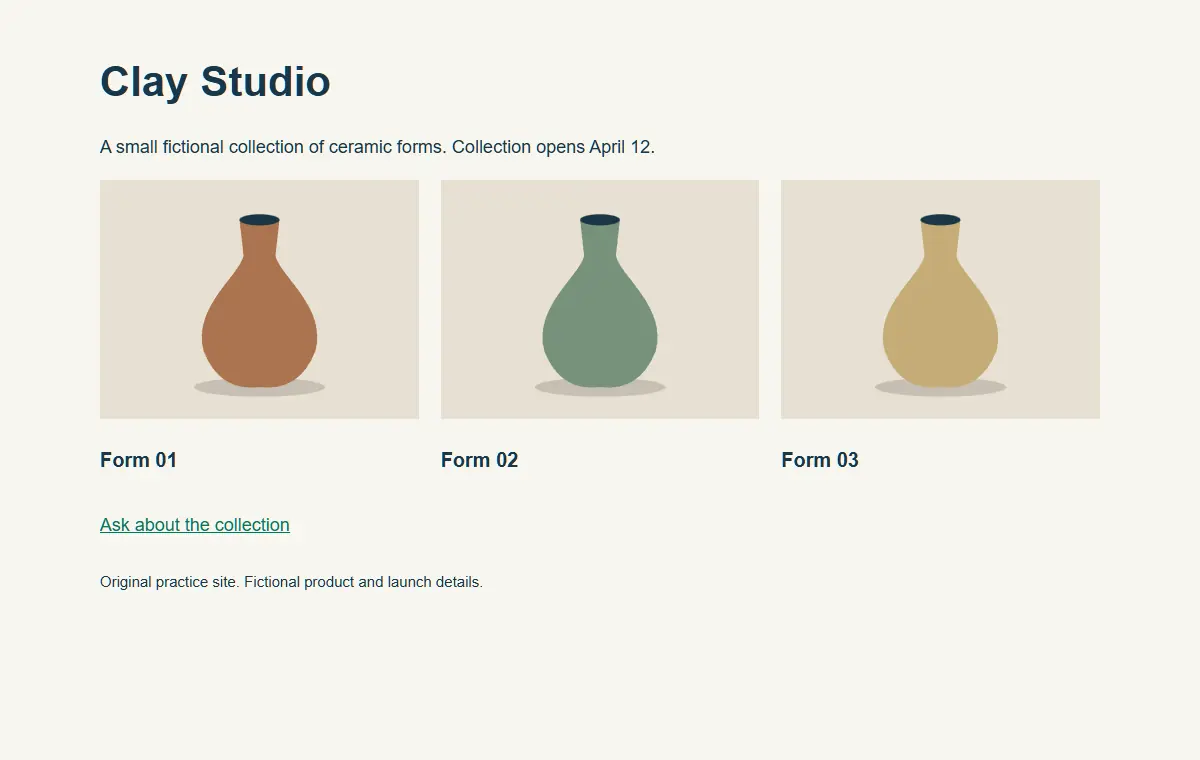
Our fictional Clay Studio site contains three ceramic illustrations, a collection date and a contact link. The requested change is small: replace the heading “Clay Studio” with “Clay Studio: Spring Collection.” The product images, date and contact destination must remain unchanged. No shipping promise has been supplied.
That is a useful first task because the acceptance checks are visible. You can compare the heading and inspect whether anything else moved. “Improve the website” leaves too many decisions open: copy, colors, layout, links and business claims could all change while the result still looks polished.
Download the offline creator-site exercise. Unzip the folder and keep its files together. It includes the original page, an intentionally flawed proposed page, a corrected page, the source illustrations, a brief and a text diff. The contact address is a nonfunctional example address.
Check the commands in your installed version
Run codex --version and codex --help before copying a command from a tutorial. Use codex resume --help when you need to continue an earlier interactive session. These help checks do not establish that an account has model access or that a particular site change will succeed.
The official CLI reference documents commands and flags. Local help is especially useful when your installed build differs from the documentation. In the checked version, the CLI exposes --cd, sandbox controls, approval controls and a resume command. Keep the version with your working notes.
codex --version
codex --help
codex resume --help
Follow the official setup and sign-in instructions if the command is unavailable. Do not paste credentials into a project brief or add account files to the practice ZIP. A site-editing exercise needs the permitted site files and instructions, not your private configuration.
Begin with a read-only review
Open a terminal in the extracted practice folder. Ask the assistant to read brief.md and before.html, identify the requested change and report what it would preserve. A read-only first pass lets you inspect its understanding before asking it to modify a working copy.
codex --sandbox read-only --ask-for-approval on-request --cd . "Read brief.md and before.html. Report the approved heading change, the details that must remain, and any missing information. Do not modify files."This is a documented invocation pattern, not a transcript of a model run performed for this article. Your environment or managed policy can affect available permissions. Read the startup information and any approval request rather than assuming a command-line label overrides the controls of the account or machine.
The expected understanding is straightforward: the heading may change, while the collection date, illustrations and contact link remain. There is no basis for adding delivery, stock or quality claims. If the proposed plan expands into a new checkout flow or brand redesign, narrow the task before continuing.
Give the implementation a clear boundary
For an actual edit, work in a suitable isolated copy or branch and choose the permissions that fit the job. Tell the assistant which file may change and how you will judge the result. Keep the earlier source available. A recoverable starting point makes it easier to compare alternatives and undo a mistaken edit.
A useful instruction is: “Change only the main heading in the working copy. Preserve the collection date, image sources, alt text, contact link and layout. Report the exact file changed and any checks run.” That separates the business decision from implementation freedom without forcing you to micromanage every keystroke.
Do not ask for a production push as part of the first content edit unless that is also an approved action. Review the result locally first. The creative asset versioning workflow explains how to retain approved versions and review notes alongside the files.
Find the deliberate mistake in the proposed diff
Open proposed.html and compare it with before.html. The heading is correct, but the proposed page also adds “Ships overnight worldwide.” That sentence is the important failure. It introduces a business promise that the brief did not authorize.
You can inspect the included proposed.diff or use Git's file comparison. With --no-index, Git compares two ordinary files without requiring this practice folder to be a repository. A difference exit status is expected when the files differ; it is not by itself evidence that the comparison failed.
git diff --no-index -- before.html proposed.htmlFor the exercise, reject the added shipping sentence and compare the corrected file. The corrected fixture changes the heading and preserves the original remainder. We checked that relationship directly. This is a controlled demonstration of scope review, not proof that an assistant always introduces this error or that one review method catches every possible defect.
Check the rendered page as well as the text
Open the corrected page in a browser. Confirm that all three illustrations load, the heading fits, the collection date is intact and the contact destination is unchanged. Resize the viewport so a long heading cannot hide a layout problem. Inspect the actual delivery page rather than relying on a screenshot of the editor.
For a real creator site, expand the checks to the behavior you touched. A caption change may only need a focused content review. A form or navigation change needs interaction checks. Preserve the distinction between “the command finished,” “the diff is correct,” “the page works” and “the production release is live.”
Resume deliberately and keep a useful handoff
The checked CLI supports codex resume for an interactive session picker, codex resume --last for the most recent session and a session identifier for a specific one. Use the intended project directory and confirm which session you are continuing. “Most recent” is not always the project you mean after working on several sites.
When continuing, restate the accepted state: heading approved, shipping claim rejected, corrected page reviewed, publication still separate. A short handoff is easier to trust than asking the next session to infer every decision from a long transcript.
Use Prompt Lab to refine a reusable creative brief and its acceptance checks. Use Editor Lab for a supported source-image correction when the site needs a better asset. Keep the code change, approved media and review record connected so the next edit starts from a known version.
Frequently asked questions
Should my first Codex task redesign the entire site?
Start with a narrow change you can inspect. Expand the scope after you understand the files, permissions and acceptance checks.
Was the proposed page generated by Codex?
No. It is an authored failing fixture that demonstrates an unauthorized shipping claim. The article does not report a separate model execution.
Does read-only mode prove my account has model access?
No. File permissions and account entitlement are different checks. Inspect the actual environment and current account route.
Why does the Git comparison return a difference status?
The supplied pages differ deliberately. With this comparison, inspect the diff and distinguish a detected difference from an inability to read the files.
How do I continue a saved interactive session?
Check your version's resume help. The reviewed version supports a picker, the most recent session and a specific session identifier.
Prepare a reviewed creative instruction
Use Prompt Lab to refine the approved brief, then retain the site change and review notes with the project.