

Read a ChatGPT model name together with the surface where you saw it. A chat menu, a Work control, a subscription name and an API identifier answer different questions. Record the route before copying a model name into a project or comparing what two people can access.
This guide uses official documentation checked on November 3, 2026 and a small original inventory exercise. It does not inspect your account or claim that every listed API model appears in ordinary Chat. Its purpose is to make a model-selection record clear enough to review and update.
Identify what kind of label you have
| Label type | What it identifies | What to record |
|---|---|---|
| Subscription name | A paid or free account offering | Plan, region, billing route and required feature |
| Interface model label | A choice shown in a particular product surface | Surface, visible label, settings and date |
| Power or effort control | A way to configure supported work on that surface | The actual option selected, separately from the model |
| API model ID | The identifier used by a documented API route | Exact string, operation and source documentation |
“Plus” is a plan name, not an API model string. Likewise, a control described for Work is not automatically a control in an ordinary Chat conversation. Start by identifying the kind of label, then follow the documentation for that route.
This also helps when comparing notes with a collaborator. “I used the latest model” leaves too much unresolved. “I used this exact model on this surface, with this setting, on this date” gives the next person something they can actually check.
Separate Chat, Work and API records
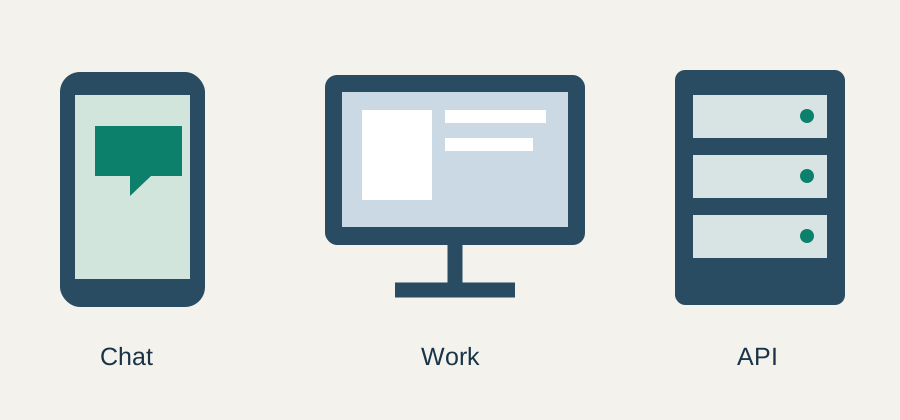
The current ChatGPT Learn model guide explicitly scopes its recommendations to Work and Codex. It describes model and reasoning controls, including the default Power setting and Advanced choices where available. It also says availability and defaults can vary by plan, client, workspace and rollout.
For ordinary Chat, inspect the model choices actually shown in the relevant account. Do not use a Work screenshot to fill an unobserved Chat field. If you have not checked the menu, record that fact instead of inventing a current selection or allowance.
For an API project, use the official API catalog and the specific model page. That catalog is a developer inventory. It does not establish the menu or subscription eligibility in a separate application.
A dated set of API identifiers
The API catalog checked for this guide lists GPT-6 Astra, GPT-6.1 Sol, GPT-6.1 Terra and GPT-6 Luna among its featured models. The corresponding identifiers in this exercise are shown below. This is a selected inventory, not a complete list of every valid model.
| Featured model name | API identifier |
|---|---|
| GPT-6 Astra | gpt-6-astra |
| GPT-6.1 Sol | gpt-6.1-sol |
| GPT-6.1 Terra | gpt-6.1-terra |
| GPT-6 Luna | gpt-6-luna |
Use provider descriptions as starting hypotheses, then evaluate the work you need. A catalog description is not a private benchmark of your brand's scripts or a guarantee of label accuracy in another media tool. Keep the required task and acceptance checks alongside the identifier.
Build a model-inventory worksheet
Download the model-inventory worksheet. It includes two documented identifier examples and a blank Chat observation. Account access remains marked “not checked.” Replace that field only after inspecting the route you intend to use.
A useful row contains the surface, display label, API ID where applicable, settings, source date and access observation. Add the accepted output filename when you test a task. Avoid treating one row's missing field as permission to infer it from another.
For example, a creator preparing a product brief can record the conversation surface and the accepted text. A developer turning that brief into a repeatable service needs an additional API record. The two jobs may share source facts while using different controls and billing routes.
Use the offline checker for record mistakes
The original inventory checker accepts the small dated set of IDs used in this exercise and rejects a subscription label supplied as an API ID. Its Chat branch asks you to inspect the actual menu. It never queries a provider or verifies account entitlement.
python model-inventory-check.py
The checked result confirms three things: the example ID record has the expected shape, “ChatGPT Plus” is rejected as an API identifier, and the account-access field remains unverified. That is a local data check, not a model-availability test.
The allowlist is intentionally short. A rejection can mean an ID is outside this exercise, including another legitimate model. Do not turn the teaching script into a universal validator. For production, use the current provider documentation and the appropriate authorized catalog route.
Attach one concrete task to the record
Suppose your next job is shortening a narration while retaining the product name, price and CTA. Put those requirements in the task record. Keep the original script and compare the accepted revision with it. A model name alone tells you nothing about whether the final words passed.
If a new setting is available, change one variable and keep the source packet stable. Record the revision and the reason for accepting it. Do not change the task difficulty at the same time and then attribute every difference to the model.
Our creative task-fit guide explains how to define media acceptance conditions. This article handles the narrower naming and surface problem, so the trial starts from a clear model record.
Keep billing and capability questions visible
A subscription can provide access to a product route without making every API operation part of the same allowance. Check the relevant current terms before using a route repeatedly. This guide does not establish a quota, a usage price or your account's entitlements.
The Go, Plus and Pro workload comparison covers the separate plan decision. Use the actual work log when evaluating a change. Do not upgrade merely to resolve an ambiguous label that could be clarified by checking the interface or documentation.
Update the record when something meaningful changes
Recheck when a model is retired, a required operation changes or a previously accepted workflow starts failing. Preserve the older record with the output it produced. A new name should create a new version of the record rather than erase the history of an approved asset.
Use Prompt Lab to keep the reviewed instruction with the project, then continue in the relevant media Lab. Link the accepted brief, source reference and output so a later revision does not depend on remembering an old menu.
Frequently asked questions
Is ChatGPT Plus an API model ID?
No. It is a subscription name. Use the exact identifier documented for the API operation you intend to call.
Do Work model recommendations describe ordinary Chat menus?
Not automatically. The current Learn guide scopes its recommendations to Work and Codex. Inspect the choices and access conditions on the actual Chat surface.
Does the worksheet verify my account access?
No. It separates documented identifiers from observed account availability. The examples leave access unverified until you check your own route.
Can the small checker reject a legitimate model?
Yes. Its allowlist contains only the dated examples used in this exercise. It checks teaching records and is not a complete provider model catalog.
When should I update a model-selection record?
Update it when the route, operation, model availability, settings or accepted task changes. Preserve the earlier record with the output it produced.
Keep the model record with the brief
Use Prompt Lab to organize the accepted instruction and record the surface used for the task.