

Compare Claude pricing by the work you need to finish and the people who need access. A solo plan buys an individual's account access and usage. A Team plan adds a shared organizational route with seats and administration. More capacity for one person is a different decision from giving several people an appropriate workspace.
The prices below were checked on official pages on November 2, 2026. The workload scenarios are hypothetical, and no paid account or capacity limit was tested. Use the current checkout for your region and billing interval before purchasing; this article's arithmetic is a planning example.
Read the current plan names first
The live Claude pricing page lists Pro, Max and Ultra for individual paid use. That matters because older comparisons still describe different tier names and allowances. Keep the source date with a saved comparison rather than treating a familiar price table as permanent.
| Route | Listed monthly billing | Listed annual billing |
|---|---|---|
| Pro, one individual | $20/month | $200 billed up front for a year |
| Max, one individual | $100/month | Monthly route shown |
| Ultra, one individual | $200/month | Monthly route shown |
| Team Standard seat | $25/member/month | $20/member/month, billed annually |
| Team Premium seat | $125/member/month | $100/member/month, billed annually |
The official Team explanation specifies a two-member minimum and support for up to 150 seats. The reviewed US prices exclude applicable taxes; regional pricing and currency can vary. Keep seat count, seat type and billing interval together when comparing totals.
Separate billing math from usage capacity
Do not multiply a rounded marketing figure when the invoice specifies a different annual total. Pro's reviewed annual charge is $200 up front. Dividing that charge by twelve gives about $16.67 per month as a budgeting equivalent. It does not turn annual billing into twelve separate payments.
Likewise, a Team rate displayed per member per month under annual billing is a rate basis. Confirm the term, total commitment and actual payment schedule. A lower equivalent monthly figure is useful for comparing recurring cost, but it is not the same as the amount due today.
Usage is a separate axis. File sizes, model choice, conversation length and task complexity can affect consumption. A seat price does not tell you a guaranteed number of approved scripts, images or finished campaigns. Record the relevant account notices and real completed jobs instead of inventing a universal cost per deliverable.
Scenario one: a solo creator with occasional briefs
Our first fictional creator needs several caption drafts, a product-photo brief and a weekly content review. One person owns the work. They do not currently need central administration for colleagues. The useful first question is whether the available individual route serves those tasks reliably enough, not whether the largest tier looks more professional.
Track one representative week: the job, inputs, accepted output, revisions and any actual interruption. Include the difficult task as well as the easy draft. If the creator rarely reaches a relevant limit, the presence of a larger plan does not establish a reason to upgrade. If a limit repeatedly blocks approved work, record when and where it happens.
The Claude free-access guide covers the earlier eligibility question. This article addresses paid-plan fit and seat math. Keep access, observed capacity and output quality as three separate decisions so a successful login does not become a performance claim.
Scenario two: two collaborators need a shared route
Suppose a fictional designer and producer both need their own access under a client-work process. They want a clear workspace owner and centralized billing. The shared-work requirement comes before comparing how many messages one individual might send.
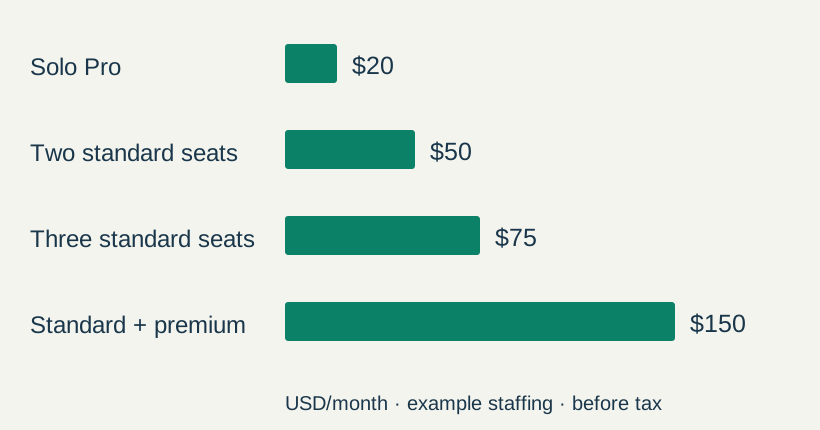
At the reviewed Team Standard monthly rate, two seats total $50 per month before applicable taxes. At the annual rate basis, two standard seats total $480 for a year. These calculations describe the specified staffing example. They do not establish which plan a particular client contract permits or what either collaborator will accomplish.
Ask who owns the workspace, who can add seats, which assets may be supplied and how access will be removed when a collaborator leaves. Those operational questions are part of the purchasing decision. Splitting a project across unrelated personal accounts can make ownership and handoff harder even when the individual prices look lower.
Scenario three: different people need different capacity
A fictional small team has one person doing frequent file-heavy work and another reviewing lighter briefs. Before upgrading everyone, inspect whether different seat types fit the actual roles. Preserve the observed workload notes so the distinction is based on jobs rather than job titles alone.
One Standard and one Premium Team seat total $150 per month under the reviewed monthly rates. The annual-rate example totals $1,440 for the year. Three Standard seats instead total $75 per month or $720 under the annual-rate calculation. These are different staffing arrangements, so the totals are not a like-for-like quality comparison.
Check the product route and credit conditions
Chat use, file-oriented work, Claude Code and the API can involve different account routes and controls. Some current paid offerings advertise API-credit benefits with conditions. Do not replace that detail with either “every subscription includes unlimited API use” or “subscriptions never include API benefits.”
For an integration, identify the billed organization, applicable credits, expiry and spending controls before running it. For a manually reviewed creative brief, an integration may be unnecessary. Match the route to the action and keep the billing record attached to that route.
When a task changes from drafting a paragraph to working across files, reread the permissions and output requirements. The chat and Cowork workflow guide explains the current experience and the importance of defining the deliverable, including during the unified-experience rollout.
Keep a decision record you can revisit
Download the seat-math examples and blank creator workload log. Replace the fictional staffing with the intended users and verify the current prices. Keep the original assumptions visible instead of silently changing a total.
A useful decision note records the date, required tasks, account route, number and type of seats, billing interval, displayed total and review date. Add what would change the choice: a new collaborator, repeated capacity interruptions, a different client-data requirement or an unused subscription.
Use the creator subscription audit to review tools by the work they support. Use Prompt Lab to preserve the approved creative request, then take the appropriate media task to its Lab. A plan decision earns its value through a useful production route and reviewed outputs.
Frequently asked questions
Is an individual high-capacity plan the same as Team access?
No. More capacity for one individual is different from seats, shared workspace ownership and organizational controls.
Can I treat an annual monthly equivalent as today's charge?
No. Read the actual billing term and amount due. A budgeting equivalent does not change the invoice schedule.
Do the examples establish a fixed number of creative tasks?
No. They illustrate staffing and listed-rate arithmetic. Actual capacity and accepted-output quality need their own observations.
Were these workloads tested in paid Claude accounts?
No. The workloads are hypothetical and the plan information comes from dated official research.
When should I revisit the choice?
Review it when the users, required tools, client restrictions, observed limits or current plan terms change.
Start with the work your plan must support
Use Prompt Lab for the approved creative request. Review the selected account route against the workload before relying on it for production.