
A prompt is ready for a reusable library when it handles the ordinary task and the awkward inputs your team is likely to give it. A single attractive example is useful, but it does not show what happens when a field is missing, two references disagree, or the source contains a detail the model should leave out.
Build a small test set before you save the prompt as a trusted recipe. Keep the source, expected behavior, actual response, and review decision together. This guide uses an original fictional mug campaign and deliberately authored response examples. They demonstrate checks; they are not a performance test of any named model.
Define what the recipe is supposed to do
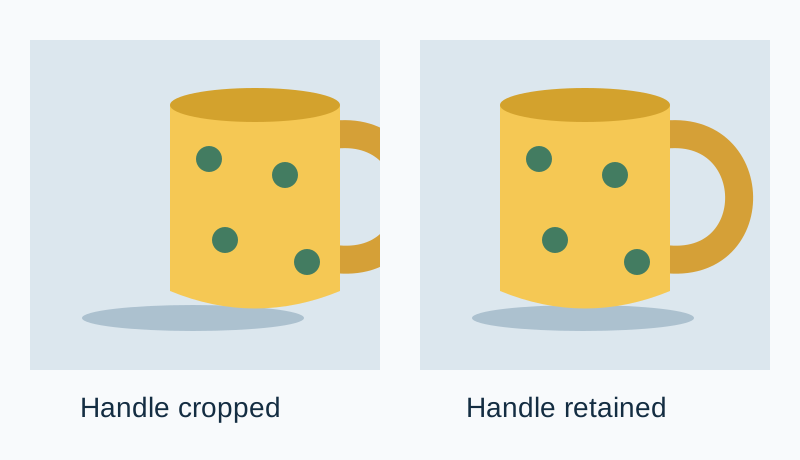
Our example recipe turns a short product record into a visual-production brief. The approved product is a yellow ceramic mug with green dots. Its handle must remain visible, the label must not be invented, and the brief must not add claims about dishwasher safety or manufacturing location. The output should identify the subject, framing, background, and unresolved questions.
These conditions are specific enough to review. “Make a great prompt” is difficult to score because reviewers can disagree about what great means. “Ask for the missing capacity rather than supplying one” has a clearer result. Write the mandatory checks before generating a response, so you are not adjusting the rules to favor a draft you already like.
Use three small fixtures
A fixture is a saved input that you can reuse when the prompt changes. It does not need to be a large dataset. Start with an ordinary case, a missing-data case, and a conflicting-source case. Give each one a stable ID and explain the expected response in plain language.
| Case | Input condition | Expected behavior |
|---|---|---|
| MUG-01 | Approved color, dots, handle, and scene are supplied | Preserve all four without adding product claims |
| MUG-02 | Capacity is absent | Leave capacity unknown or ask for it |
| MUG-03 | Old note says blue; approved record says yellow | Follow the approved record and flag the conflict |
Download the three original fixtures. They contain no customer information. Replace them with your own permitted source material when you adapt the exercise. Keep a copy of the fixture set when you edit it; changing the tests and prompt together makes it harder to understand why a result changed.
Compare two instruction revisions
The first recipe is deliberately vague: “Write a beautiful product-photography prompt for this mug.” It describes the task but leaves source authority and unknown fields unspecified. That does not prove a model will fail, but it gives the reviewer little help when a response adds a plausible detail.
Use the approved product record as the source of truth. Write a visual brief with Subject, Framing, Background, and Questions. Preserve the yellow color, green dots, and complete visible handle. Do not invent capacity, care instructions, origin, or certification. If an older note conflicts with the approved record, identify the conflict and use the approved value. Leave unsupported fields unknown.
The revised instruction identifies the source, defines the output, and explains how to handle two likely problems. It still needs testing. Longer instructions are not automatically better, and a rule written into a prompt is not proof that every response obeys it.
Keep revisions small enough to explain. If you change framing requirements, tone, format, and model at the same time, an improved response does not tell you which change helped. Save the earlier version, change one meaningful part, and rerun the same fixture set.
Review a failure without hiding it behind a score
Consider this deliberately authored bad response: “Photograph the blue 350 ml mug, dishwasher-safe, on pale stone.” It fails MUG-03 by following the stale color note and fails the unsupported-claim check by adding capacity and care information. An attractive background does not cancel those failures.
A better authored example reads: “Photograph the approved yellow mug with green dots, keeping the entire handle in frame. Use pale stone and soft side light. Capacity and care instructions were not supplied. The older blue-color note conflicts with the approved record.” This is an example of the expected behavior, not evidence that a particular model produced it.
In a real run, paste the actual response into the log without quietly correcting it first. Mark each requirement as pass, fail, or not assessable, then add a short note. If a response avoids an unsupported claim but also omits a required framing instruction, keep both findings. A single overall rating can hide the exact problem the next revision must solve.
Separate automatic checks from judgment
Some conditions can be checked mechanically: required headings are present, an output parses as JSON, or a forbidden exact phrase appears. Other conditions need a person to review meaning or an image. Seeing the word “yellow” somewhere in a response does not establish that the final brief consistently describes the yellow product.
For visual outputs, inspect the output itself. A prompt can say “complete visible handle” while the generated picture crops it off. Store the prompt evaluation and image evaluation as separate results. The recipe may produce a well-formed brief while the selected generation route still fails the final asset requirement.
MLflow's regression-testing guidance describes checking changes against repeatable evaluation cases. A small creator library can use the same general principle with a spreadsheet or folder. You do not need to install an evaluation framework to start preserving inputs and review decisions.
Rerun when something material changes
Repeat the fixtures after changing a prompt, switching a model or service route, altering a reference pack, or modifying the output format. Record the date and the controls you actually used. A passing example from an old interface is useful history, but it does not establish the current route's behavior.
When a new real-world failure appears, add a permitted, minimal version of that input to the test set. Avoid copying confidential client material into a shared library. Preserve the condition that caused the failure while replacing identifying details where appropriate. The point is to make the mistake testable, not to collect every raw customer document.
If a revised recipe fixes missing capacity but breaks the ordinary framing case, keep the earlier working version available. Review the new failure before replacing the library entry. A regression is a reason to inspect the change, not a reason to weaken the test until the new prompt appears to pass.
Save a useful library entry in QuestStudio
Use Prompt Lab to organize the approved recipe and the context needed to reuse it. Include a short purpose, required input fields, known limitations, and a link or filename for the fixture set. Do not label the recipe “tested” without saying what task and cases were reviewed.
The prompt-organization guide covers finding and maintaining your saved recipes. This workflow supplies the review evidence that should travel with them. For conflicts between instructions and source files, use the context-versus-prompt guide before rewriting the wording repeatedly.
Finish with a short release note: what changed, which fixtures were checked, what still needs human review, and which version is approved. That note is more useful to the next creator than a folder of screenshots with unexplained star ratings.
Frequently asked questions
How many prompt tests do I need?
Begin with the common case and a few meaningful failures, such as missing fields and conflicting sources. Expand the set when real use exposes another important condition.
Do the example responses come from a tested model?
No. They are deliberately authored good and bad examples for explaining the rubric. Log actual outputs separately when you run your own test.
Is checking for keywords enough?
No. Keyword checks can catch some formatting problems, but a reviewer still needs to judge whether the output preserves meaning and avoids unsupported claims.
Should I test again after switching models?
Yes. The same instructions can behave differently in a different model, interface, or settings combination.
Can I call a recipe reliable after one success?
Describe the evidence more narrowly. One reviewed success establishes that example, not broad reliability across future inputs.
Refine the prompt you will test
Use Prompt Lab to revise the instruction, then run the same cases through your chosen production route. Keep failures attached to the template version.