

The narration is more even after compression, but the product name sounds less clear and the next sentence seems to dip. The threshold may be reasonable while the attack and release timing are wrong for that performance. I would compare the same short passage at matched listening levels before adding more processing.
Attack describes how the compressor's gain reduction responds as the signal calls for compression. Release describes how it recovers. Their exact behavior depends on the processor, detector, knee, and other settings, so a number in milliseconds is not a universal sound.
Choose a passage that exposes the problem
Use a sentence with a clear opening consonant, a louder emphasized word, a short pause, and a quieter follow-up. Include the actual product name or key instruction. A sustained vowel is easy to make smooth but may reveal little about intelligibility.
Keep an untouched track and a processed copy aligned to the same start. Disable unrelated changes for the comparison. If the second version is also equalized, denoised, and made louder, you will struggle to tell what the compressor timing accomplished.
Write the desired result in ordinary language: “control the emphasized price without softening the first consonant or dragging down the next phrase.” That is a better target than “radio voice,” especially for a conversational product demonstration.
Set the amount before judging the timing
Threshold and ratio determine the basic amount of gain reduction requested by a signal. Attack and release shape its movement over time. Avid's compression guide explains those controls and the gain-reduction meter.
Start with enough compression to make the troublesome phrase easier to manage, without trying to remove every natural level change. Watch the meter as context, then listen to the word. A meter that moves less is not automatically evidence of a better narration.
If a single word is wildly louder than everything else, a local clip-gain adjustment before the compressor can be more controlled than forcing the processor to solve the entire performance. Keep that decision visible in the session so you do not later mistake the edited source for the untouched recording.
Compression above a threshold is also different from suppressing room noise during pauses. The gate and expander guide addresses that separate task.
Use an envelope illustration to understand response
The original diagram applies a simple exponential response to a requested six-decibel reduction. It compares two chosen attack time constants, then shows recovery after the request ends. This is a teaching model, not a measurement of a commercial plugin or a recommended preset.
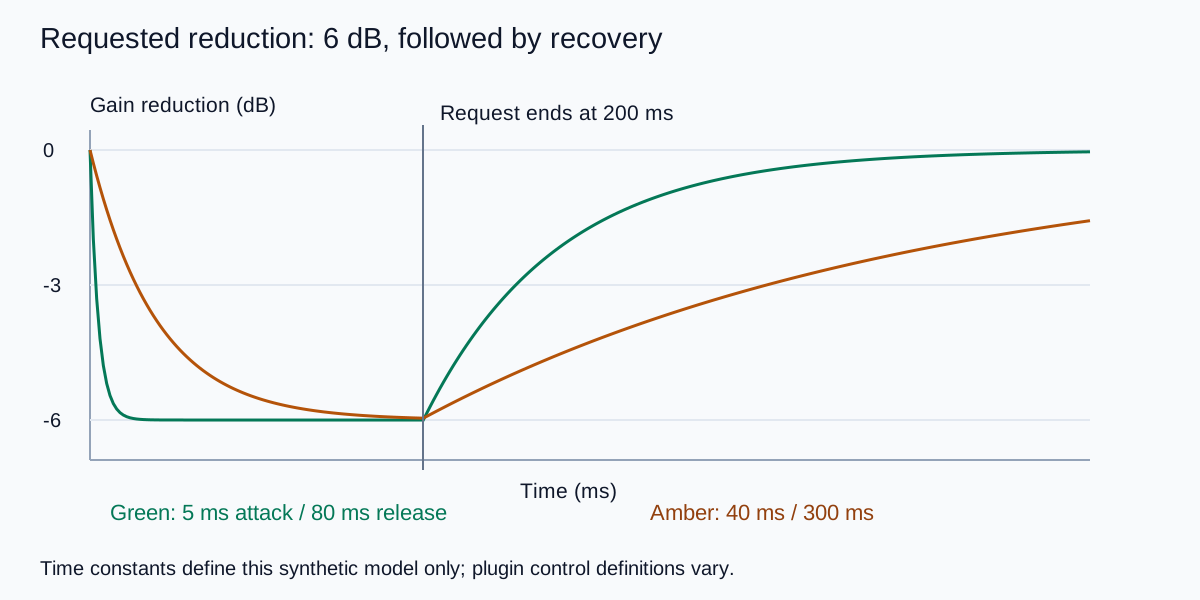
A faster response reaches substantial reduction sooner. A slower response leaves more of the beginning less attenuated. Recovery also takes time, so the next word may arrive while reduction from the previous word is still active.
Do not interpret an attack setting as a guaranteed silent waiting period followed by an abrupt switch. Many processors begin responding immediately and approach a target over time. Read the selected processor's documentation when an exact response definition matters.
Adjust attack while protecting the word
Keep the release and amount stable while comparing attack settings. Listen to the beginning of the key word, the body of the vowel, and the relationship with the following word. Does the consonant remain recognizable? Does the loud emphasis still jump out unnecessarily?
If the beginning sounds dull or flattened, compare a slower attack or less reduction. If a sharp onset still dominates, compare a faster response. These are diagnostic directions, not guarantees; sibilance, plosives, and microphone problems may need different treatments.
I would avoid compensating for a poorly recorded plosive by crushing the whole sentence. Check the source first. A precise edit or a better take can preserve the voice more effectively than a stronger global compressor setting.
Save the two most useful candidates with their settings, not a long chain of unnamed experiments. Return to the original periodically. It is easy to accept an increasingly processed voice simply because it has become familiar during the session.
Adjust release around the next phrase
Now keep the selected attack stable and listen through the pause. If gain reduction hangs into the quiet follow-up and the phrase feels held down, compare a shorter recovery. If the level audibly swells or chatters, compare a slower or otherwise more suitable response.
A very fast release can expose an unnatural movement in the background or in the voice itself. A very slow release can make the processor carry the previous emphasis into the next sentence. The acceptable behavior depends on the rhythm of the delivery and what is underneath it.
Listen with the actual music bed as well as in isolation. A small change that sounds pleasant alone can make the product name less readable in the mix. Do not automatically make the narration more compressed when the simpler fix is reducing a competing music accent.
Use the phrase listening log to record the key consonant, emphasized word, recovery, and reason for selecting a version. The goal is a sentence that remains easy to follow.
Match level and check the exported result
Adjust comparison playback gain so the processed version does not win merely by being louder. Keep that audition adjustment separate from the delivery settings. Watch output peaks because makeup gain can create a new problem after otherwise sensible compression.
Listen at a comfortable level on the intended mix and one ordinary playback device. Check the exact exported file, including the beginning and ending. If a new artifact appears only after encoding, investigate that stage rather than repeatedly changing the source compression.
Keep a short acceptance note: the important words remain clear, the emphasis is controlled, and recovery does not distract. If the untouched performance already meets those goals, little or no compression is a valid decision.
How QuestStudio helps before finishing
Use Voice Lab to create a source narration with the intended wording and delivery. Review pronunciation and pacing before mixing. Compression cannot repair an incorrect product name or restore an omitted sentence.
Perform the attack, release, and output checks in an audio editor with the required controls. QuestStudio source creation does not imply undocumented compressor settings. If the delivery itself is too forceful, compare a calmer source take before trying to reshape it with heavy dynamics processing.
My recommendation is to tune around one meaningful sentence, then verify the whole narration. A setting that helps the opening may be too aggressive for a quieter ending.
Frequently asked questions
What attack and release values should every voiceover use?
There is no universal pair. Tune the selected processor around the performance, amount of reduction, and final mix.
Is attack a delay before compression begins?
Not generally. Many processors begin responding and approach the requested reduction over time. The exact control definition depends on the design.
Why does the next sentence become quieter?
Slow recovery may carry gain reduction into it, but source levels and other processing can also contribute. Compare the aligned original and processed passage.
Can compression remove room noise?
It is not a general noise-removal tool. Makeup gain can make background noise more apparent. Diagnose the noise and pause treatment separately.
Does Voice Lab provide the compressor controls in this guide?
This workflow uses Voice Lab for source narration and a suitable external audio editor for dynamics processing and export review.
Technical references
Continue with a useful next step
 Voice
AI Voiceover Pickups: Replace a Line and Keep the Tone
Replace one AI voiceover line without an obvious change in tone. Recover the voice settings, generate phrase context and check timing, joins and captions.
 Voice
Noise Gate vs Expander: Keep Voiceover Pauses Natural
Choose a noise gate or expander for voiceover pauses. Use a clear level example, protect quiet word endings, and avoid settings that make the room pump.
 Voice
AI IVR Voice Prompts: Build and Test a Clear Phone Menu
Create AI IVR voice prompts from an approved phone tree. Write short choices, organize modular files and test keys, timeouts and fallback routes on a call.
Hero: AI-generated editorial illustration. Supporting diagrams and exercises: QuestStudio.