
The room is silent between sentences, but the first consonant disappears and the last word sounds cut short. That is not a cleaner voiceover. It is a processor making the wrong decision about which quiet sounds belong in the performance.
For conversational narration, I would usually try gentle downward expansion before a hard gate. An expander can reduce low-level sound without forcing every pause into silence. A gate can still be useful, but it needs a clear reason and a careful check of quiet speech.
What a gate and an expander actually change
A downward expander reduces signals below a threshold according to its ratio and other settings. A gate applies a stronger attenuation when the signal falls below its opening or closing criteria. Real implementations can include a limited attenuation range, different detectors, and timing controls, so “gate” does not always mean an instantaneous switch to perfect silence.
The OBS expander documentation describes its adjustable ratio and smoother reduction of quiet sound. This is a level-based decision. The processor does not know whether a quiet sound is a fan, a breath, or the final consonant that makes a sentence understandable.
That limitation explains my first check: listen to the untreated source. If the fan remains audible under every spoken word, closing the pauses will not remove it while the voice is present. You may need a quieter recording setup or a separate noise-reduction workflow.
Read the difference with one level example
Consider an idealized downward expander with a threshold of −40 dBFS and a 2:1 ratio. Below that threshold, every additional decibel down at the input becomes two decibels down at the output. An input at −50 dBFS is 10 dB below the threshold, so the simple curve places it at −60 dBFS.
This is an original static calculation. It leaves out attack, release, detector averaging, knee shape, and any maximum attenuation. It helps you understand a ratio; it is not a preset for your microphone.
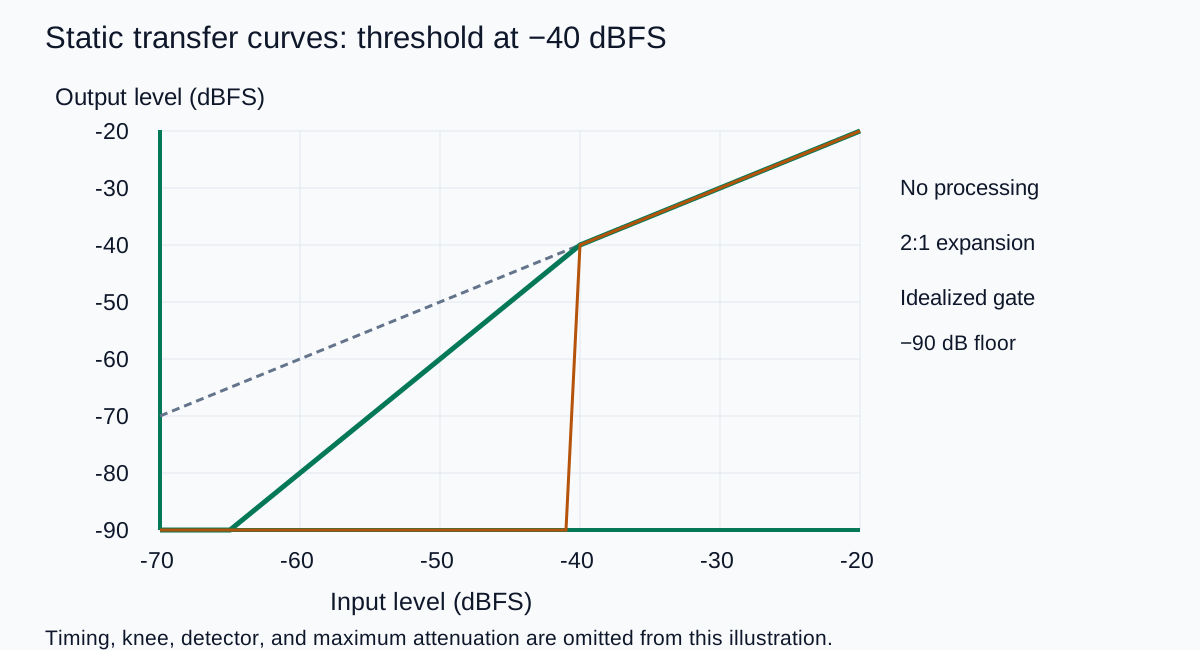
| Input level | Distance below −40 dBFS | Calculated 2:1 output |
|---|---|---|
| −35 dBFS | Above threshold | −35 dBFS |
| −45 dBFS | 5 dB | −50 dBFS |
| −50 dBFS | 10 dB | −60 dBFS |
| −60 dBFS | 20 dB | −80 dBFS |
Now imagine a quiet word ending at the same level as a chair creak. A static threshold treats them alike. Raising the threshold may suppress the creak more aggressively while also damaging the word. The solution is not always another turn of the threshold control.
Set the threshold from your quietest useful speech
I would make a short test recording with a normal sentence, a softer sentence, a natural pause, and a phrase that ends gently. Keep the microphone position and recording gain the same as the real session. Include enough room sound to understand what the processor is reacting to.
- Mark the source problems. Note whether the noise is constant, intermittent, or only noticeable in long pauses.
- Find the quiet speech you want to keep. Do not set the threshold from the loudest word alone.
- Begin with a modest reduction. Aim for a less distracting pause, not a completely empty waveform.
- Compare at similar listening level. A louder processed version can feel better even when its word boundaries are worse.
- Check the soft sentence again. Listen for missing beginnings, shortened endings, and changes in the room sound between words.
Use the pause-processing review sheet to record the setting and the exact word that fails. “The final s disappears” gives you a useful next action. “Sounds more professional” does not tell you what to adjust.
Use timing controls to protect the sentence
Attack controls how quickly the processor opens or stops reducing the signal after detection. Release controls how it returns toward attenuation. Some gates also provide a hold period and separate opening and closing thresholds. The OBS filter guide links the gate and expander documentation so you can check the controls exposed by that implementation.
If a word begins weakly and becomes loud, a slow opening can hide its onset. If the gate closes immediately as a phrase fades, the ending can sound unnaturally short. If it opens and closes repeatedly around the boundary, listen for a fluttering room sound rather than assuming the microphone is malfunctioning.
I would change one control while replaying the same marked phrase. First decide whether the threshold is excluding wanted speech. Then work on the transition. A longer release cannot reliably restore a word that never opened the processor in the first place.
There is no universal millisecond setting for all voices. A fast instructional read, a whispered line, and a reflective narration have different envelopes. Keep the performance intact, then reduce the distraction as far as that recording allows.
Choose the right treatment for the noise
| Problem | What I would try first | Why |
|---|---|---|
| Low room sound mainly noticeable in pauses | Gentle expansion | Less contrast between speech and silence |
| A few isolated clicks between sentences | Local editing with short fades | Avoid processing every quiet word |
| Steady noise audible beneath speech | Source improvement or suitable noise reduction | A pause processor does not separate overlapping sources |
| A deliberately silent gap in a scripted cue | A controlled edit or carefully set gate | The silence serves an intentional timing choice |
For a recorded voiceover, you have an advantage over a live stream: you can fix a few pauses individually. I would not force a global processor to solve three isolated chair noises at the cost of every sentence ending. The audio noise-removal guide helps choose a broader cleanup method when the problem is present throughout the recording.
Keep room tone when the edit needs continuity. A clean but abruptly silent gap can make an insert feel detached from the surrounding performance. The room-tone recording guide covers collecting a usable reference for that purpose.
Do not add a gate automatically to an AI voice
A generated narration may already have quiet pauses. Adding a noise gate because it appears in someone else's recording chain can do nothing useful or damage a soft ending. Start with the actual file and identify a problem before choosing a processor.
In QuestStudio Voice Lab, create a short script that includes the quiet phrase and pause you care about. Keep that original as the reference. Apply any gate or expansion in your audio editor, then compare the final mix with music and effects in place.
If the problem is an overly breathy performance, a strange pronunciation, or inconsistent delivery, processing the pauses may miss the real issue. Revisit the source or the breath-sound cleanup workflow before making the whole track more aggressive.
Approve the words before the waveform
My final review is a complete listen at a comfortable level, followed by a check of the marked quiet phrases. Every necessary word should remain clear, pauses should fit the scene, and the room should not seem to switch on and off unnaturally.
A less tidy-looking waveform can be the better voiceover. Keep the setting that preserves the performance, even if a little low-level ambience remains.
Frequently asked questions
What is the main difference between a noise gate and an expander?
A downward expander progressively reduces low-level signals according to its settings. A gate generally applies a stronger reduction below its opening or closing criteria. Actual behavior depends on the processor and its range and timing controls.
Can a noise gate remove fan noise under speech?
Not by separating the fan from the voice. When the gate is open, the overlapping noise can remain. Improve the source or consider a suitable noise-reduction method for that problem.
Why are my word endings disappearing?
The threshold may classify quiet endings as unwanted sound, or the closing behavior may be too abrupt. Compare the untouched phrase and adjust the threshold before fine-tuning timing.
Should I use the same settings for every narrator?
No. Base the settings on the recording level, noise, quiet speech, and intended performance. Test a soft phrase as well as normal speech.
Does AI narration always need a noise gate?
No. Listen to the actual file first. If its pauses are already clean, a gate may add no value and can damage quiet parts of the delivery.
Technical references
Continue with a useful next step
 Voice
AI Voice Changes Mid-Script: Keep Long Narration Steady
Keep AI narration consistent across sections. Save a voice reference, track settings, review joins, and repair complete phrases without changing the speaker.
 Voice
AI Voiceover File Delivery: Give Editors a Usable Handoff
Deliver AI voiceover files editors can use. Confirm formats and timing, map clips to the approved script, and reimport the package before handing it over.
 Voice
How to Write Better Prompts for AI Voiceovers: 17 Proven Prompt Formulas for More Natural Results
Learn how to write better prompts for AI voiceovers with simple formulas for tone, pacing, pauses, emphasis, and script structure that sound more natural.
Hero: AI-generated editorial illustration. Supporting diagrams and exercises: QuestStudio.