

A reviewer sends a note at 01:00:00:00, but the editor's clock and the video's elapsed duration do not agree. The footage may be fine. The disagreement can come from counting conventions rather than missing frames or audio drift.
At the common 30000/1001 frame rate, usually called 29.97 fps, drop-frame timecode skips selected frame numbers so its labels closely track elapsed time. It does not discard video pictures. I would confirm rate, timecode convention, and starting timecode before exchanging detailed notes.
Separate three things that look like time
Playback rate determines how quickly frames are presented. A frame index identifies a picture's position in a sequence. Timecode labels pictures using hours, minutes, seconds, and frame fields. These are related, but they are not interchangeable.
A displayed value can also include a nonzero starting offset. A clip beginning at 01:00:00:00 does not necessarily contain an hour of material before its first visible picture. Confirm whether a review system reports source timecode, sequence timecode, or elapsed player time.
The 3Play Media timecode guide describes the drop-frame distinction and common punctuation. A semicolon often signals drop-frame counting, but a written note should still state its convention explicitly.
Why nominal 30-frame counting drifts from the clock
At exactly 30 frames per second, 108,000 frames last one hour. At 30000/1001 frames per second, the same number of frames lasts 3,603.6 seconds, or one hour plus 3.6 seconds. Non-drop-frame numbering uses the nominal 30-frame count without correcting that difference.
The exact rational rate matters in this calculation. “29.97” is its familiar rounded name. Using the rational value avoids suggesting that a decimal rounded to two places is the underlying timing definition.
Drop-frame numbering compensates by skipping the labels 00 and 01 at the beginning of each minute except every tenth minute for this 29.97 convention. That is 108 skipped labels per labeled hour. No corresponding image frames are removed from the file.
Other rates have their own conventions. Do not copy this two-number rule into a 59.94 workflow or assume that 23.976 uses the same scheme. This guide's worked ledger is specifically for 30000/1001 with nominal 30-frame numbering.
Watch the minute boundary, not the picture disappear
These are consecutive picture labels around the first minute boundary. The non-drop-frame sequence advances from 00:00:59:29 to 00:01:00:00. The drop-frame sequence advances from 00:00:59;29 to 00:01:00;02. In each case, the next displayed picture is still the next picture.
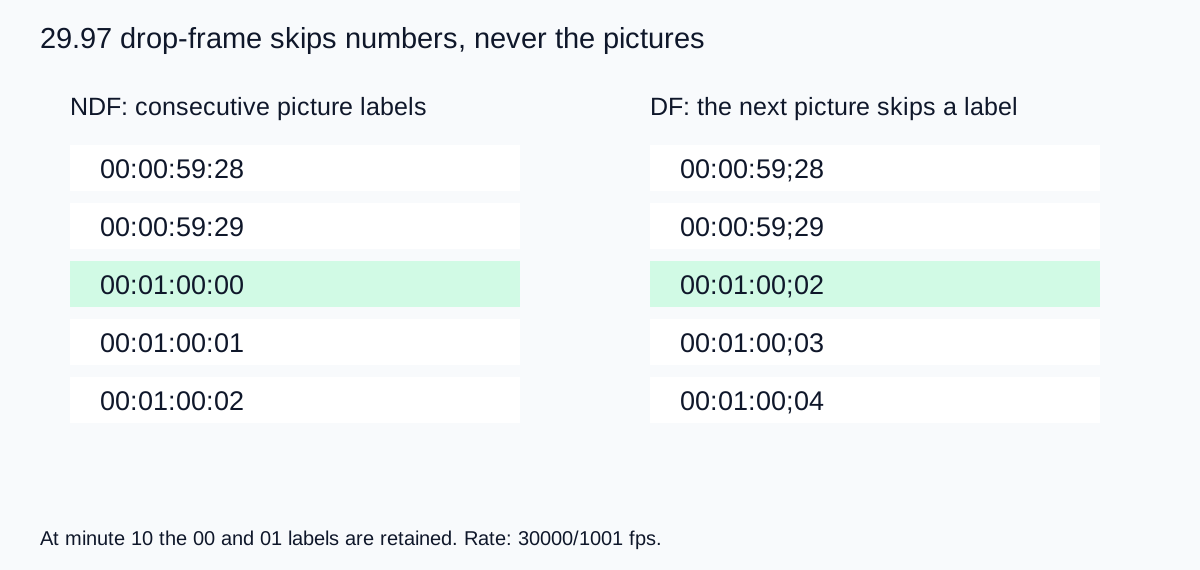
At the tenth-minute boundary, the drop-frame labels do not make that two-number skip. This repeated exception keeps the correction close to the actual clock relationship. It is a counting system, not a variable playback speed.
Download the boundary worksheet to compare the first-minute and tenth-minute examples. The file contains teaching values, so it should not replace metadata from your own edit.
A one-hour comparison with explicit assumptions
Starting at a zero-based timeline origin, the frame labeled 01:00:00:00 in nominal 30-frame non-drop counting follows 108,000 frame intervals. Those intervals take 3,603.6 seconds at 30000/1001 fps. The corresponding drop-frame hour label follows 107,892 intervals and lands at approximately 3,599.9964 seconds.
The small residual shows why “closely tracks elapsed time” is more precise than claiming perfect equality at every boundary. The calculation also states its origin convention: frame labels identify positions, while duration counts intervals. Confusing an inclusive last-frame label with elapsed duration can create an additional one-frame disagreement.
I would use these numbers to understand a mismatch, not manually retime a finished video. Changing the displayed convention should not require stretching the audio or dropping pictures. If playback itself drifts, investigate that separate problem using the audio and video sync guide.
Send timed feedback with enough context
For a precise review, include the filename or version, playback rate, timecode convention, and whether the note uses source or sequence time. Add a short visual description of the moment. “The hand touches the cap” provides a useful check if an exported review copy starts at a different offset.
For a casual short review, elapsed player time and a clear description may be sufficient. Do not burden collaborators with unnecessary frame notation when they are choosing between two opening shots. Use precise timecode when a frame-specific change or a formal interchange actually needs it.
When captions or markers cross applications, confirm the format's timing units. Some formats use elapsed timestamps rather than SMPTE frame labels. Do not mechanically replace colons with semicolons and assume the timing has been converted. Export through a supported workflow and check early, middle, and late cues against the picture.
Keep one agreed review version. A trim at the start of a revised export can invalidate every later note even when the timecode convention is correct. Version control for the video is as useful as correct arithmetic.
How QuestStudio fits the timing handoff
Create source shots in Video Lab, then inspect the actual files when assembling them in an editor. A requested duration or a prompt mentioning a frame rate does not establish a particular SMPTE timecode track.
Set the sequence and delivery conventions in the editing workflow, and use the export review checklist to check the saved file. Keep generated clips, edited sequence, and review exports clearly named so a note points to the intended version.
My recommendation is to write the timing convention once at the top of a review document, include a visual cue with important notes, and test one exchanged marker before sending hundreds. A small agreement prevents a large amount of unnecessary retiming.
Frequently asked questions
Does drop-frame timecode delete video frames?
No. It skips selected frame numbers. The pictures remain in the sequence.
Why is there a semicolon in some timecodes?
A semicolon commonly indicates drop-frame notation. Confirm the actual rate and counting convention rather than relying only on punctuation.
How much does 29.97 non-drop counting differ after a nominal hour?
At the exact rate 30000/1001 fps, 108,000 frame intervals take 3,603.6 seconds. That is 3.6 seconds beyond one hour.
Can I fix audio drift by changing the timecode display?
Not if the media actually drifts during playback. A display convention and the underlying media timing are different issues.
Should I use the same two-number skip at every frame rate?
No. The worked rule here applies to 29.97 drop-frame counting. Confirm the convention required by your actual frame rate and delivery workflow.
Technical references
Continue with a useful next step
 Video
AI Video Audio Out of Sync: Fix Offset and Timing Drift
Fix AI video audio sync with three timing anchors. Separate a fixed offset, growing drift, edit jumps, and incorrect mouth movement before changing the track.
 Video
44.1 vs 48 kHz: Choose an Audio Sample Rate for Video
Choose between 44.1 and 48 kHz for a video workflow. Compare real test files, preserve duration when resampling, and avoid confusing sample rate with bit depth.
 Video
How to Export From DaVinci Resolve on the Deliver Page
Export video from DaVinci Resolve using the Deliver page. Set the range, format and audio, queue the render, and verify the file before you send it out.
Hero: AI-generated editorial illustration. Supporting diagrams and exercises: QuestStudio.