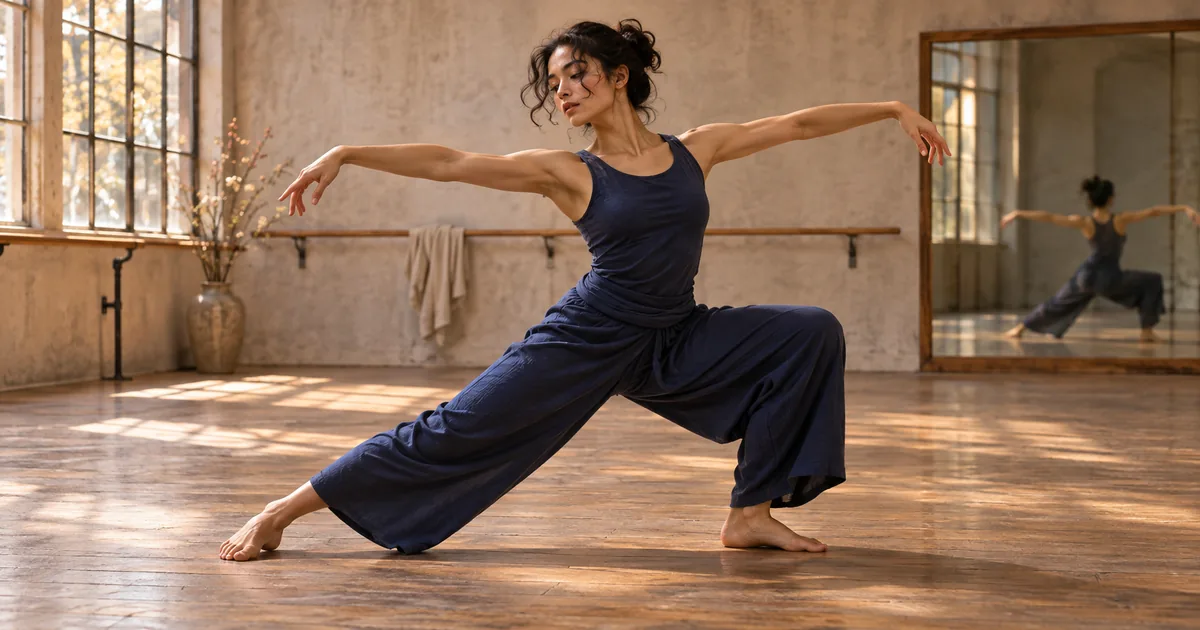

To edit a dance reel from one performance, choose a short phrase that makes sense on its own. Start slightly before the movement begins and stay long enough to show how it resolves. Use the widest usable take as the backbone. Cut on a beat when it helps the movement, and check that hands and feet survive the phone crop.
Jump to the Video Lab example.
Find the phrase before planning cuts
Watch the whole recording once. Mark where the dancer starts a new phrase, changes direction, or lands after a turn. Then watch the strongest candidate without music. If you can see a preparation, a change, and a finish, you have enough for a reel. If you can only see the middle, move the in point earlier before reaching for effects.
For a worked example, imagine a contemporary solo recorded in one wide take. The dancer steps diagonally, extends both arms, turns on the next count, and ends in stillness. Start just before the weight shifts and keep the stillness at the end. That gives viewers a chance to see what the dancer set up. A clip that begins after the first step makes the turn less readable, even if it is shorter.
Put three markers on the timeline: the first visible preparation, the key movement, and the landing or hold. Start with a direct cut that preserves all three. If you need to make the reel shorter, trim the idle time before the first marker and after the last one. Leave enough of the breath between them for the phrase to make sense.
Protect the movement in the vertical crop
Open the actual portrait preview. Move through the phrase at quarter speed and check the widest arm reach, highest jump, and lowest floor contact. Put a small visual margin around the dancer's range. The midpoint of the body may move left or right during the phrase, so a center crop chosen from the first frame can miss a foot on the last one.
| What you see | Edit to try |
|---|---|
| The toes are cut off during the landing | Use a wider crop or a smaller portrait inset for the entire move. |
| A reaching hand leaves on one beat | Shift the frame gently before the reach, then hold through it. |
| A mirror creates a distracting duplicate | Keep the full performer and trim unused background if the reach still fits. |
| A title overlaps the feet or stage floor | Place the title on a separate opening or closing card. |
A wider image inside a vertical canvas can be a good choice for partner work or floorwork. Keep the extra space at the top and bottom simple. Avoid filling it with animations that compete with the dancer. The goal is to give the audience a clear view of what the choreographer made.
Cut with the sound and protect the recorded performance
Listen for a count, breath, footfall, or other sound that identifies the move. Put your timing marker there and try a cut around it. Watch both versions. A cut on the music's strongest beat can look early if the dancer finishes just after it. Leave the landing in the wide shot before cutting away.
If you recorded several angles of the same performance, line them up with a visible event such as a clap or a heel strike. Check the moment at both camera angles before you insert a close-up. If you only have the wide take, keep it through the main phrase. A cutaway can give you room to add a title or a credit before or after the performance.
Keep room sound if it helps the viewer hear the movement and you can use it in the export. A loud track placed over the original can erase a meaningful footfall or breath. Try listening on a phone. Adjust the balance until the main beat and the recorded movement are both understandable.
Make an optional title or closing shot
If a separate title needs a short visual, try a quiet shot of the empty rehearsal space. Use it before or after the real clip. Leave a calm area for editable credits.
Open the example in QuestStudio Video Lab.
Vertical 9:16 video of an empty contemporary dance rehearsal studio after a practice, polished amber wood floor and a long blank indigo wall. Gentle sunlight moves across the floor while the camera stays steady. Keep the center clear for editable title or credits. One simple lighting change. No people, reflections of people, words, logo, or camera sweep.Place the title cutaway beside the actual footage and compare the color and lighting. If it looks like a different venue, use a title card over black or your own still instead. Watch the final reel once with sound and once muted. In both versions you should be able to tell where the phrase starts, what the dancer does, and how the move ends. Then check credits, sound, and the crop in the app where you plan to share it.
Compare two trims before you pick the short version
Make one draft with a little extra room before and after the chosen phrase. Make a second version that cuts in on the turn and ends on the landing. Watch them on the same phone at the same volume. For the diagonal-step example, the shorter edit may look faster, but try to explain what direction the dancer starts from. If you can't see the first weight shift, extend the in point by enough frames to catch it. You can recover time from the title or from the last hold.
Once the edit reads, check the smaller cues. The moment a dancer prepares to turn can be marked by a shoulder movement the viewer can see at full frame but miss in a crop. If it matters, hold the wide shot instead of cutting to the face at that instant. Put the close-up on a moment where the face tells the audience something it couldn't see in the wider frame.
Make a note of the source take, phrase start, phrase finish, and chosen crop. If a choreographer asks for an extra count or a dancer asks to leave out a particular close-up, you can change that stretch without rebuilding the whole sequence. Keep the edited clip next to the full take so the performer can review it in context.
If you need a short original title shot, prepare one in Video Lab and cut it around your real performance.
Create a QuestStudio accountFrequently asked questions
How long should a dance reel be?
Start with the shortest complete phrase you can show clearly. Keep the preparation and landing, then trim idle time at either end.
Should I cut every time the music hits a beat?
Use the beat when it supports what the dancer is doing. Keep the shot through the landing if changing angles would hide the movement.
What if the dancer doesn't fit in a vertical frame?
Try a wider crop inside the vertical canvas or make a gentle reposition before the move. Check full reach, jump height, and floor contact.
Where should I put the title?
Try an opening or closing card if text covers movement. Keep any credit or caption clear of the dancer's hands and feet.
Related guides
 Video
Shot Types Prompt Pack for Image to Video: Drone, Dolly, Handheld and More
Use this shot types prompt pack for image to video with copy-ready prompts for drone, dolly, handheld, wide, macro, and rack focus.
 Video
AI Storyboard to Animatic: Time Your Shots Before Video
Turn AI storyboard frames into a useful animatic. Build a timed shot list, test narration and transitions, and find pacing problems before generating video.