
Useful email prompts give the assistant a communication job, the approved facts, and the commitments it must not invent. For creator-client work, the most important sentence is often the request: send the missing reference, approve a crop, or agree on a revised scope. A polished greeting cannot compensate for an unclear decision.
The three examples below use one fictional product-image project. They are original authored drafts, not messages sent to a client or a report of tested model performance. Replace the fictional details with approved project information, review the result, and make the send decision yourself.
Keep one source brief behind all three messages
The fictional project covers six still product images and one review round. Two scenes are approved; four still need reference files. Scene B’s crop needs a decision. An animation has been requested, but animation is outside the current scope. No response deadline has been approved. These facts are enough to write clear messages without inventing urgency or promising a delivery date.
Treat the source brief as the authority. The model can help arrange the message, but it should not decide the scope, the recipient’s obligations, or a schedule that depends on missing material. If the brief does not say a deposit is required, the email should not introduce one as though it were agreed. If the project owner has not set a deadline, ask for a response without manufacturing one.
Email one: ask for missing reference files
The job is to identify the exact dependency and explain what happens next. Avoid blaming the client or implying that all production is blocked when two approved scenes can continue. Also avoid promising a final date before the files have been inspected. The message should make the next action easy to understand.
Use the prompt below with your current project brief. Include the actual asset names when they are known. “Please send everything” is less useful than a precise list of missing references and a request to identify the person who can provide them.
Draft a short creator-client email requesting missing reference files.
Facts: six still images; two approved scenes can continue; four scenes await references.
Ask the recipient to send the four references or identify their owner.
Say the schedule will be confirmed after reviewing the files.
Do not invent a deadline, fee, or promise of immediate completion.
Subject: Reference files needed for the remaining four images
Hi Alex,
The two approved scenes are ready to continue. Please send the reference files for the remaining four images, or confirm who can provide them. I will confirm the production schedule after reviewing those files.
Thanks,
SamReview the dependency, not just the politeness
The authored draft keeps three facts together: some work can continue, four references are missing, and scheduling follows review of those files. A friendlier rewrite should preserve all three. If it changes “after reviewing” to “as soon as you send,” it may create a promise the project owner did not approve.
Before sending, add the actual file list or upload destination if the owner has supplied it. Confirm that the link is accessible to the recipient. The email should not say “attached checklist” unless the attachment is present. These are small operational checks that prevent an otherwise clear draft from creating another round of confusion.
Email two: ask for one concrete approval
An approval request should identify the version and the decision. “What do you think?” invites broad feedback and may not establish acceptance. Ask whether the scene B crop is approved or which specific area should change. Keep the draft marked for review until the answer arrives.
The prompt can ask for a neutral tone without making silence count as approval. If your actual agreement contains a review window, supply the exact approved wording. Do not let the assistant invent a rule that an unanswered message automatically authorizes release.
Write an approval request for the attached scene B crop.
Ask for approval or a specific change location.
Keep the asset marked for review until confirmation.
No response deadline or silence-as-approval rule is supplied.
Subject: Please review the scene B crop
Hi Alex,
Please confirm whether the attached scene B crop is approved, or note the specific area you want changed. I will keep this version marked for review until you confirm.
Thanks,
SamTie approval to the version the client actually saw
Replace “scene B crop” with a clear version label when several alternatives exist. If the recipient reviews an earlier image, a later “approved” reply can be ambiguous. The project record should connect the reply to the actual file or review link. Save that connection before moving the asset into the release folder.
If feedback requests a change, restate the affected area and compare the revision with the source brief. A crop correction should not quietly change the product color or remove a required label. Our image fact-check workflow provides a useful companion review for the asset itself.
Email three: respond to an added deliverable
A scope-change email should recognize the request and separate it from the approved work. The point is to reach a revised decision before starting the additional deliverable. It does not need to sound hostile or turn into a long explanation of every production detail.
For this fictional job, animation is outside the six-still-image scope. The next useful questions are the intended length and destination. Those details help define the added work. A price, schedule, and revision allowance can follow an actual scope decision; they should not be invented to fill the email.
Draft a calm scope-change response.
Current scope: six still images and one review round.
New request: animation, not included.
Ask for intended length and destination.
Offer to prepare revised scope for approval before starting.
Do not invent pricing or delivery timing.
Subject: Animation request for the product set
Hi Alex,
The current scope covers six still images and one review round. The requested animation would add a separate deliverable. Please confirm the intended length and destination so I can prepare a revised scope for approval before starting it.
Thanks,
SamA tone revision must not change the agreement
A common editing risk is adding a generous-sounding sentence such as “I can include this at no extra cost.” That is a business decision, not a tone adjustment. Another is changing a request for a revised scope into a promise that the animation is already underway. Check every commitment after asking for a warmer or shorter version.
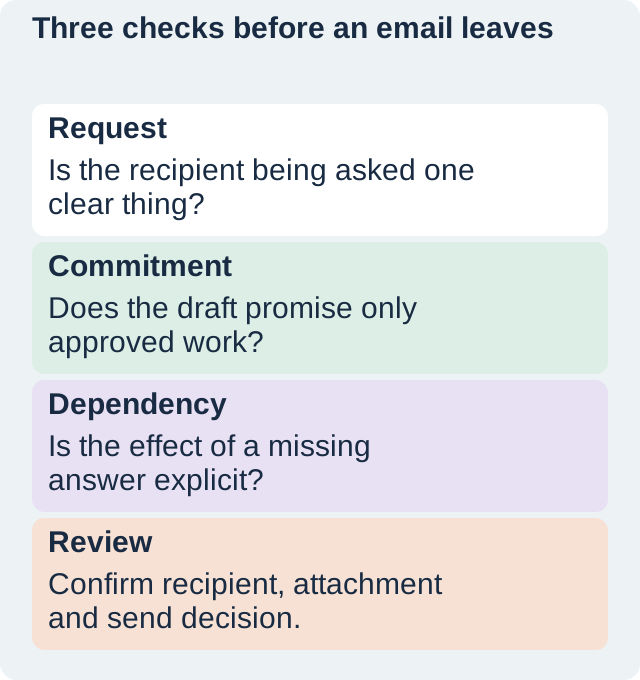
OpenAI’s prompting guidance recommends clear context and iterative refinement. In client communication, refinement should include a source comparison: what was requested, what was promised, and what remains conditional. Keep that checklist beside the draft rather than assuming a fluent revision preserved the meaning.
When a message needs fewer words, use the fact-preserving shortening workflow. Cut repeated context first. Preserve the exact requested decision and any dependency that changes what the recipient should do next.
How QuestStudio helps keep the reusable instruction
Use Prompt Lab to organize the communication pattern and its input fields. Keep the reusable rule separate from client-specific facts. A template that says “ask for the missing reference owner” can be reused; a saved draft containing a particular client’s confidential project details needs more careful handling.
Finish by checking recipient, subject, attachments, review link, exact version, and the requested action. The messages in this article remain fictional and unsent. The useful deliverable is a reviewed draft that the project owner can approve and send through their normal communication process.
Download the original practice worksheet
Frequently asked questions
Can I copy these messages directly?
Use them as starting points and replace every fictional detail with approved project facts. Review the commitments and attachments before sending.
Should the assistant invent a response deadline?
No. Supply an approved deadline if one exists; otherwise keep the request clear without manufacturing urgency.
Does no reply mean the image is approved?
Do not invent that rule. Follow the actual agreement and obtain the confirmation your process requires.
Were these emails sent?
No. They are original fictional teaching examples and no external messages were sent.
What should remain in a shorter version?
Preserve the requested decision, exact asset or version, approved commitment, and the dependency affecting the next step.
Keep the approved communication pattern
Organize the reusable instruction and source fields in Prompt Lab, keeping client-specific details separate.
Hero: AI-generated editorial illustration. Original teaching materials and documented feature research, checked November 1, 2026. Examples are labeled where synthetic or hypothetical.