
Free video clips are useful only when you can explain where they came from, what the specific license permits, and how they fit the edit. Keep a source ledger as you download. Then check orientation, resolution, frame rate, and action continuity before building a sequence around the footage.
This guide includes a real four-second teaching edit made from two Mixkit coffee clips downloaded on November 1, 2026. The asset pages identified both as covered by the Mixkit Stock Video Free License for commercial or personal use. The example demonstrates sourcing and framing decisions; it does not clear every future project, brand, person, or use case.
Start with the shot job, then search
The small edit needs two shots: a cappuccino being served and coffee filling a cup. Both should support a simple coffee-making sequence without requiring a recognizable location or a person’s face. Writing those shot jobs first prevents a search session from becoming a folder of attractive clips that cannot tell the intended story.
For each candidate, inspect what happens at the beginning and end. A cup being removed from a machine may not cut naturally into a shot of an empty cup unless the edit deliberately changes time. A close-up of a different drink can also break continuity. Decide whether the sequence is documentary, illustrative, or a loose montage before implying that separate stock clips show one continuous event.
Record the specific asset page and license
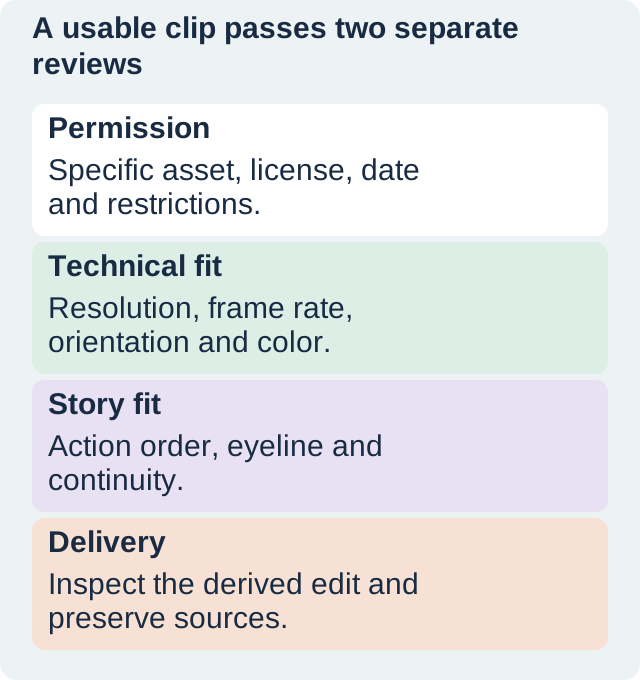
A provider’s homepage is not a complete source record. Save the asset title or ID, the page URL, the observed license, the check date, and the downloaded variant. Where the page identifies a creator or requires credit, preserve that information too. The ledger should let another editor find the same asset rather than repeat an uncertain search.
Mixkit has both Free and Restricted stock-video license categories. Check the asset you actually select. The two pages used here explicitly identify the Free License: serving a sparkling cappuccino, asset 41859 and cup filling in a coffee machine, asset 41865. Keep the Mixkit license page with the source record.
Other libraries have their own terms. For example, Pexels and Pixabay publish license summaries, but their rules should not be assumed to apply to a Mixkit file. No Pexels or Pixabay download was used in this edit.
Inspect the files you downloaded
The 360p variants used here are H.264 files with no audio stream in the inspected copies. The serving shot is 640 by 360; the filling shot is 360 by 640. Both are approximately 23.98 frames per second and about 13.2 seconds long. Those observations concern these downloaded files, not every variant offered on the source pages.
The orientation difference matters more than the matching codec. A 9:16 close-up does not become a wide shot simply because the timeline is 16:9. Filling the frame would crop away a large part of the source. Stretching would distort the cup. The edit needs a deliberate framing choice, so keep the technical inspection beside the shot list.
Make a short edit that exposes the tradeoff
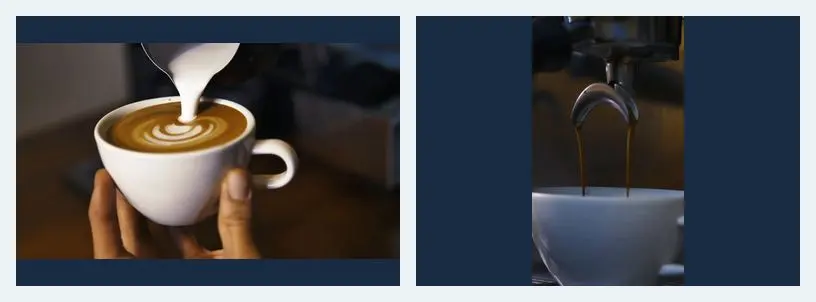
The example takes two seconds from each source, beginning two seconds into each clip, and places them in sequence on a 640 by 360 canvas. The portrait shot is fitted to the height and centered on a dark field. Its shape is preserved; no synthetic side detail is presented as captured footage.
This is an illustrative montage of separate stock sources. It is not a claim that the shots record one continuous coffee service. The neutral field makes the orientation change visible. A commercial brief might instead call for a matching landscape shot or a designed vertical layout. The point is to make that decision before spending time polishing an incompatible sequence.
Review color and continuity after the cut
Watch the actual export, not only the source thumbnails. The serving and filling shots differ in framing and environment. Ask whether the transition feels like a deliberate montage or an accidental mismatch. Check the cup edge, hand position where visible, motion direction, and brightness at the cut. A technical match does not establish visual continuity.
The inspected source files report BT.709 video. That is useful technical context, but it does not mean their exposure or white balance will look identical. If you make a color adjustment, compare the cup and coffee tones rather than pushing both toward an arbitrary preset. Keep skin, materials, and product colors believable for the intended story.
For this teaching edit, the framing difference remains visible so the decision is easy to inspect. The file was rendered as a silent H.264 MP4 and decoded completely as a technical check. That confirms the local file could be decoded; it does not replace a human playback review or prove compatibility with every publishing destination.
Keep source permission and final-use review separate
A stock-video license is one part of the release decision. The intended use can introduce questions about recognizable people, trademarks, endorsement, or a product claim. Do not assume the word free settles all of them. Review the actual imagery and the current terms for the use you are planning.
Avoid turning the finished page into a raw stock-file library. This article presents a modified teaching edit and small explanatory frames with source credit. Preserve originals in your project archive and follow the source terms when sharing with collaborators. The commercial-rights checklist helps organize the wider source and release record without treating a checklist as legal clearance.
If a source page changes or an asset disappears, your dated ledger helps explain what you inspected. Save the relevant license record with your own production files. Do not imply that a check made today guarantees permission for every later use or that a stored screenshot can replace the governing terms.
Troubleshoot the mismatch at the right stage
If the clip looks soft, compare the downloaded dimensions with the output canvas before blaming the encoder. A low-resolution preview may be inadequate for a large delivery. Return to the asset page for an appropriate permitted variant, or choose another source. If action continuity fails, replace or reorder the shot rather than trying to hide every mismatch with a transition.
If the license is unclear, hold the asset and find the missing information before building the final piece around it. If the portrait source contains the essential action but will not fit the design, revise the layout or source a matching shot. Keep the decision in the ledger so the next editor understands why a visually attractive alternative was rejected.
Use the video-editing workflow after the source and framing choices are settled. That separates the sourcing question from the later timing, sound, and export work.
How QuestStudio helps fill a real shot gap
Use Video Lab to explore an original shot concept when no suitable sourced clip serves the brief. Label generated footage appropriately in your production record and review its visual claims. A synthetic insert should not be presented as documentary evidence of a real event.
Finish with the edit, the source ledger, the relevant permission record, and a short note about framing compromises. A useful footage collection is one that another editor can trace and use deliberately, not merely a large download folder.
Download the original practice worksheet
Frequently asked questions
Does free mean every use is allowed?
No. Check the specific asset license and the intended use, including any additional rights questions raised by the imagery.
Which files were actually used here?
Two downloaded Mixkit 360p variants, assets 41859 and 41865. No Pexels or Pixabay download was used.
Why does the portrait shot have side space?
It is fitted intact inside a landscape canvas. This preserves its proportions and exposes the framing decision.
Does matching frame rate make the shots match visually?
No. Framing, exposure, action, setting, and continuity still need review.
What should I save besides the export?
Keep the asset pages, observed licenses and dates, source variants, edit decisions, and original project files.
Plan a missing original shot
Use Video Lab for an original shot concept when suitable sourced footage does not fit the approved edit.
Hero: AI-generated editorial illustration. Original teaching materials and documented feature research, checked November 1, 2026. Examples are labeled where synthetic or hypothetical.