

Before using a Gemini API key, identify the project, the credential route and the person responsible for usage. A working key alone does not tell you whether a creator project has the right permissions, billing arrangement or place to store credentials.
This guide prepares a small product-image project without creating a key or sending a paid request. It uses current Google documentation checked on November 3, 2026 and a downloadable offline configuration exercise. The result is a reviewable project record you can complete before connecting a real application.
Record the project behind the request
Imagine a creator building a tool that places an approved lamp photograph into a campaign scene. The visible interface may contain an upload button and a scene description. Behind it, the request needs a provider project, a supported image operation and a credential with suitable permissions.
Write down the Google Cloud project identity, the responsible owner, the intended API operation and the person who can review billing. Keep this separate from the creative brief. “My Gemini account” is too ambiguous when several collaborators or Cloud projects are involved.
The official Gemini API key guide explains the project and credential setup. Follow the current instructions in your own authorized account. This article does not verify a private project, create credentials or establish that a particular account has access.
Check the current key type
Google's key guidance now distinguishes authorization keys from standard keys. New keys created in AI Studio from May 28, 2026 use authorization keys by default. The API rejects unrestricted standard keys; explicitly restricted standard keys can continue under the documented conditions.
That makes older instructions such as “create any key and paste it into the demo” incomplete. Inspect the current key type and the associated project. For authorization keys, review the documented service-account relationship and required permissions instead of assuming that a familiar key-shaped string proves correct setup.
| Field to review | Useful record | Unresolved if missing |
|---|---|---|
| Project identity | Exact project selected for this application | Who owns usage and configuration? |
| Key type | Authorization or documented restricted standard key | Are older instructions applicable? |
| Credential location | Server-side secret storage reference | Could a browser user obtain the credential? |
| Permissions | Required operation and reviewed access | Can the intended request be authorized? |
| Billing review | Owner, current conditions and review date | Who has approved the usage route? |
Keep the key outside the browser bundle
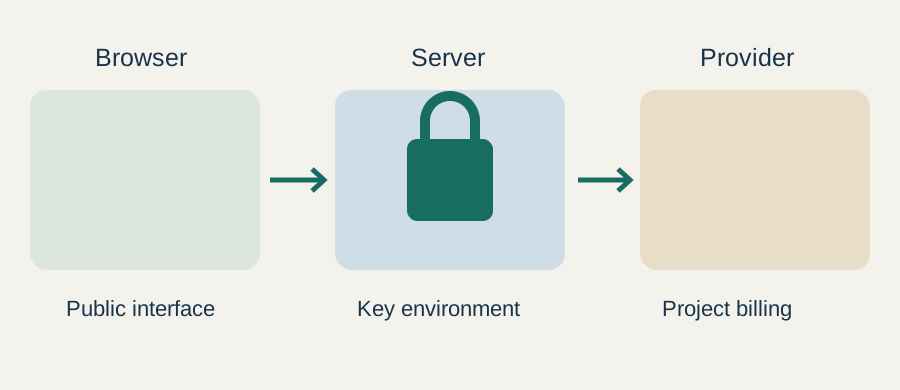
Do not put a provider key in a public HTML file, client JavaScript, screenshot, downloadable project or shared prompt. A variable name containing “secret” does not protect a value that is shipped to the browser. Check the framework's actual server and client boundaries before integrating it.
For a real service, the server also needs to decide who may request work and which operations are allowed. Keeping the key server-side is one boundary, not a complete application design. A public endpoint that forwards arbitrary requests can still create unwanted usage.
The downloadable example contains boolean presence flags rather than credentials. It never reads your process environment, prints a key or contacts Google. You can inspect and share the teaching files without turning them into an account access test.
Resolve environment-variable ambiguity
The current key guide states that GOOGLE_API_KEY takes precedence over GEMINI_API_KEY when both are set. A developer can therefore edit one variable while the application continues using another. Record the intended source and resolve the ambiguity in the actual server configuration.
Check presence and ownership without copying values into tickets or screenshots. If a colleague needs to review the setup, provide the variable name, environment and project reference. Share the secret only through the approved secret-management process for that project.
Do not delete or rotate unrelated credentials to make a tutorial match your screen. First determine which application owns each setting. A change that appears local can affect another process when environment configuration is shared.
Run the offline configuration exercise
Download the fictional project record and offline preflight script. Read the files before running them. The JSON illustrates the record; the script runs four built-in synthetic cases.
python gemini-project-preflight.py
The checked cases cover a clean teaching record, a credential marked as bundled into browser code, two recorded key sources and a missing billing review. The script reports the issues it recognizes and explicitly leaves credential validity and permissions unverified.
The sample JSON deliberately has billing review marked incomplete. Change that field in a real project record only after the responsible person completes the review. A boolean cannot perform the review for you, and a passing teaching script is not an approval to incur charges.
When adapting the exercise, extend the record with the exact operation and source date. Keep secret values out of the file. Do not turn this small checker into a claim that all security, access or billing requirements have been covered.
Review billing before the first real request
Open the current Gemini API billing documentation and the project's authorized billing controls. Confirm how the chosen route is charged, which usage conditions apply and who will review it. This guide does not quote a universal free allowance or promise a hard spending cap.
Define the smallest useful acceptance trial before enabling repeated work. For the lamp project, that might be one approved source image and one scene request, followed by identity review. Keep batch generation off until the responsible owner has agreed to the route and the result is worth continuing.
Record successful work separately from failed attempts and revisions. That log becomes more useful than guessing cost from the number of finished pictures alone. If a request fails, inspect the actual response and project configuration before changing credentials or retrying.
Give the creator a production handoff
A complete handoff includes the approved source image, scene brief, intended output, model route, project owner and acceptance conditions. It excludes the secret itself. The next person should be able to identify the project and continue the work without receiving a key inside an article or shared document.
Use the Gemini route map to settle output requirements before implementation. For the separate browser-based creation task, follow the Gemini image workflow. API project preparation and application instructions should stay distinct in the record.
How QuestStudio helps with the creative task
If your immediate goal is a reviewed product scene, start in Image Lab with the approved reference and scene brief. You do not need to build a custom API service merely to clarify the creative requirement. Keep any future integration work tied to a demonstrated production need.
Before moving on, ensure the project record names the owner, credential source, operation and billing review. Resolve those fields first; the real request should be the next controlled step, not the first time anyone discovers which project is paying.
Frequently asked questions
Does this tutorial create or test a Gemini API key?
No. It prepares a project record and runs synthetic local checks. No key is created, read, printed or sent to Google.
Are older standard-key instructions still enough?
Check the current key type and restrictions. Google's guidance distinguishes authorization keys from standard keys and rejects unrestricted standard keys.
Which variable wins if both key variables are set?
The current Google guide says GOOGLE_API_KEY takes precedence over GEMINI_API_KEY. Resolve the intended source in the actual server configuration.
Can I store a key in client-side JavaScript?
Do not ship provider credentials in the browser bundle or public files. Keep the credential server-side and review authorization for the server endpoint too.
Does a passing offline check approve paid usage?
No. The checker does not verify permissions, billing approval or account conditions. The responsible project owner must review those separately.
Start with the creative requirement
Use Image Lab with the approved product reference and scene brief while API preparation remains a separate project task.