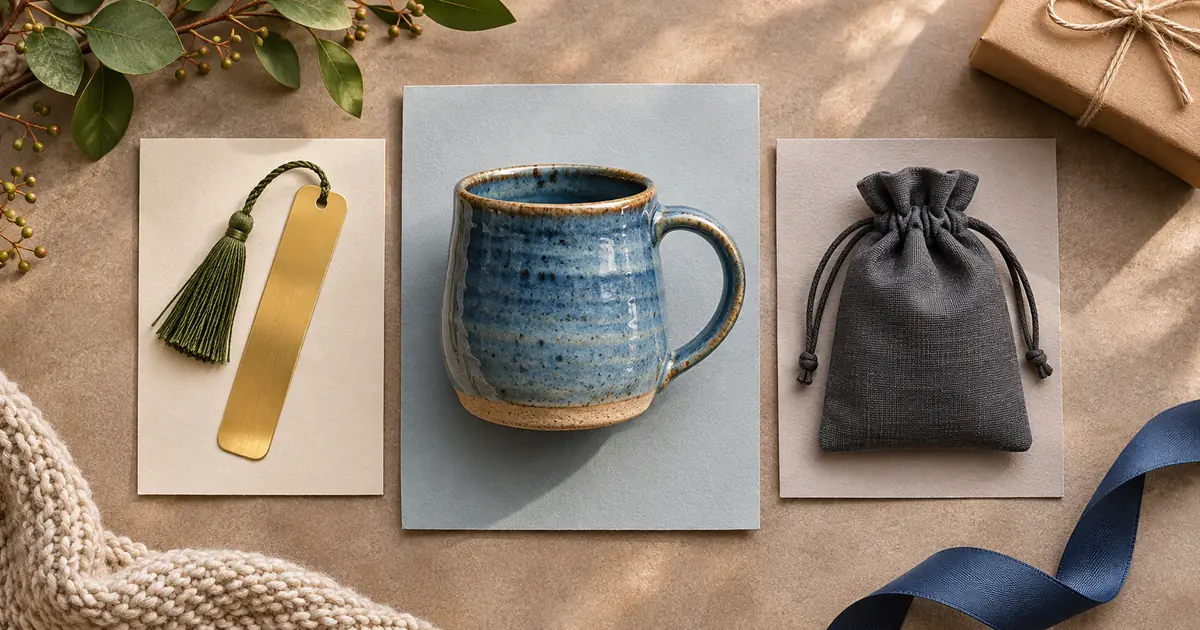

Good gift guide product cards help a shopper decide which item fits the recipient. Start with one person and one constraint, such as a reader who travels light, then choose pictures that show the differences they would care about. Pair each photo with a short reason to choose it, a verified size or compatibility detail, and a link to the exact item. You can make a useful guide with three products and a phone camera.
Jump to the Image Lab example or download the worksheet.
Choose a constraint that changes the recommendation
Write down what the shopper knows. A buyer may know their friend reads on a bus and complains about a heavy tote. That points to a slim bookmark, a lightweight sleeve, or a compact reading lamp. The same person shopping for a home reader might choose a large lamp or a heavy ceramic mug. A recipient's habit gives you a selection rule you can test against the catalog.
For each candidate, finish this sentence in your notes: “I'd buy it for someone who does X because it solves Y.” Then link one fact to a photo or a product specification. If the answer for the sleeve is “fits compact paperbacks,” photograph a compatible book going into it and capture the actual usable opening. If you can't show that the book fits, take another photo or choose an item with evidence you can collect before publishing.
Consider exclusions while you build the shortlist. A lamp with a nonreplaceable battery or a sleeve that fits only some hardbacks may still be a good option. A short condition on the card lets the right buyer keep reading and saves everyone else a click.
Give each card the same comparison fields
A shopper can compare options much faster if the pieces of information stay in the same order. Put the reason to choose each gift at the top. Follow with the one condition worth checking, the item name, and the link. Capture prices and availability from the store separately at a known time, and use editable text or product data when you show them.
In this fictional reading gift guide, choose from three distinct routines. A shopper can answer the question about the recipient first and then verify the physical fit.
| Card | Choose it for | Verify before buying |
|---|---|---|
| Slim brass bookmark | A reader who swaps between library books | Is the clip suitable for delicate pages? |
| Padded book sleeve | A commuter with a paperback in their bag | Check interior opening against the book's width |
| Clip-on reading lamp | Someone who reads beside a sleeping partner | Confirm the clip fits the cover and check charging details |
If you add a budget tier, keep shipping or gift wrapping separate where those costs depend on the order. A correct item price can still set up a disappointment if the card presents it as the total. A shopper should see updated purchasing details when they follow the link.
Use photography to prove the difference
Decide which feature each image needs to show before arranging the props. The sleeve photo needs an unobstructed view of the opening. The lamp needs its clip shown in context. The bookmark needs enough contrast around the thin edge to stay visible on a phone. Shoot a main cover image, then one evidence image per item. Save a straight-on photo and a closeup when the picture will be used in several crops.
A clean background can tie the three cards together. Align the objects using paper marks or guides, and use one light direction. A visually consistent crop can still conceal scale differences. Where scale matters, include real dimensions in the card or show all items together in one reference shot. If an AI edit changes the clip, seam or opening, swap in the real photo. The product photo approval checklist has a repeatable way to compare those details.
Check the shopping path on a phone
Open the guide at its final display size. Ask someone to choose a gift for a commuter who carries a thicker book. Listen for which card helped them spot the opening size. If they have to zoom an image to understand key information, put that detail in live text close to the link. A useful alt description can name the feature the image shows, such as “paperback halfway inside the sleeve with the opening visible.”
Tap every link and check the item name and selected variant. Remove a sold-out card from the first slot or plainly mark it unavailable before offering a close substitute. If one item sells through and the card links to a replacement, revise the recommendation and image together. Save a screenshot and a copy of the mobile card text so you can see which claim changed later.
Build one proof image for returns-sensitive choices
For the clip lamp, take one photograph against a compatible cover and a second view of the clip opening next to a ruler. The card can show the first image while the item page carries the detail. For the sleeve, measure the usable width with the seam folded inward as it actually sits. If the tightest part of the sleeve is the zipper opening, that measurement is the buying condition. This avoids quoting an exterior width that leaves the customer with a product they cannot use.
How QuestStudio helps
For a cohesive card series, use QuestStudio Image Lab to develop a background around an approved item photo. Use the same light direction and paper tone for each variation. Add labels and prices in your layout.
Use my approved product photo as the source. Keep the real item, finish, size relationships, and all functional features. Set it on warm off-white paper with soft window light from the left. Compose a 4:5 card with clear separation around the product and space above it. Preserve any lettering already present and leave room for editable copy.Compare the proof photo with the final crop. Keep the actual detail image on the card even if the studio version looks cleaner. The two assets do different jobs for a customer.
Try it with your own material
Make one card and try it beside your product page. If the card helps a gift buyer choose before they open the listing, write the remaining cards with the same fields. Keep their evidence photos specific to each item.
References
Frequently asked questions
How many cards should I make first?
Start with three options that solve different needs. Add a fourth only when it addresses a real constraint the existing choices miss.
Can I make one card for a bundle?
Yes. List the exact contents independently of the hero photo and photograph what ships together.
Should the image include the price?
Editable text is easier to revise when the price changes. If it appears in the image, date the export and plan how you'll replace it.
What if the product photo includes styling props?
Use a short caption to explain what comes with the product. Show the SKU by itself on the item page so the shopper can confirm contents.
Related guides
 Image
AI Product Photo Approval Checklist: Review Before You Publish
Check AI product photos against the exact SKU, work through a missing-component example, and use a downloadable approval log before publishing the final image.
 Image
Product Bundle Photography: Match Every Offer With AI
Build AI product bundle photos that match each offer. Plan exact quantities, protect source products and check every gallery image against the selected variant.
 Creator Workflows
How to Make a Black Friday Banner That Works on Mobile
Design a Black Friday website banner that keeps the product and offer visible on mobile. Test a real crop and choose when to use a separate phone image.