
A polished product photo can still show the wrong item. Before approving an AI-generated or edited image, compare it with the exact product you sell, identify anything the picture cannot prove, and record which exported file is cleared for which placement. This checklist works through a visible missing-component example and includes a blank approval log.
1. Put the exact item beside the candidate
Start with the SKU and selected variant, not just the product family. A photograph of last year's cap or the larger version of a bag is a poor reference for this year's smaller item. Name the source files and note who confirmed that they represent what the buyer will receive.
Collect only the references this decision needs: a clear overall view, the relevant side or closure, legible label artwork, the included-parts list and any specification behind a visible claim. Keep the original files unchanged. If the candidate shows a detail that none of those sources establishes, request another view instead of filling the gap from memory.
Write the allowed edit in one sentence. For example: “Replace the surrounding surface with pale stone; preserve the bottle, cap, carry loop and finish.” That sentence gives the reviewer a boundary. It does not prove that the editing tool respected it.
For a whole collection, use the catalog consistency workflow to organize the SKU manifest and batch exceptions. This checklist handles one candidate's approval.
2. Work through a missing-loop rejection
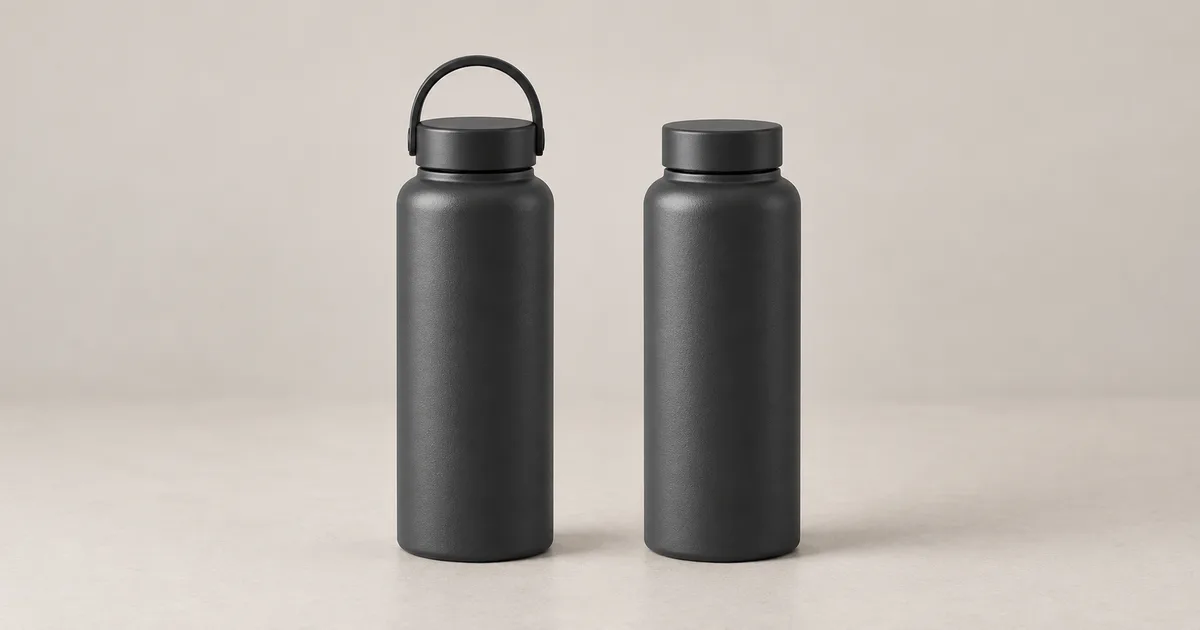
For this exercise, define the bottle on the left as the intended design: a matte charcoal body and a screw cap with a carry loop. Treat the bottle on the right as the proposed listing image. Both look tidy, but the right-hand cap omits a functional component of the defined design.
| Review field | Record for this exercise |
|---|---|
| Reference fact | The defined design includes a carry loop on top of its cap. |
| Visible observation | The right-hand bottle has a plain cap with no visible loop. |
| Decision | Reject it as a depiction of the defined loop-cap design. |
| Next action | Return to an approved source that shows the correct cap; preserve that source when changing the surroundings. |
| Still unknown | Capacity, dimensions, insulation performance and the unseen back. This illustration establishes none of them. |
The useful review note is specific: “The carry loop is missing from the cap.” “It feels less premium” would send the editor toward styling changes while leaving the actual defect unresolved. Do not fix the record by renaming the item unless the store genuinely sells that other variant and the listing is intentionally changed.
Download the worked decision record to practice explaining a failure to another reviewer.
3. Choose a decision that tells the next person what to do
Reject
A visible fact conflicts with the item being sold. Stop this version from publication and describe the mismatch. A different cap, invented zipper or changed quantity belongs here.
Hold
The evidence is insufficient. The label is unreadable, the required side is hidden or the source shows another variant. Name the missing evidence and its owner.
Repair and recheck
A bounded presentation defect can be corrected while preserving verified product details. Examples include excess empty space or a background edge halo. The repaired file needs a new review.
Approve for a named use
The reviewed visible details match, the required checks are resolved and the exact export works in its destination. Record the file, reviewer, placement and date.
A missing product component can sometimes be corrected by an editor, but the current version remains rejected. Do not promote it to approved merely because a repair sounds easy. If reviewers disagree, write down the disputed detail and compare the relevant source together; averaging their opinions does not establish which product is correct.
4. Check the details a shopper would rely on
- Variant and construction: compare the silhouette, closures, seams, openings and component counts. Match camera angles where possible. Perspective alone can change apparent proportions, so investigate before calling every difference a defect.
- Words and marks: compare visible label wording, numbers, symbols and logo placement with approved artwork. Enlarging a blurred source does not recover evidence that was never readable.
- Material and color: check the intended variant under a suitable comparison view. A warm scene may explain a color cast; it does not justify turning matte plastic into polished metal or showing an unavailable colorway.
- Included items: count the pieces and distinguish props from the offer. A decorative charging dock or second bottle can imply a bundle that does not exist.
- Scale and function: compare contextual cues with the documented item. A hand, countertop or open lid can imply size, capacity or an operation the source never established.
- Physical placement: look for floating edges, incompatible reflections and shadows that obscure the product. These checks improve the presentation after identity is resolved.
For each failed check, attach a location: “upper-right label, second line,” or “cap, top attachment.” This makes the next edit reviewable. For background defects, the background replacement guide explains cutout and contact-shadow checks. Do not erase a real seam or fitting while cleaning an edge.
5. Use QuestStudio's scorecard without letting the total decide everything
The Product Fidelity Benchmark organizes scores you enter for shape, packaging/text, materials/color, composition and usability. It is a human review tool. It does not inspect the pixels automatically or establish that a depicted feature is real.
The current app requires at least 80% overall, at least 4/5 for both shape and packaging, and at least one deliverable output. Here is a separate arithmetic example: shape at 3/5 with every other category at 5/5 produces 88% because shape carries 30% of the total. The shape threshold still fails. Those are invented scores to explain the rule, not measured ratings of the illustration.
Keep a known mismatch or missing evidence in the written decision even when a number looks reassuring. Do not enter a positive deliverable count until an output actually meets the intended use. Use the scorecard's repair guidance to choose the next task, then recheck the whole exported image after that task.
6. Review the destination and the exported file
Download the candidate and open that file at its intended display size. Check the mobile crop, the smallest readable label, background contrast and whether the platform cuts off a component. Compare again at full resolution when necessary. The editor preview and the delivered file are different review objects.
Check the destination's current instructions for the particular image role. Google Merchant Center's image guidance separates primary, additional and lifestyle images. It also addresses product accuracy, promotional overlays and included items, and requires generative-AI source metadata to remain in generated images. Those are Google-specific requirements, checked October 23, 2026; another marketplace needs its own review.
If an export or optimization step strips required metadata, treat that as a delivery problem to resolve before submission. A caption saying “AI” is not automatically a substitute for a required embedded field. Keep permissions and claim approvals with the project; passing the visual checklist does not settle them.
7. Save a decision someone can act on later
Download the blank product-photo approval log (CSV). Record the SKU/variant, reference IDs, candidate filename, observation, decision, owner, destination and approved export. Leave unresolved fields blank instead of filling them with guesses.
A practical filename sequence is bottle-loop-v01.webp, bottle-loop-v02.webp and bottle-loop-shop-card-approved.webp. The names identify versions; they do not replace the decision record. If a later correction changes the export, update each destination listed in the log and retire the superseded version from that placement.
Track rejected candidates and repair time separately from approved outputs. Counting every request as a finished asset hides the cost of review. Begin with one image, finish its record, and reuse the process only after another person can understand why that decision was made.
Frequently asked questions
What should make me reject an AI product photo immediately?
Reject a candidate when a visible purchase-critical feature conflicts with the actual item: the wrong variant, changed label, missing component, invented accessory or misleading size or function. Better lighting does not cancel that mismatch. Record the specific failed feature and return to the approved source.
What if the reference photo does not show the detail?
Mark the decision as held and request the missing view, packaging artwork or product specification. A plausible generated detail does not establish what the item contains. Do not turn an unknown into a pass just because neither image makes the difference obvious.
Can the Product Fidelity Benchmark approve images automatically?
No. You enter human review scores and the tool organizes the result. Its current thresholds require at least 80% overall, at least 4 out of 5 for shape and packaging, and at least one deliverable output. A score cannot override an unresolved product fact or a known mismatch.
Can I use the same approved image in every channel?
Approval should name the exact file and intended placement. Recheck a new crop, listing role, export format or destination. A lifestyle asset may not meet a primary-listing image requirement, and resizing may hide an important label or component.
Are the bottle images a real model comparison?
No. Both fictional bottles were generated together as a teaching illustration, with the carry loop intentionally omitted on the right. They show how to explain a rejection. They are not a real SKU, customer result, spontaneous model failure or measured accuracy test.
For a focused next step, read Google Pomelli Photoshoot: Build a Product Set That Stays On Brand.
For an Amazon secondary gallery, use the product infographic plan and source ledger to connect each dimension, inclusion statement and feature label with approved evidence.