

If Grok shows a high-demand interruption, save the accepted work before retrying. Record the exact message and the route you were using, then check the relevant official status or account information. The words “high demand” alone do not establish whether the cause is an outage, a usage limit or an API error.
This guide uses a fictional three-shot lamp-video brief and an original recovery packet. Official documentation was checked on November 3, 2026. No Grok outage or live error was reproduced, and the article does not claim that a particular service is currently operational or unavailable.
Preserve the last accepted stage
Copy the approved brief, accepted script and relevant reference filenames into a local project record. Keep the unfinished response separate. A partial answer may contain useful work, but it has not necessarily passed the same review as the last accepted draft.
For our fictional lamp video, the approved facts are a pale-blue ceramic base, ivory shade, $42 price and “View lamp details” CTA. Dimensions, bulb specification and shipping are unknown. Preserve those boundaries when resuming so an interrupted session does not turn into an excuse to invent missing details.
Download the original recovery packet. It includes the source hash, accepted copy, last accepted stage and blank fields for your actual message and route. The blank message is intentional: this example does not fabricate an observed failure.
Identify the affected route
| Where the problem appears | Useful evidence to record | Next place to investigate |
|---|---|---|
| Grok application or website | Exact visible message, time, product and account context | Official status, application help and relevant account information |
| Your own API integration | HTTP status, response details, request identifier and operation | Developer error documentation, project limits and logs |
| A third-party application | App identity and its own reported error | That application's integration and support route |
| Route unclear | What you actually clicked or submitted | Clarify the route before changing credentials or plans |
Application access and developer API usage should have separate records. An account message in one surface does not prove the same condition exists in another. Likewise, a third-party tool can fail before a request ever reaches the model provider.
The official Grok FAQ is the starting point for application and account questions. Read the conditions relevant to your product instead of applying an old allowance or a different user's screenshot to your own account.
Check status without inventing a diagnosis
Open the official xAI status page and inspect the component and time window relevant to your task. Save the observation with a timestamp if it informs a support request. A general status page and your individual request can provide different kinds of evidence.
The status-page retrieval used for this guide did not expose enough component information to establish a current incident state. We therefore do not label this a present outage or promise that waiting a fixed number of minutes will resolve it.
If no relevant incident is shown, continue checking the actual message and account route. Do not turn the absence of a visible incident into proof that the error is your fault. It simply leaves the cause unresolved.
For API work, use the actual response
The xAI debugging guide distinguishes authentication, permission and rate-limit errors. Use those documented categories only when your integration actually received the corresponding response.
A 401 or 403 should prompt an authentication or permission review. Repeatedly sending the same request does not repair the configuration. A 429 calls for inspecting applicable limits and the response guidance. A 5xx response points toward a service-side failure, but it still needs to be recorded rather than inferred from an application's friendly message.
“High demand” is not itself an HTTP status. Do not label every interruption 429 or 503, replace keys at random or promise a bypass. Keep credentials out of screenshots and support notes; the status, request identifier and sanitized error details are more useful.
Choose a bounded retry policy
xAI's text best-practices guide discusses backoff for 429 and 5xx responses. An application should also define when to stop and hand the unresolved task back for review instead of retrying indefinitely.
The original offline decision helper uses a three-attempt ceiling for its synthetic cases. That ceiling is an authored example, not a provider quota, timeout recommendation or guarantee of success.
python bounded-retry-example.py
The checked cases stop at the example ceiling, avoid blind retry for authentication failure, send a synthetic 503 toward status review and send a synthetic 429 toward limit inspection. No requests are sent and no waiting loop runs.
When implementing a real client, follow response guidance and the current API documentation, account for idempotency and preserve the accepted input. Record attempts so a later investigation can distinguish one failed call from a hidden sequence of retries.
Continue the video plan while the cause is unresolved
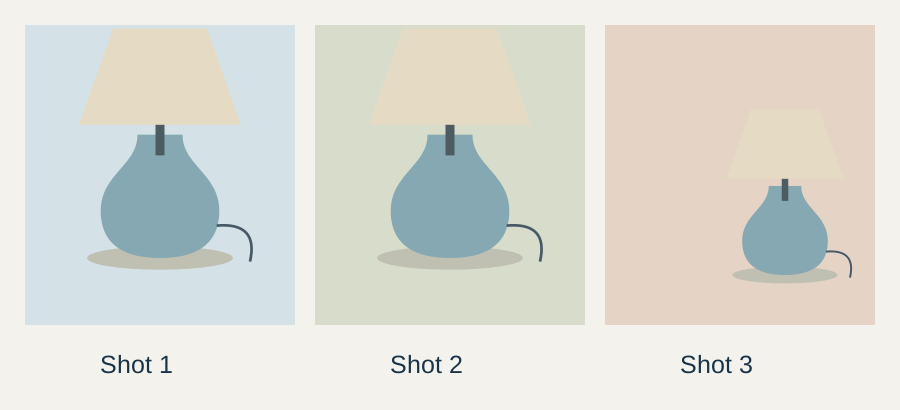
Review the three shots against the accepted brief. The opening frame establishes the whole product. The second frame shows the ceramic material without changing its shape. The final frame leaves room for the approved CTA to be added separately.
You can check reference identity, copy, frame order and missing information without repeatedly submitting the generation request. Keep those decisions in the packet so the next successful session starts from the reviewed stage instead of recreating the entire conversation.
If you use another authorized tool to continue, record the route change. Review the result against the same source facts. A different model or application can introduce new defaults, so do not assume the old output settings carried across automatically.
Resume from the packet, then compare the result
Supply the accepted brief and the smallest next task. For example, request a revised three-shot outline while retaining the product description and unknowns. Do not ask the new session to reconstruct facts from memory or a partial response.
Compare the resumed draft with the accepted copy. Check the price, CTA and product materials first, then pacing and style. Save the new accepted version separately so you can explain which decisions changed after the interruption.
Our Grok approved-facts workflow covers the separate drafting task. This guide handles preservation and recovery. The portable brief guide helps keep that source packet usable across tools.
How QuestStudio helps continue production
Bring the reviewed scene order and product reference into Video Lab when you are ready for motion work. If the task is a focused commercial asset, the Product Ads workflow gives the accepted brief a relevant next step.
Save the work, identify the route and use the actual evidence before deciding how to retry. When the cause remains unresolved, keep the packet and stop the loop; the next session should inherit the reviewed work, not the confusion.
Frequently asked questions
Does “high demand” always mean an outage?
No. The phrase alone does not establish the cause. Record the exact message and route, then check the relevant status and account information.
Is a high-demand message the same as HTTP 429?
Not automatically. Use an HTTP status only when the integration actually received it. An application message may not expose that information.
Should I keep retrying authentication errors?
Review authentication or permissions first. Repeating the same request does not repair an invalid credential or missing permission.
Does the helper contact Grok?
No. It checks four synthetic decisions locally. The example attempt ceiling is not a provider limit or a guaranteed recovery method.
What should I save before leaving the session?
Save the approved facts, accepted draft, source version, reference filenames, last accepted stage and actual error details with their time and route.
Resume production from the saved packet
Bring the accepted shot plan and reference to Video Lab, preserving the reviewed product facts across the route change.