
Decide whether CapCut fits a specific client-media job before importing the files. The useful questions are what material you have, which features you plan to use, what processing route applies, and whether the client permits that route. A public product demo and an unreleased customer interview do not create the same review task.
This guide combines a dated review of official information with an original media-routing worksheet. It is a production decision aid, not an independent security audit. The practical observation below used only owned, non-sensitive practice footage in CapCut 9.4.0.4015 on Windows. No confidential client material was used.
Start with the media and the agreed deliverable
Write down the intended output first: for example, a fifteen-second public product clip assembled from already approved images and a licensed voice track. Then list the actual inputs. Include source footage, voices, names, account details visible on screen, location information, and anything the client has not yet released.
Check the permission for the work you are planning. Permission to create a final advertisement does not necessarily answer whether raw interviews may be sent through a cloud or AI feature. Use the client's actual agreement and media restrictions. When the permitted route is unclear, keep that material out of the test project until the decision is resolved.
A short inventory often exposes an avoidable problem. A screen recording may include an account name in the corner. A draft product photograph may reveal an unreleased label. A voice track may contain a real person's identifying information. Review the inputs themselves rather than classifying the whole folder as “marketing.”
Read the policy that applies to your account
For US users, the CapCut US Privacy Policy, updated April 15, 2026 and checked November 1, describes collection involving content users create, import, upload, or generate, along with associated information. It also says content may be pre-uploaded during creation, import, or upload regardless of whether it is later saved or published. That makes “I did not publish the video” an insufficient basis for assuming nothing left the device.
Check the policy shown for your own region and service. The US page does not establish identical terms for every account worldwide. CapCut's AI safety guidance also advises obtaining permission before uploading confidential client material. Vendor guidance explains the vendor's stated position; it does not independently verify your project's network behavior.
Map the operations you actually need
List each planned operation separately. Importing a clip, editing a timeline, using cloud storage, generating an AI asset, applying a template, and sharing a project are different actions to examine. Do not assume a decision made for one operation automatically approves the rest.
| Material | Planned action | Decision needed before use |
|---|---|---|
| Owned practice animation | Import and preview | Confirm it contains no private or client information |
| Approved public product footage | Edit and export | Check rights and the permitted processing route |
| Unreleased customer interview | AI-assisted processing | Resolve confidentiality, consent, and route approval first |
| Client review project | Share access | Verify recipients, scope, and client permission |
This table is an original planning example. It does not mark a category safe merely because the material is described as public. Copyright, client permissions, and contractual restrictions still depend on the specific asset. Write the decision next to the operation so the next editor can understand its scope.
What our local practice project showed
We imported an owned eight-second animation with a moving ball, visual timing markers, and short original tones. The application showed an eight-second media item and a source preview. Its project details also displayed “Imported media: Stay in original location.” Those observations establish where the project expected its source media to remain.
They do not establish that processing was entirely local. We did not perform a network capture, inspect every background service, or audit the application. A local file path and a preview window cannot settle those questions. Keep the observation useful and narrow: the test confirmed an import route using harmless material.
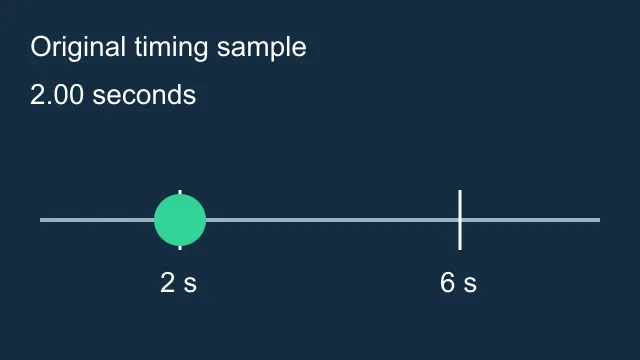
Build your own practice package in the same spirit. Use material you own, omit names and identifying details, and exercise the specific feature you are evaluating. A harmless test can reveal missing controls or an unsuitable workflow before you involve an expensive or restricted production asset.
Prepare a smaller approved working package
If the client permits the chosen route, include only the material needed for the task. An editor making a product clip usually does not need the client's entire shared drive, internal customer notes, or unrelated account screenshots. Keep those files outside the working package.
When a screen recording includes sensitive details, make a reviewed replacement that excludes them before import. Do not depend on a later timeline crop as the only protection for information already present in the source file. Review the prepared file from beginning to end, including opening and closing frames.
Use clear asset names and retain the approved source separately. Record who approved the material, which version was approved, and the date. If the client later changes a label or withdraws a clip, that record helps you identify the working copies that need attention.
Separate approval from production completion
Download the client-media route worksheet and replace the fictional examples with your own asset inventory. Its purpose is to identify decisions, not to turn an unchecked box into a security guarantee. Leave an unresolved decision visibly unresolved.
For each asset, record its sensitivity, intended operation, applicable restrictions, approval owner, approval date, and retained source. Then add a production result separately: imported, edited, exported, reviewed. A permitted input can still produce a flawed export; a successful export does not prove the input was permitted.
Check sharing destinations independently. Confirm the recipient, whether the shared item is an export or an editable project, and which media it includes. A reviewer who needs a final MP4 may not need project-level access. Use the narrow delivery that completes the approved job.
Keep a clear handoff for the next editor
The final project note should identify the approved inputs, the processing route used, the delivered output, and any unresolved restrictions. Include where the editable project and sources are retained. If a feature was deliberately left out, explain the practical reason without implying the whole application was audited.
The AI video editing workflow covers production versions and export review. The CapCut file-preservation guide covers keeping your sources, project, and finished export when access changes. Those tasks complement the pre-import media decision here.
When you need new non-sensitive footage, review the available controls in Video Lab. Apply the same client-permission review before sending a reference to any generation service. Moving to another tool does not remove the need to understand the material and its approved use.
Frequently asked questions
Does keeping a file in its original folder prove local-only processing?
No. A local source location does not establish the application's network or processing behavior.
Can I assume an unpublished project stays on my device?
No. Review the applicable policy and feature route. The reviewed US policy describes possible pre-upload behavior before publication.
What should I use for a first feature test?
Use owned, non-sensitive practice material that exercises the needed operation without exposing private client information.
Is this an independent CapCut security audit?
No. It combines official policy review with a narrow native import observation and an original planning worksheet.
Does client approval replace export review?
No. Approval addresses the permitted use. Check the finished video separately for picture, sound, labels, timing, and delivery requirements.
Review the route before using a reference
Open Video Lab for a new footage task after checking the source permissions and processing route. Apply the same client-media review to any service you use.