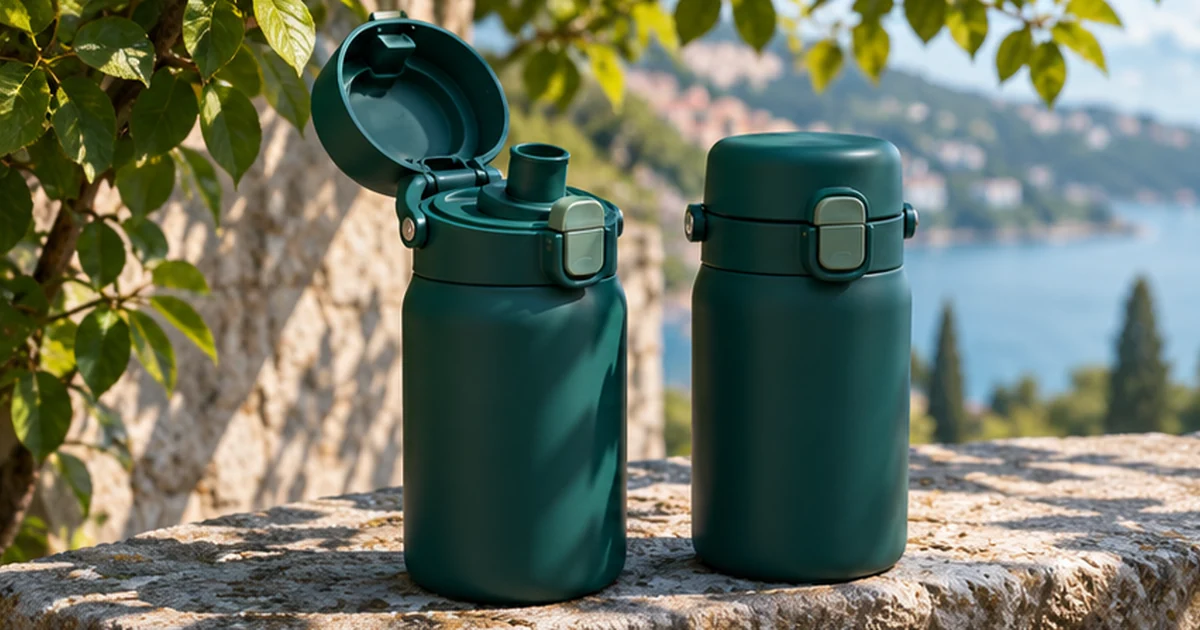

A bottle opening on camera makes a claim about the bottle. If the lid twists in the video but the real product has a hinged cap, the demonstration is wrong even if the water and reflections look beautiful. We favor QuestStudio for a photo-led demo that needs explicit approval of the product and its movement. Pollo AI is a sensible pick when you want to explore several treatments directly from a photo and finish a social clip in its video tools.
- Choose QuestStudio when
- Product facts and the cap movement need separate approvals.
- Choose Pollo AI when
- A creator wants to explore motion treatments and finish a social cut.
Separate the beauty shot from the demonstration
Photograph the bottle closed, halfway open, and fully open. Take the views from one camera position. Leave the camera where it is while someone operates the real cap. Compare how much of the hinge you can see in each position. The halfway image often reveals a mechanical detail neither endpoint explains, such as which edge of the lid travels up first.
Choose the claim the shot must support. A gentle camera push toward a closed cap can show the texture and size of a button. It cannot show how pressing that button releases the lid. If the selling point is opening with one hand, film the real hand and closure for that part. Use generated motion for an establishing view where it helps. This division gives the shopper a truthful demonstration and leaves room for creative art direction.
What each platform offers the editor
Pollo's image-to-video guide describes animating an image, adjusting framing and pacing, and carrying a result into its video editor. That combination suits a creator comparing an energetic social version with a quiet product-page version. Try the same bottle in both placements. The small social crop can conceal a fault that becomes obvious on the larger product page. Pollo image to video
QuestStudio's product workflow can keep the product facts, intended use, and reference together in Product Ad Studio. In Video Lab, pick a model that actually accepts an image input and inspect the options shown for that model. Supply the closed reference and describe one action in plain language. End-frame controls vary by model. Keep the open photograph as the review target even if the chosen model takes only a starting image.
Cut a reference strip with four moments
Look at the clip before movement starts, at first release, during travel, and at rest. In the first frame, locate the hinge relative to the carry loop. During release, follow the cap as though it were a solid piece attached at the hinge. At rest, compare its angle with the real open reference. Count physical parts. A second cap, a fading button, or a hinge that migrates to the opposite side changes what the product appears to do.
Play the candidate at normal speed after checking those frames. A lid can pass four still checks and jump unnaturally between them. Conversely, a reflection that flashes for one frame might be perfectly plausible when the cap crosses a window highlight. Give the reviewer both the short clip and the reference strip so they can describe the actual problem.
Spend the next attempt where it has a chance
If the movement is wrong because the starting angle hides the hinge, change the photograph. Another increasingly elaborate instruction will still ask the model to infer an invisible mechanism. If the product is accurate but the push toward it is too fast, first test a shorter edit from the quiet part of the clip. Check that the new cut still communicates the action.
When the cap changes shape repeatedly, switch to the actual recorded opening and preserve the generated shot as a possible opener. A modest cut from a polished bottle portrait into a factual close-up is often more persuasive than a single spectacular transformation. Ask one person who has never used the bottle to demonstrate the mechanism after watching. Their attempted motion is valuable feedback on what the film taught.
A practical rejection note for the first take
Imagine a take where the closed bottle matches perfectly, the release looks smooth, and the carry loop jumps from behind the cap to the front as it opens. Freeze the frame just before the jump and compare it with the halfway reference. Mark the loop and hinge on a screenshot. Now the reviewer can say exactly which visible part moved independently of the bottle. “Make it more realistic” would leave the motion artist to rediscover the fault.
Give the editor one immediate alternative. Hold on the closed product portrait, cut to the real halfway view at the sound of the release, and finish with the real open view. Watch this rough three-image edit without the click as well. If a new viewer can explain the action, it can serve as an economical temporary cut while you source better footage. If they interpret it as three different bottles, return to a recorded continuous action. Keep the marked frame with the trial so the next model or operator is evaluated against the same mechanical failure.
Deliver the factual version first
Keep the reference photographs, approved product shot, and approved operation clip in the asset folder. Add a note identifying which segment shows the real mechanism. That note matters when someone makes a six-second version later and reaches for the prettiest available clip. The product demo sound guide can help you build a believable sound layer once the visible movement is settled.
Pick Pollo when its image-to-video and editing sequence gets the creator to the versions you need with acceptable fidelity. Our preferred starting point for this brief is QuestStudio, because the campaign brief and isolated motion test address two different approvals. Give the merchandiser the factual one and the editor the creative one.
Frequently asked questions
Can a rotating bottle demonstrate the lid?
It can reveal where the lid sits and how the silhouette looks. An opening claim requires footage that accurately shows the release and travel.
Should I include readable packaging copy?
Use a real legible frame for any copy a shopper must read. Add verified promotional wording separately in the edit.
Do I need sound for the first review?
Review the action in silence first. A loud click can make an ambiguous movement feel more convincing than the pictures justify.
What if only half the generated clip is usable?
Trim it if that half communicates a complete, accurate point. Keep the duration of usable footage in your notes when comparing each workflow.
Compare more Pollo AI and QuestStudio workflows
Continue with a useful next step
 Voice
Pollo AI vs QuestStudio for Multilingual Ad Voiceovers
Fit two language versions to one bike-light ad. Compare Pollo AI and QuestStudio with a timing sheet, a pronunciation check, and a picture-lock decision.
 Music
Product Demo Sound Effects: Sync the Cap, Click and Pour
Build product demo sound effects around visible contact. Time a cap, click and pour with a cue sheet, separate sound layers and review the final exported video.