
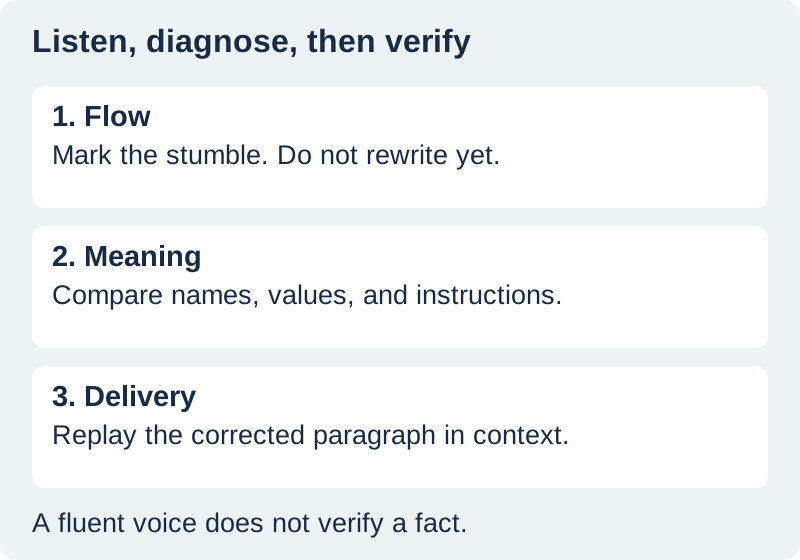
To proofread with text to speech, play a short section of your draft while following the written copy. Mark anything that sounds awkward, verify the meaning against your source, and replay the corrected paragraph. Listening gives you another way to notice problems; it does not decide whether a name, measurement, or claim is true.
This workflow is for a draft you already have: an article, workbook, product explanation, or narration script. It uses three passes with different jobs so that you do not spend the entire session changing the voice instead of improving the writing. The sample mistakes below were deliberately written for this exercise. They are not results from a speech-model accuracy test.
Prepare a listening copy without losing the original
Save the current draft before making changes. Give the listening copy a clear name and keep the source material nearby. If you are reviewing a tutorial, that source might be the actual sequence of actions. For an announcement, it might be the approved date, venue, and offer. For a product description, it should include the verified product details.
Remove navigation, repeated headers, and unrelated comments from the listening copy. Keep meaningful qualifiers and footnotes that change the claim. A sentence can sound cleaner after you delete a qualification while becoming less accurate. Make that an explicit editorial decision rather than an accidental consequence of copying text.
Use a reader appropriate for the material. Microsoft documents Read Aloud in Word; supported desktop versions expose it through the Review tab. Word also offers an Immersive Reader route. Available voices and controls depend on the version and platform. For confidential work, confirm that the chosen service is permitted for that content.
Pass one: hear the flow before editing it
Start at a comfortable speed with one or two paragraphs. Listen for repeated words, sentences that run past a natural stopping point, abrupt topic changes, and references whose subject is unclear. Use a simple mark in the margin rather than stopping to rewrite every phrase immediately.
A useful note names the problem: “three instructions in one sentence,” “unclear what ‘it’ means,” or “the opening repeats the heading.” A note such as “bad sentence” makes the next pass harder. If you cannot explain the problem yet, record the sentence and continue to the next complete thought.
Follow the text during the first playback. On a second listen, look away briefly and ask what you actually understood. A reader seeing a diagram may infer something that a listener cannot. For a narrated tutorial, that distinction tells you whether the line needs a clearer noun or whether the picture should appear sooner.
Pass two: compare the meaning with the source
Now inspect the marked sentences. Separate a writing problem from a pronunciation problem. If the draft repeats “the,” edit the draft. If a correctly spelled name is pronounced unexpectedly, preserve the written spelling and make a separate narration note. You should not publish a phonetic spelling merely to make a particular voice say the name correctly.
Check facts that can survive a perfectly fluent reading: numbers, units, dates, names, directions, exclusions, and negations. “Do not cover the label” and “cover the label” both sound like ordinary English. Only the source tells you which instruction belongs in the article.
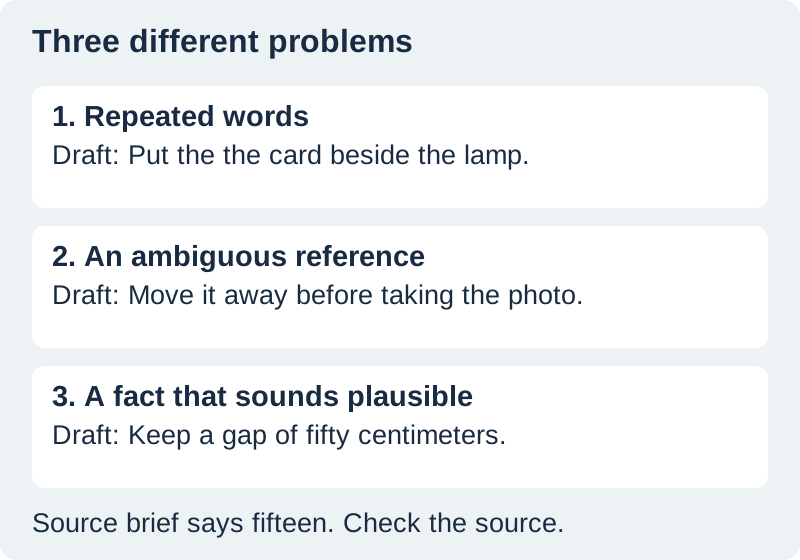
Our fictional brief calls for a blue card fifteen centimeters from a lamp. The bottle label must remain visible, and the card should turn slightly left. Compare that brief with this intentionally defective draft:
Put the the blue card fifty centimeters from the lamp. Move it to the left. Check this before taking the photograph.
The repeated word may be easy to hear. “Fifty” is harder: it is a plausible value spoken normally. The two vague references also need attention. Does “it” mean the card, lamp, or bottle? Does “this” mean the gap or reflection? Listening exposes uncertainty, but the brief resolves it.
Make the smallest useful revision
A corrected version could read: “Place the blue card fifteen centimeters from the lamp. Keep the bottle label clear. Turn the card slightly left and check the reflection before taking the photograph.” This restores the brief and gives each action a recognizable object.
Do not automatically shorten every sentence. A longer sentence can connect a condition with the action it governs. Splitting it carelessly may turn an optional step into a requirement or separate a warning from the instruction it qualifies. Read the complete paragraph after making a local edit.
Preserve the author's voice. A conversational article does not need to become a formal report because a speech engine pauses differently than you expected. Ask whether the wording helps the intended reader, not whether it flatters the selected synthetic voice.
Download the practice passage and correction log. The log separates what you heard, what the source establishes, and what you changed. Use it on one real paragraph before committing to a whole-document review.
Pass three: replay the revision in context
Play the revised paragraph with the sentence immediately before and after it. Listen for a new repetition, a missing connection, or an abrupt change in tone. Then read it silently. A revision that helps speech may still create a confusing heading, an awkward line break, or an unclear link in the published layout.
For narration, compare the spoken wording with the approved written version. Keep pronunciation adjustments in a separate production script if necessary. Our guide to speaking numbers and dates explains that distinction for values whose display and spoken forms differ.
If words disappear from the audio even though they remain in the input, stop treating that as proofreading feedback. Follow the TTS omission diagnostic to find the failing stage. Rewriting accurate copy to hide an output error can create another problem.
Finish with a visual and factual check
Listening cannot reliably reveal every homophone, punctuation choice, broken link, or formatting error. Finish by checking the actual page: headings, lists, image captions, references, and the first and last lines of any copied block. Confirm that a last-minute change appears in every dependent asset.
For a script adapted from spoken notes, use the voice-typing correction workflow before this listening review. Dictation and read-back are separate stages. Once the text is approved, Voice Lab can help you audition a short narrated version; the approval still belongs to the person checking the copy.
Frequently asked questions
Can text to speech find every writing error?
No. Listening can expose repetition, awkward rhythm, and unclear references, but plausible factual errors and many homophones can pass unnoticed. Pair it with source verification and a visual proofread.
Should I use a very fast playback speed?
Use a speed that lets you follow the sentence and mark a specific problem. Faster playback is useful only if you still understand the wording; it is not a reliable shortcut for careful factual review.
Should I rewrite a correctly spelled name for the voice?
Keep the approved spelling in the published copy. If narration requires a pronunciation aid, record it separately and check the resulting audio against the actual name.
How much text should I review at once?
Begin with one or two paragraphs. Expand to a coherent section when the process is working. Short review units make it easier to connect a listening note with the exact sentence.
What should I approve before generating final narration?
Approve the wording, facts, names, and intended pronunciation. Then review the generated audio for completeness and delivery, and reopen the final export before handing it off.
Listen to the approved script
Use Voice Lab for a short narration sample after your factual and written-copy checks.
Hero: AI-generated editorial illustration. Original teaching materials and documented feature research, checked October 31, 2026. Examples are labeled where synthetic or hypothetical.