
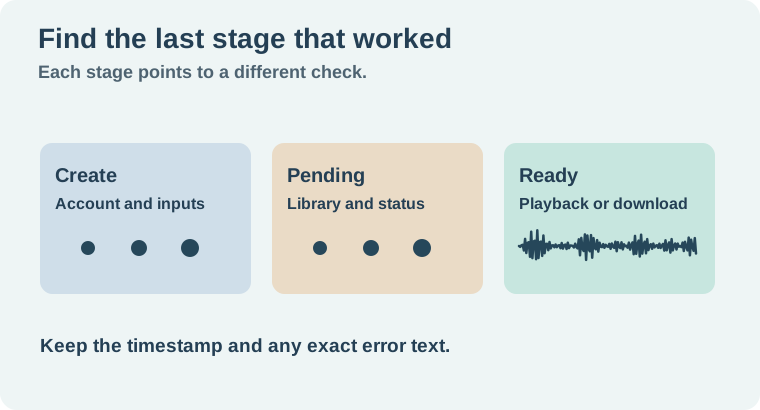
If Suno is not working, first identify where it stopped. Did the Create page fail to load, did the request fail before it started, or did a submitted generation remain pending? Check your Library before retrying. A job can be accepted even when the editor seems stuck, and a second request makes it harder to understand what happened.
Use the exact error and time rather than a broad label such as “Suno is down.” A personal account issue, a missing control and a wider incident can have different symptoms. Check what your own session actually shows.
Start with the last thing that worked
If the page does not load, open Suno's official help in another tab and check your connection with a separate site. Confirm you are in the intended account. If another normal browser session opens the same page, compare browser extensions or blocked resources one at a time. Save any draft text outside the form before refreshing a page that might discard it.
If the page loads and the Create button is disabled or a message appears, read that message first. Confirm the required fields and selected model. Check the account's visible generation balance and any relevant access notice. A model or feature can be unavailable even when a different workflow works. The Suno v6 guide covers model selection as its own decision.
For a moved or missing Persona control, use the Style Persona troubleshooting guide. Finding a saved style is a different task from confirming whether a submitted generation was accepted.
Check the library before repeating a request
If the request appeared to start, check the Library and any job state the interface shows. Record the current time and the status. Save the visible song or request link if one exists. Do not submit the same request several times while the earlier one is still active. Wait for a clear result or use the support route if the status remains unclear.
When the interface explicitly shows a failure, record the exact message before changing the prompt, model, and browser together. Check the account's credit information separately. A displayed balance alone does not tell you which attempt succeeded or why a track is missing. If you suspect a credit discrepancy, keep the before and after observations and ask support to check the specific attempt.
If a retry is appropriate, make one small test with a simple prompt and an available model after confirming there is no active duplicate. A successful simple request suggests you should look more closely at the original workflow. It does not establish what happened to the earlier attempt. Keep both records.
Separate playback problems from generation problems
If the song exists in your Library but you hear nothing, play another known-good track through the same device. Check volume, the output route, and whether the browser tab is muted. If the older track works and one new result does not, keep the result link and note whether the problem happens in a second player or device where available.
If the result plays and simply sounds different, review the settings and the source rather than treating it as a service error. The Suno instrumental remix guide explains how to compare the new arrangement with its source. Change one variable at a time so you can tell whether it improved the result.
For an apparent widespread incident, check current announcements from Suno through its official channels. Avoid assuming a report from another account confirms the same failure. Keep your own timestamp and result links so the report remains useful when the service recovers.
Send a useful support report
Suno's official support instructions provide the support route. Include the time and time zone, browser or device, workflow and model, exact error, and any song or request link. Say whether the item appears in the Library and whether you saw an account or credit notice. A short reproducible description is more useful than several screenshots with no time reference.
For a fictional example, write that the Create page loaded, the request showed as pending at 14:10 Eastern, and the Library still showed pending when checked later. Add the relevant link. That identifies the stage without guessing what the service did internally.
Give support two separate observations when credits look wrong
Suppose you noted a balance of 50 before one submission. The page later shows 40 and you cannot find the track. Record when you saw each number, how many submissions you made, and whether the same account was signed in on both screens. If the Library entry appears later, record its link and status with the later time. That gives support a way to distinguish a delayed result from an account or balance question. A difference between two screenshots shows what the interface displayed. It does not establish the charge or the outcome on its own. Keep the report small by leaving out your original lyrics and recordings unless support requests them for a specific reason.
How QuestStudio helps
Use Music Lab if you need a separate candidate bed while the original issue is being investigated. Keep the new candidate and the Suno request record separate. Finish by keeping a short log of the last working stage and the next check so you can resume without repeating the same request.
Download the suno generation troubleshooting log.
Frequently asked questions
How do I know if my request was accepted?
Check the Library and any job state or song link shown for the attempt.
Should I keep clicking Create if nothing appears?
Check the earlier request first. Repeated submissions can make the result and credit history harder to trace.
What if credits look different after a failure?
Record the timing, displayed balance and exact error, then send the relevant attempt to support.
Why is a finished track silent?
Test another track on the same device and check output, volume and tab mute before diagnosing generation.
What should I include in a report?
Include the time zone, workflow, model, browser, error and relevant song or request link.