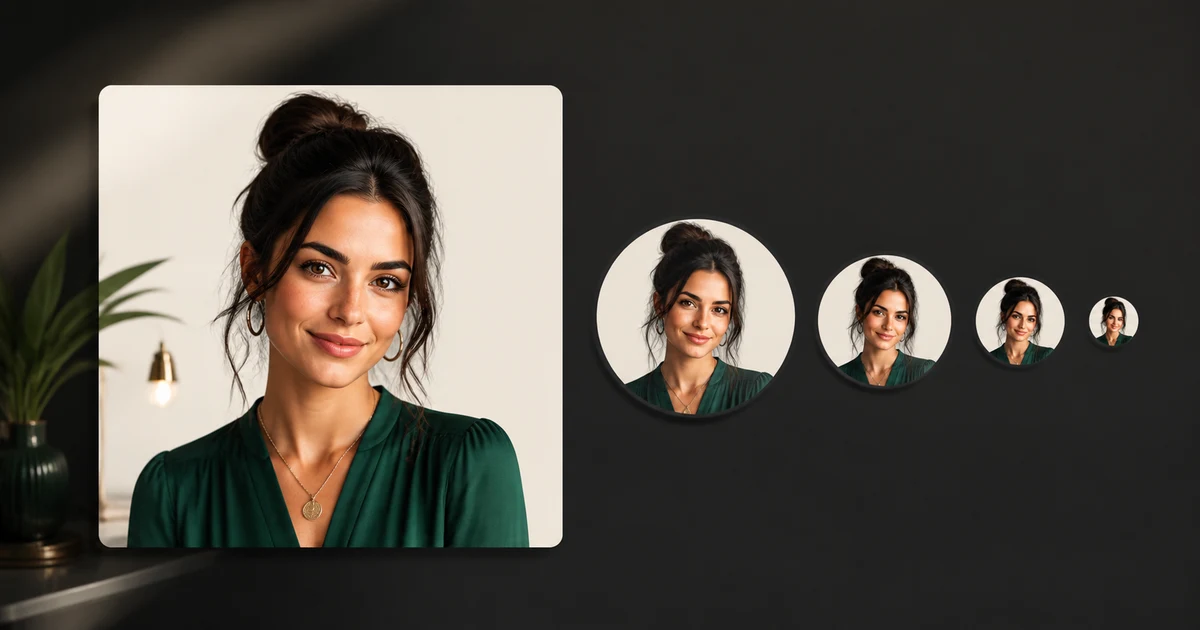

This guide turns a current search question into a repeatable production decision. It focuses on the source, controls, review, and destination checks that determine whether an output is actually useful.
The official size is a rendering constraint
YouTube's current channel-branding guidance says profile pictures render at 98 by 98 pixels and accept JPG, GIF, BMP, or PNG files up to 15 MB; animated GIFs are not supported. That does not mean you should design on a 98-pixel canvas. Create a larger square master so edges and retouching remain clean, but make every composition decision for the final tiny circle.
A common failure is approving a detailed 2000-pixel portrait on a desktop monitor. At channel size, the eyes vanish, the background merges with the face, the wordmark becomes noise, and the circular mask clips the hair or symbol. The solution is not a larger upload. It is a clearer visual identity.
Use the square-to-circle-to-98 px test
Keep essential facial features or the core symbol well inside the circle. Corners of the square will not contribute. Give hair, glasses, hats, and outer marks breathing room. The crop must still work if the interface applies a slightly different preview or border treatment.
Choose one identity system
Most channels need one of three systems: a face-led portrait, a symbol-led mark, or a simple character. A face supports expert, creator, commentary, and personality-led channels. A symbol supports a brand that must remain stable across hosts. A character can create recall for entertainment or education but needs a consistent shape and palette.
| System | Keep | Remove |
|---|---|---|
| Face-led | Eyes, silhouette, expression, one color cue | Busy room, full body, small props |
| Symbol-led | One bold shape, clear negative space | Taglines, thin details, several icons |
| Character-led | Head shape, eyes, signature accessory | Complex scene, tiny costume texture |
Do not place the full channel name in the avatar unless it remains legible at 98 pixels—which most names will not. The channel name already appears beside the picture in many contexts.
Write an AI concept brief for recognition
Use AI to explore an original portrait or symbol, not to imitate a living creator, channel, or protected mascot. Define the subject, crop, expression, silhouette, palette, background, light, and exclusions. For a portrait: “Original adult creator, centered head-and-shoulders crop, direct friendly gaze, strong face separation, simple deep-teal background, soft frontal light, no text, no props, no border, ample space around hair.”
Generate several concepts from the same brief. Reject identity drift, clipped hair, odd glasses, asymmetrical jewelry, mushy edges, or a background that matches the skin or hair too closely. If using a real person's face, obtain permission and choose an accurate, non-deceptive representation.
Build contrast without an artificial halo
The face or symbol should separate from the background by value, color, or both. Test in grayscale: if the subject disappears, the colors are doing too much work. Use a simple background, controlled light, and one accent hue connected to the channel's wider visual system.
Heavy outlines and neon halos can read at small size but may make an expert brand feel generic. Start with natural separation. Add a restrained border only if the avatar repeatedly disappears against YouTube's light and dark surfaces.
Make the crop manually
- Place the approved image in a square working file.
- Add a non-destructive circular mask or guide.
- Center the eyes or primary symbol optically, not only mathematically.
- Scale down until the full silhouette has breathing room.
- Hide the guide and export a clean square PNG or JPG.
- Create a 98 × 98 preview and view it at 100%, not enlarged.
Optical centering matters because hair, hats, side lighting, and asymmetrical symbols carry visual weight. A mathematically centered face can still look off-center inside a circle.
Run a five-context thumbnail test
Review the 98-pixel preview against white, near-black, medium gray, and two colors common in your thumbnails. Place it beside a channel name and beside three other avatars. Ask a person unfamiliar with the design to identify the face, symbol, or category after a brief glance.
- The identity is recognizable without enlarging the image.
- Eyes or the central symbol remain clear at 98 pixels.
- The circular crop does not clip essential features.
- The subject separates on light and dark interfaces.
- No tiny word, line, or texture turns into visual noise.
- The design is distinct without copying another channel.
- The supported export is under 15 MB and opens correctly.
Keep avatar and thumbnail jobs separate
The profile picture identifies the source; the video thumbnail sells one specific video. Do not force the avatar to contain a title, episode concept, reaction scene, and logo. Reuse a small set of colors, face treatment, or illustration cues so the two systems feel related while remaining legible in their different jobs.
When you change the avatar, compare channel-page recognition, comment recognition, and mobile rendering—not only subjective preference. Save the old version, source prompt, crop, export, and change date so you can evaluate the rebrand instead of guessing.
Create and approve the master
Use QuestStudio Image Lab to produce an original square concept, then finish the crop in an image editor and run the 98-pixel test. AI is useful for exploration; the final approval still belongs to a person checking identity, rights, detail, and destination rendering.
Before uploading, verify the current requirements in YouTube's official channel-branding guidance and review YouTube's profile-picture design guidance. Platform requirements can change, so the official help pages should be the final check.
Frequently asked questions
What size should a YouTube profile picture be?
YouTube currently says the image renders at 98 by 98 pixels. Build a larger square master, then test the final circular crop at 98 pixels.
What file types does YouTube accept?
Current official guidance lists JPG, GIF, BMP, and PNG, with no animated GIFs and a maximum size of 15 MB.
Should a YouTube profile picture be circular?
Upload a square file, but design for the circular presentation and keep important content away from the corners.
Should I put my channel name in the profile picture?
Usually no. Most channel names become unreadable at 98 pixels; use one face, symbol, or character with a clear silhouette.
Can I use AI to make the picture?
Yes, for an original authorized concept. A person should still check likeness rights, visual artifacts, crop safety, and recognition at actual size.