
ChatGPT Profile Picture Prompts: 25 DP Ideas That Keep You Recognizable should help you turn one clear reference photo into a recognizable, platform-ready profile picture without accidentally changing age, facial structure, skin texture, or personal style. The useful prompt is not a pile of quality adjectives. It is a compact production brief that identifies the source, states the allowed change, locks the details that matter, and defines how the output will be judged.
Start with a front-facing reference photo with even light, the full hairline visible, and no beauty filter. Preserve facial structure, apparent age, skin tone, eye color, hairline, distinctive features, and natural asymmetry. Change only platform, crop, background, wardrobe, expression, lighting, lens look, and amount of retouching. That order matters because a model may satisfy the mood while quietly replacing the thing the image or clip was supposed to represent.
Before you copy a prompt
Decide whether you are generating a concept, editing a real image, or preparing a commercial asset. Concepts can explore. Edits should preserve documentary truth. Commercial assets need a stronger product, identity, claim, and rights review. Keep the untouched source and use authorized references.
Do not ask for every improvement in one pass. First approve identity or product fidelity. Next approve composition. Then change lighting or background. Finally, upscale, crop, caption, and export. This sequence makes a failure diagnosable instead of forcing you to guess which phrase caused it.
ChatGPT Profile Picture Prompts: copy-ready templates
Replace bracketed variables, remove instructions that do not apply, and paste one prompt at a time. The preservation and exclusion clauses are intentional. They reduce the chance that a visually attractive result changes the subject.
1. LinkedIn headshot
Review: Compare the result with the source before moving to the next variation. Save the prompt with the approved output so the decision is repeatable.
2. WhatsApp DP
Review: Compare the result with the source before moving to the next variation. Save the prompt with the approved output so the decision is repeatable.
3. Instagram creator profile
Review: Compare the result with the source before moving to the next variation. Save the prompt with the approved output so the decision is repeatable.
4. YouTube channel avatar
Review: Compare the result with the source before moving to the next variation. Save the prompt with the approved output so the decision is repeatable.
5. Founder profile
Review: Compare the result with the source before moving to the next variation. Save the prompt with the approved output so the decision is repeatable.
6. Creative professional
Review: Compare the result with the source before moving to the next variation. Save the prompt with the approved output so the decision is repeatable.
7. Black-and-white portrait
Review: Compare the result with the source before moving to the next variation. Save the prompt with the approved output so the decision is repeatable.
8. Customer-support avatar
Review: Compare the result with the source before moving to the next variation. Save the prompt with the approved output so the decision is repeatable.
9. Gaming profile portrait
Review: Compare the result with the source before moving to the next variation. Save the prompt with the approved output so the decision is repeatable.
10. Minimal avatar
Review: Compare the result with the source before moving to the next variation. Save the prompt with the approved output so the decision is repeatable.
A reliable five-step workflow
- 1Choose the least distorted reference
Avoid wide-angle selfies taken too close to the face. A simple eye-level portrait gives the model a better identity anchor and makes later changes easier to judge.
- 2Name the destination before the style
A LinkedIn headshot and a gaming avatar need different contrast, wardrobe, crop, and background. State the platform and use before asking for a mood.
- 3Lock identity in plain language
List the features that must not change. Do not rely on a vague instruction such as keep me the same. Compare the result side by side at the same size.
- 4Generate for the final crop
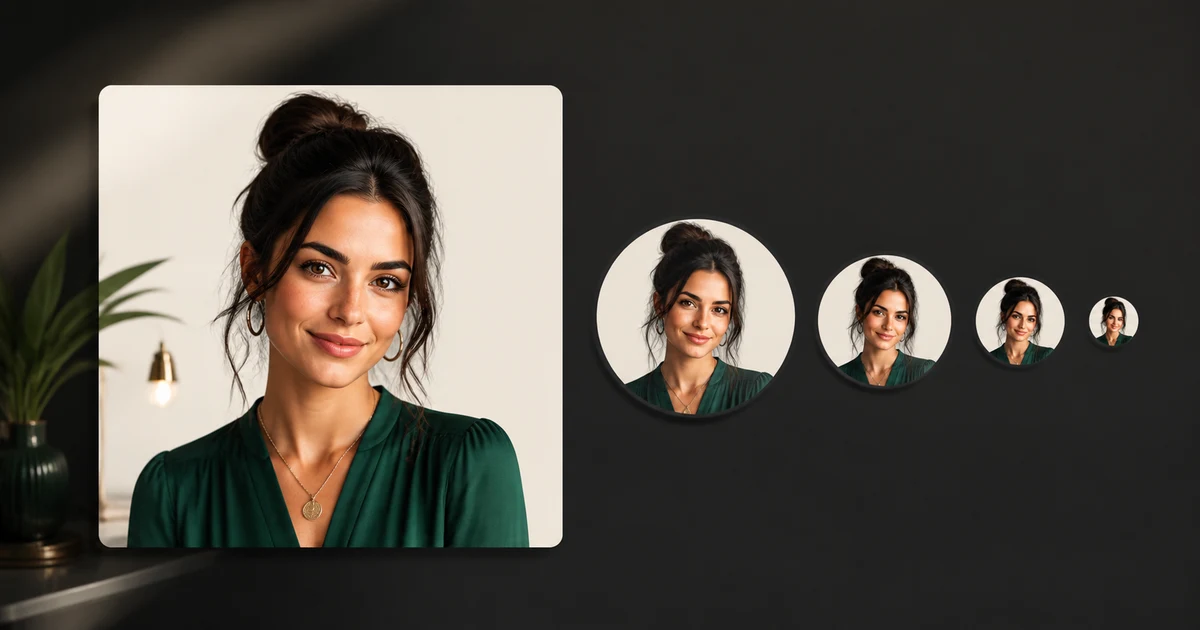
Leave space around the hair and shoulders, then preview the image as a small circle. Details near the corners will disappear on most profile surfaces.
- 5Export and inspect at small size
Check at 48, 96, and 256 pixels. Eyes, face outline, and background separation should remain clear without aggressive sharpening.
Fix the most common failures
It looks like a sibling
Reduce the style change, use a clearer reference, and repeat exact identity constraints before changing wardrobe or background.
The crop cuts hair or chin
Ask for a looser square composition with explicit safe space around the head, then crop outside the generator.
Skin looks plastic
Remove words such as flawless and perfect. Request natural pores, restrained retouching, gentle contrast, and no beauty filter.
The image disappears at thumbnail size
Simplify the background, strengthen subject separation, and remove props or tiny decorative details.
When a result fails, change one instruction and generate again. Do not add several new adjectives. A short change log such as version 2: looser crop or version 3: preserve exact wheel design turns prompting into a controlled test.
How QuestStudio helps
Save the source, prompt, negative constraints, model choice, and approved output together in Prompt Lab. Then use Open Image Lab to compare a controlled brief without rebuilding the project context. The goal is not to switch models constantly. It is to identify which model and settings produce an acceptable asset with the fewest retries.
Measure a successful first usable result, revisions per approved asset, repeat use, and whether the reader reaches a real creation workflow. Raw generations and pageviews are activity, not proof that the content helped.
Final approval checklist
- The face matches the reference at a glance
- Hairline, age, skin tone, and distinctive features are unchanged
- The circular crop does not cut hair, chin, or shoulders awkwardly
- The portrait reads clearly at 48 pixels
- No invented logo, credential, uniform, or workplace is implied
Run this checklist against the actual destination. A thumbnail, marketplace listing, wedding album, campaign, and vertical reel all reveal different errors. Approval should describe why the asset passed, not merely that it looks good.
Frequently asked questions
What is a good ChatGPT prompt for a profile picture?
Name the platform, crop, lighting, background, wardrobe, expression, and the facial details that must remain unchanged.
How do I keep my face the same?
Use a clear reference, request one change at a time, list identity constraints, and compare the output side by side with the source.
What size should a profile picture be?
Create a clean square master at the highest useful output size, then export platform-specific versions and test the circular crop.
Should I use an AI profile photo for LinkedIn?
Use it only if it remains recognizably you and does not imply a false role, workplace, credential, or appearance.
Why does my DP look blurry?
The source may be soft, the face may occupy too little of the frame, or the platform may compress the upload. Start with a clean master and downsize once.
Use the prompt as a brief, not a magic phrase
Choose one real output, use the cleanest reference you control, and make one change at a time. Keep the best prompt beside the approved result and record why rejected versions failed. That small discipline improves the next project more than adding another stack of style words.
Open Image Lab when you are ready to test the workflow.
Continue with a useful next step
 Image
ImageYouTube Profile Picture Size: An AI Workflow That Survives 98 px
Design a YouTube profile picture that remains recognizable in the 98 px circular render using an AI-assisted concept, crop-safe layout, and tiny-size QA.
 Image
ImageChatGPT Birthday Photo Prompts: 10 Ideas and an Invite
Create birthday photos with ten source-based briefs, a real fictional-portrait edit, and an editable invitation. Check likeness, crop and exact event details.
 Image
ImageChatGPT Realistic Portrait Prompts (2026): 25 Photo Ideas
Copy 25 ChatGPT realistic portrait prompts for natural photos, couples, headshots, and editorial images, with lighting, lens, skin, and negative prompts.