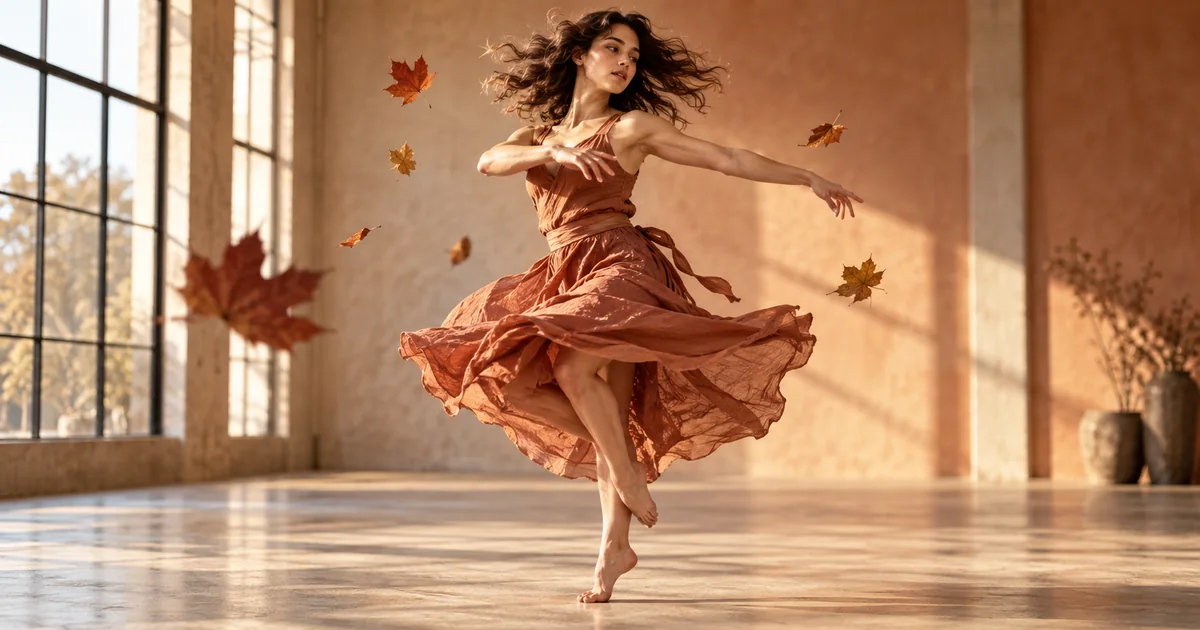

The leaves barely move, but the camera travels around the dancer. That difference is what sells bullet time. If everything slows together, you get slow motion; if the whole frame stops, you get a still. The prompt needs to direct two kinds of time.
Download the bullet-time shot sheet · Try the bullet-time shot brief
Editorial guide checked September 13, 2026. Examples and worksheets are original planning material; the hero is an AI-generated illustration, not a model benchmark.
Direct the subject and camera separately
Bullet time is a relationship between action and viewpoint. The subject remains almost suspended while the viewpoint moves enough to reveal depth. You do not need a particular film reference to describe that relationship, and you do not need an enormous orbit for the audience to recognize it.
Recent tutorials from Kapwing and Picsart show how the effect is being adapted into AI workflows. Their ready-made examples are useful starting points, but a template cannot decide which instant matters in your own scene. That is the directing decision to make first.
Our original assignment is a dancer holding a grounded turn while a few autumn leaves hang around the torso. The camera moves through a small arc. We are looking for one continuous shot with a readable supporting foot, stable body proportions, and believable changes in which leaves overlap the dancer. This is a proposed exercise, not a measured result from a named model.
Choose an instant that reads as a still
A confusing starting pose becomes more confusing when the camera reveals new surfaces. Choose an action with a clear silhouette: one foot supports the dancer, one arm extends, and the other stays away from the face. Avoid hiding both hands inside a dense cloud of objects.
The floating objects should explain the suspended action rather than overwhelm it. A few leaves at different depths are easier to track than a hundred particles. At least one can sit in front of the dancer and another behind. Their changing overlap helps reveal the camera’s movement.
Keep the environment simple but not depthless. A window frame, the floor, and a distant wall provide stable anchors. A perfectly featureless background may make an orbit look like the subject rotating in place. A crowded café introduces many objects the system must keep coherent. The studio sits between those extremes.
Inspect anatomy and object count before animation. If the still already contains an extra hand or a leaf fused to a sleeve, generation has inherited that ambiguity. Correct the source image or choose another one before spending time on motion variations.
Start with a modest arc and one time state
For the first test, begin inside the suspended moment. Do not ask for normal action, a speed ramp, a complete orbit, and a return to normal speed in the same short clip. Each transition adds a separate task. Once the central effect works, you can design the entrance and exit around it.
The brief separates three things: the subject’s state, the camera’s travel, and the protected facts. It avoids a list of competing camera commands. “Clockwise” can still be interpreted differently depending on viewpoint; if direction is essential to the edit, judge the actual output instead of assuming the word resolved it.
Use a supported short duration and keep the model constant for the first comparison. A request for a precise number of orbit degrees is not necessarily a measured camera control. Treat such language as direction unless the selected tool exposes an explicit parameter.
Prove that the camera moved through space
Watch the background rather than the dancer for one pass. Nearby and distant features should shift in a way that suggests depth. If the entire image merely slides sideways, you may have received a pan over a still. If the dancer spins while the room remains unchanged, the subject moved instead of the viewpoint.
| What you see | Likely interpretation | Next test |
|---|---|---|
| Everything slows together | Ordinary slow motion | Make the camera travel explicit while the subject stays suspended |
| Dancer turns on the spot | Subject rotation | Fix the pose and foot contact in the brief |
| Whole frame slides uniformly | A flat image move | Add clear foreground and background depth |
| Leaves appear and disappear | Unstable object interpretation | Use fewer, more separated leaves |
These are diagnostic hypotheses, not a way to reverse-engineer the model. Use the visible failure to choose a small next change. A slightly different starting image may help more than adding another sentence about realism.
Check the foot, the silhouette, and the overlaps
A planted foot gives the audience a strong physical anchor. Compare its contact with a nearby floor feature through the shot. If it slides while the dancer appears weight-bearing, the illusion weakens even when the upper body looks excellent.
Then inspect the body silhouette. A new viewpoint should reveal surfaces coherently, not stretch an arm to fill space. Pay particular attention to hands, the far side of the face, and the edge of flowing fabric. Those areas can change quickly while the center of the frame remains persuasive.
Finally, follow a few distinctive leaves. A leaf passing behind the arm should remain the same leaf when it reappears. You do not need to count every pixel, but you should notice a sudden duplicate, a leaf attached to the skin, or an object that changes size without a plausible depth change.
Review at normal speed after scrubbing. A technically suspicious frame may be irrelevant to the delivered shot, while a slight continuous foot slide can be immediately noticeable. Accept or reject according to the actual viewing experience and the role of the shot.
Add the entrance and exit only after the core works
If the effect needs a trigger, plan what causes the suspension: a turn, a tossed object, or a sudden discovery. Keep that causal action clear. You can generate it as a separate shot and cut into the suspended view when a single long generation cannot maintain the transition.
The exit also needs a decision. The leaves can resume falling, the dancer can complete the turn, or the shot can cut away during the hold. Do not automatically request all three. A short effect often feels stronger when it ends before the system has to invent a complicated recovery.
Sound should reinforce the chosen timing. A brief reduction in room sound or a sustained texture can support the suspended moment, while a normal-speed footstep at the wrong instant can contradict it. Mix against the accepted visual timing in an editor rather than treating a generated sound as proof the motion is correct.
Run the controlled test in QuestStudio
Open Video Lab with the brief and choose a supported model for your starting image or text workflow. The prompt does not unlock a special bullet-time mode or guarantee the same result across models. Check the displayed duration, input requirements, and generation cost before running the test.
Save the source, brief, selected settings, and accepted clip. Use the shot sheet to record the foot-contact result, camera evidence, and object-continuity failures. Once the modest orbit works, increase the ambition one step at a time. The goal is a usable, understandable effect that fits the scene.
Frequently asked questions
How is AI bullet time different from slow motion?
Bullet time separates the near-frozen action from a moving viewpoint. Ordinary slow motion slows the whole recorded event, including the camera.
Do I need a full 360-degree orbit?
No. A shorter arc can communicate the effect while exposing fewer unseen surfaces for the model to invent.
Why do objects multiply during the shot?
The model may reinterpret overlapping or poorly specified objects as the view changes. Reduce clutter and define the visible objects before adding a bigger move.
Does the brief guarantee a working result in Video Lab?
No. Supported models interpret camera directions differently. Generate a small test and judge the accepted shot rather than assuming a prompt guarantees the effect.