
You ask for a sideways camera move. The teapot rotates instead. You ask for a push-in. The whole image enlarges while the background stays flat. Both results can look polished, but neither answers the same directing instruction. A useful Hailuo AI camera control test separates what the camera does from what the subject does.
Download the camera movement test card · Test a simple shot in Video Lab
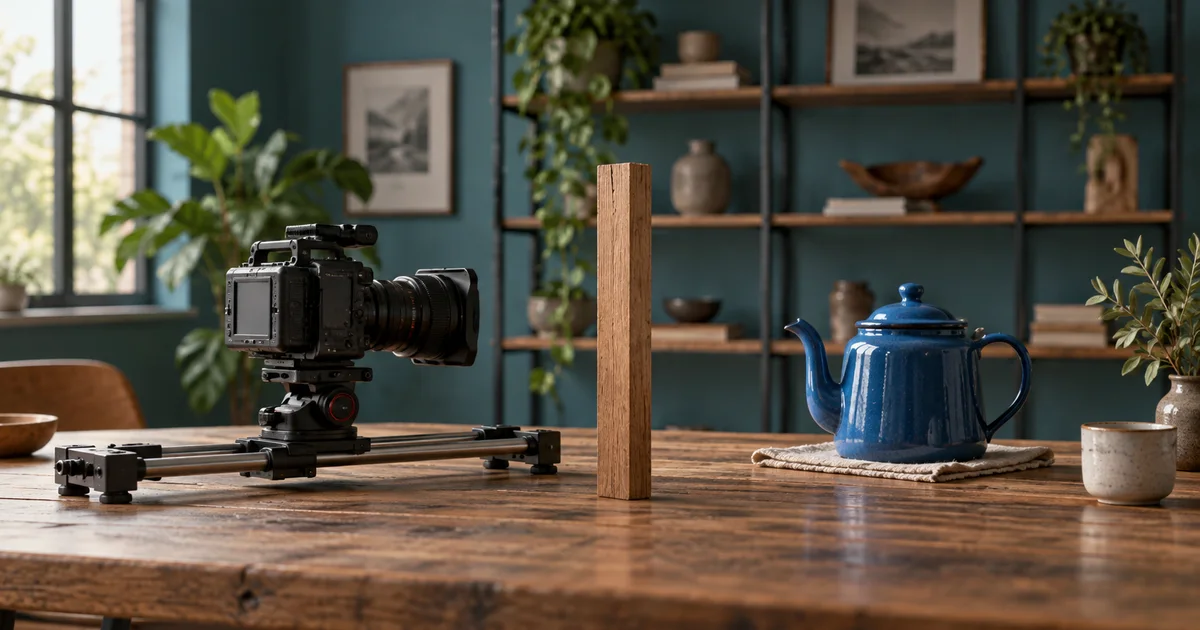
Feature information checked September 17, 2026. The teapot exercise is a proposed diagnostic test, not a reported Hailuo benchmark. The hero is an AI-generated editorial illustration.
Check the model before copying camera syntax
Hailuo tutorials span multiple generations of models and interfaces. A command demonstrated in an older Director model is not automatically a universal control for every current model. The current MiniMax video guide documents supported models and camera-direction examples, including bracketed instructions in its H3 guidance. Match the instructions to the model you actually select.
Write down the provider, model name, input mode, available duration, and date of the test. If you use a third-party interface, its options may differ from the provider’s own application or API. Do not combine a duration limit from one tutorial, a syntax example from another model, and an input workflow from a third service.
For a first test, plain-language direction is easier to inspect than a long string of copied camera commands. If your selected model documents a special control, compare it deliberately against that baseline. Keep the subject and the rest of the prompt stable.
Build a scene that makes camera movement visible
Place a blue teapot in the middle distance, a narrow wooden post closer to the camera, and shelves well behind it. This is a synthetic scene design for the exercise, not a requirement to photograph physical props. The three depths help reveal whether the viewpoint changes.
In a sideways move, the nearby post should change its overlap with the teapot and distant shelves. In a simple image enlargement, those overlaps largely remain unchanged. Generated video can imitate some cues imperfectly, so use several pieces of evidence rather than treating one observation as a physics proof.
| Requested move | What to inspect | Common misleading result |
|---|---|---|
| Static camera | Landmarks hold their relative positions | Unrequested drift or scale change |
| Short lateral move | Foreground overlap changes against distant objects | The teapot slides or rotates instead |
| Push toward the teapot | Changing depth relationships and framing | A flat enlargement of the source |
| Pan from a fixed position | View turns across the scene | Camera translates around the subject |
Choose a source frame that leaves room for the proposed movement. A tightly cropped handle cannot remain fully visible during every large move. An extreme orbit also asks the model to invent surfaces absent from the reference. Begin with a small movement through a clearly described space.
Run a static baseline first
This baseline asks whether the scene can remain stable before adding camera movement. Watch the spout, handle, lid, and table edge. If those features change in a stationary shot, a complex move will make diagnosis harder. Simplify the source, reduce conflicting visual detail, or choose a clearer reference.
Use the shortest duration that can show the intended action clearly within the options offered by your selected model. Longer is not automatically a better test. It creates more time for an unrelated failure and may consume more of the generation allowance.
Keep the baseline file. Comparing against memory is unreliable, especially when one result has prettier light. Record what failed in concrete terms: “handle opens into two loops near the end” is actionable; “not cinematic enough” is not.
Change only the camera instruction
For the next version, replace the static-camera sentence with: “The camera makes a short, smooth sideways move to the right; the teapot remains stationary.” Leave the subject, lighting, input image, duration, and other settings unchanged where the interface allows it.
The direction refers to camera movement, not necessarily the subject’s movement on the screen. As a camera moves right, a stationary nearby object often shifts left within the image. Write the world movement and the expected screen effect separately so you do not accidentally reject a plausible result.
If the selected model supports a documented camera token or dedicated control, try that as a separate variation. Do not add a push, orbit, tilt, zoom, and handheld sway at once. A successful result would be difficult to attribute, and a failed result would provide little guidance.
Review motion in three passes
First, watch at normal speed. Can you describe the requested move without reading the prompt? Does the movement feel continuous, or does it start with an unexplained cut? If the effect is too subtle for the intended shot, decide whether a larger move is necessary before changing the subject.
Second, inspect landmarks. Compare the post’s overlap with the teapot and shelves at the beginning, middle, and end. Check whether the background behaves like a space or bends around the subject. A fixed object should not independently glide to maintain the composition.
Third, inspect identity. Look at the spout opening, handle attachment, lid, and reflection. A camera move can be convincing while the product quietly changes. The useful output has to satisfy both the motion brief and the subject requirements.
Use the failure to choose the next attempt
| Failure | Likely ambiguity | Next controlled change |
|---|---|---|
| Teapot rotates | Motion assigned to the subject | State that the subject is fixed and simplify the move |
| Image only enlarges | Insufficient depth cues or zoom interpretation | Strengthen visible foreground depth and specify camera travel |
| Background bends | Move demands unstable geometry | Reduce travel and visible complexity |
| Spout changes shape | Unknown surfaces or identity instability | Use a smaller angle and clearer source |
| Move begins with a cut | Prompt suggests multiple shots | Describe one uninterrupted shot |
These are diagnostic hypotheses, not guaranteed causes. Save the change and the result. If a smaller move still damages an exact product, a modest editorial move on an approved still or real camera footage may serve the project better than more generations.
Turn the test into a reusable shot brief
Once a move is usable, record its purpose in the edit. The teapot shot might reveal the handle while leaving the logo side unchanged. That is more specific than “make a cinematic product shot” and helps you preserve the working constraints when the subject changes.
Repeat the test with the next subject before assuming the same wording transfers perfectly. A reflective kettle, a transparent bottle, and a soft bag expose different failure modes. The reusable asset is the review method and reference discipline, not a magic prompt that always works.
In QuestStudio Video Lab, use an available model to explore a simple movement brief and inspect its output. Check that model’s supported controls; the Hailuo-specific instructions discussed here belong to the Hailuo/MiniMax environment you select. For broader H3 prompting context, read the MiniMax H3 guide.
Frequently asked questions
Why does the subject move when I ask the camera to move?
The instruction may be interpreted as scene motion. Explicitly keep the subject stationary, request one small camera action, and include landmarks that make the viewpoint change observable.
Can I use every old Director-mode command in a new model?
Do not assume that. Match syntax and limits to the current model documentation and the controls your interface exposes.
Does visible parallax prove a physically correct camera move?
No. It is a useful cue, but generated geometry can still be inconsistent. Check object identity, background behavior, and the entire motion as well.
Should I add more camera keywords when a move fails?
Usually start by reducing ambiguity. Change one instruction, keep the comparison conditions stable, and use the result to decide the next change.