
Two beautiful stills can make an impossible video brief. If the object changes shape, the camera jumps, and the room rearranges between the endpoints, the model has to invent more than a transition. Start by making the two states compatible and checking that the chosen tool actually accepts both.
Reviewed October 23, 2026. Hero artwork is an original AI-generated illustration. Worked cases are teaching examples; they are not customer results or model benchmarks.
1. Check the two-frame capability before making the pair
First-frame input, image reference and last-frame control are not interchangeable labels. Confirm that the selected model and interface provide separate fields for the beginning and ending images. A provider may offer a feature through one route while another interface exposes only the starting image.
Adobe Firefly's image-to-video instructions explicitly describe first and last frame inputs. Check the current selected-model options and restrictions there. This is an example of documented input support, not a guarantee that every generated frame will match your intended geometry.
QuestStudio's current Video Lab offers a start-image control but no separate last-frame field. You can prepare a still in Image Lab and test a start-image shot in Video Lab. Do not treat a desired final state written in the prompt as a locked second endpoint. If both images must be supplied, choose a workflow that explicitly accepts them.
2. Define one transition with a short contract
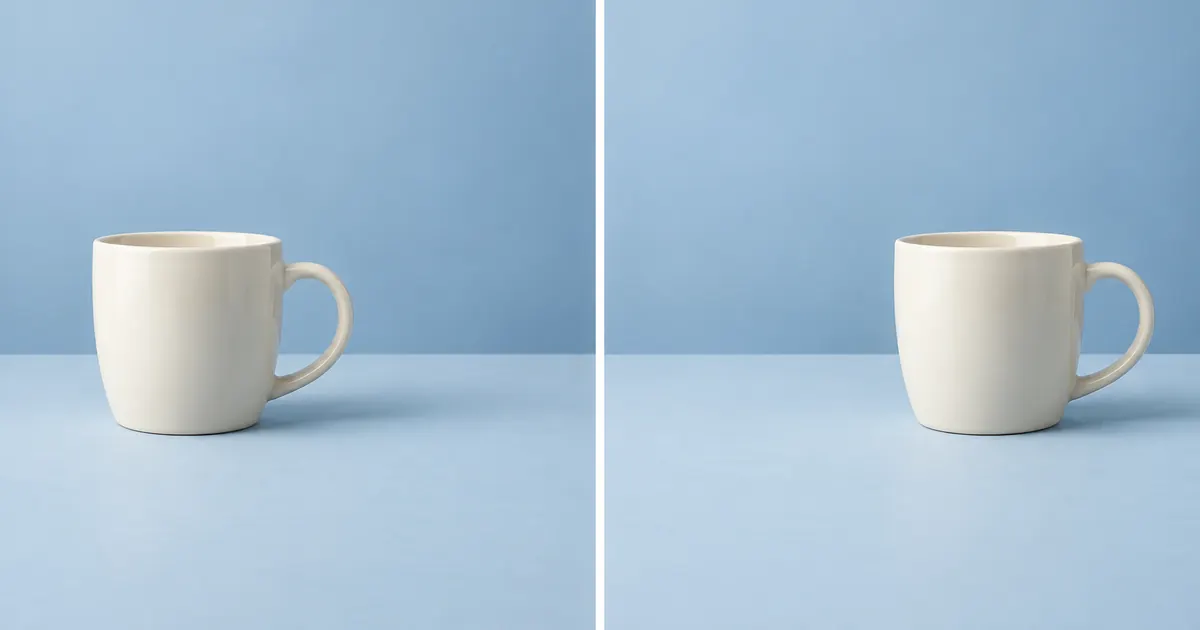
For this fictional exercise, a cream cup slides from the left side of a blue tabletop toward the right. The camera stays fixed, the cup remains upright, and its handle keeps the same orientation. The scene is an illustrative motion study, not a demonstration of a real product or evidence that an object moved without a cause.
Write what causes the movement if realism matters. A visible hand, a moving surface or an intentionally stylized animation are different stories. Do not ask for a documentary-looking action while leaving its physical cause unexplained. If the concept is deliberately surreal, state that in the creative brief.
| Property | Start plan | End plan |
|---|---|---|
| Cup center | About 30% across the frame. | About 70% across the frame. |
| Contact line | Same table height. | Same table height. |
| Cup size and handle | Approved size; handle to the right. | Same size and orientation. |
| Camera and lighting | Locked view; soft side light. | No zoom, cut or lighting change. |
| Motion | Stationary opening hold. | One slide, then a settled ending. |
The percentages are planning targets, not measurements of the hero or a generated clip. The hero is an AI-generated conceptual diptych; it has not been submitted as a tested endpoint pair. Download the endpoint contract and replace the planned values with your actual files and observations.
3. Compare the stills before asking for motion
Place the two candidate images side by side at the same dimensions. Check the horizon, table edge, vertical lines and subject scale. If one camera view is wider, decide whether that is an intended camera move or an accidental mismatch. Do not leave the model to guess whether a smaller cup means a zoom, a different object or a transformation.
Inspect identity details next. Count handles, openings, limbs, buttons or product components as relevant. Compare the same visible side where possible. A changed handle or lid is an endpoint defect even if both pictures look polished individually. Fix the stills before spending time on the transition.
Check exposure, light direction and shadow placement. Some change may be intentional, but it should belong in the contract. A strong unexplained switch in shadow direction gives the transition another problem to solve. Keep the first test simpler than the final creative ambition so you can identify what failed.
Use the reference-pack workflow to identify the approved source for each invariant. A second generated still is a candidate to review, not automatic confirmation of the first image's subject.
4. Write the motion between the states
“A stylized cream cup slides smoothly along the tabletop from its starting position to the supplied ending position. The camera remains locked. Keep the cup upright, its handle facing right, and its shape and scale unchanged. End with the cup settled. No cut, zoom, extra cup or transformation.”
This instruction describes a deliberate animation, not a claim that an ordinary cup moves itself. Change the action and cause to suit the actual project. Include only motion that belongs between the approved endpoints. Adding a spin, steam burst and camera orbit gives the system several ways to abandon the intended path.
Choose a duration that the selected model supports and that leaves room for the action. A long distance with an abrupt stop can require an implausible speed; a very long static transition may invite unnecessary movement. Treat duration as a tested creative choice rather than assuming a universal best value.
If the transition needs several distinct actions, break it into shots or intermediate planned states. Use the room-state ledger approach for a staged renovation concept. Generated intermediate states remain inventions even when the endpoints are real photographs.
5. Review the middle, the landing and the holds
Watch the whole clip at normal speed first. Does the action read as one coherent move? Then inspect the midpoint and any suspicious interval. A model can reach an acceptable ending by briefly duplicating the cup, changing its shape or hiding a jump behind blur. Matching the last image does not excuse a broken path.
For the cup exercise, review the rim, handle, contact shadow and table edge throughout the movement. Check that the object does not penetrate the surface, float unexpectedly or change scale. If an intentional stylized effect is allowed, state it in the contract so a reviewer can distinguish the idea from an accident.
Inspect the landing separately. Does the cup settle, overshoot, bounce or keep drifting? Does the final hold last long enough for the intended edit? A single acceptable last frame may still be unusable if the preceding movement never resolves.
Log a failure with its interval and first visible symptom. “The handle disappears halfway through” is useful. “Try making it more cinematic” does not address the defect. Change the relevant source, action or duration, then compare the entire replacement clip.
6. Use an honest fallback when the constraints do not fit
If the selected tool accepts only a start image, make a start-image shot and judge its actual ending. Do not label that result two-frame controlled. If exact still endpoints matter more than generative motion, a conventional animated layout or an intentional edit between the two stills may serve the project better.
If the endpoints depict incompatible physical states, redesign the shot or make the transformation an explicit creative effect. Do not disguise a factual before-and-after comparison with invented intermediate evidence. Viewers should understand whether they are seeing a visualization or a documented process.
Prepare a starting image in Image Lab, save the approved candidate, and carry the contract into the video stage. Keep source filenames, model/interface, actual input fields, prompt, duration and review notes together. This record makes a successful shot repeatable enough to investigate when a later version behaves differently.
Frequently asked questions
Does every image-to-video tool accept a last frame?
No. Some accept only a starting image or a general reference. Verify separate first- and last-frame controls for the selected model and interface before planning a two-endpoint workflow.
Can I supply a last frame in QuestStudio Video Lab?
The current Video Lab interface has a start-image input but no separate last-frame field. A prompt describing the ending is not equivalent to supplying a locked ending image.
What should stay the same across the two images?
Keep subject identity, component count, scale, camera and lighting consistent unless a particular change is intentional. Write the allowed differences in the contract so the reviewer can distinguish motion from an endpoint mismatch.
Why can the ending look right while the clip still fails?
The intermediate motion may contain a duplicated subject, disappearing detail, geometry change or jump. Review the entire path, the landing and any required hold, not only the first and last frames.
Is the cup illustration a tested first-to-last generation?
No. The hero is a conceptual diptych generated for this article. The contract uses planning targets, not measured results from a video model. No paid video generation or performance benchmark is presented.
When the transition represents an imagined room renovation, keep a room-state ledger and review fixed landmarks.