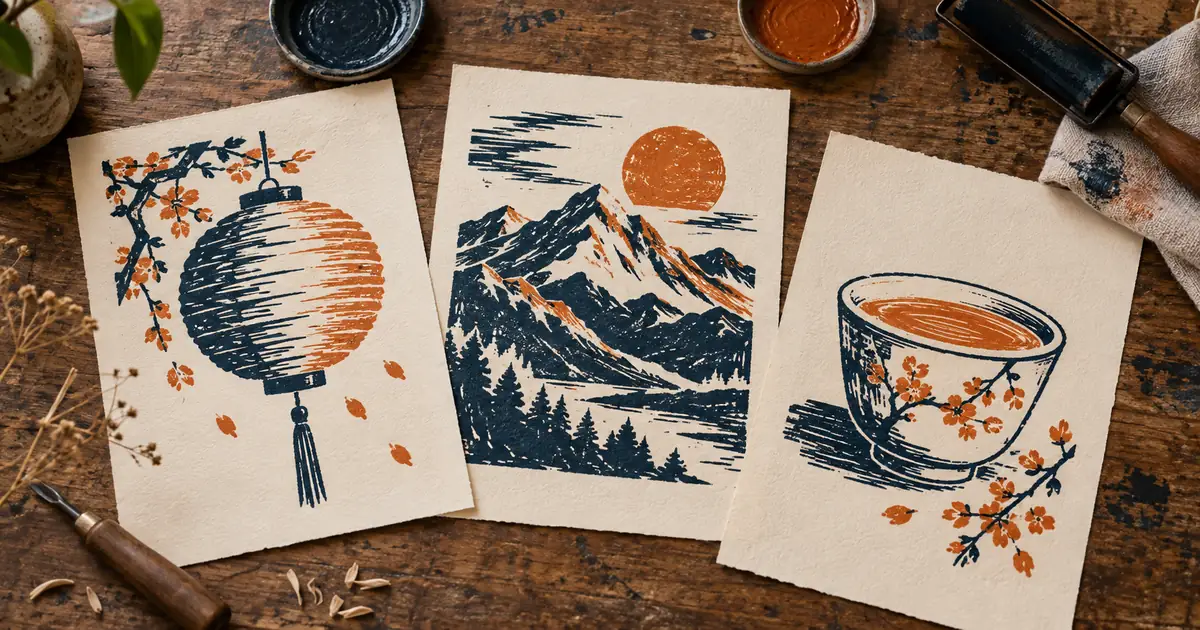

A lantern, a mountain, and a teacup can belong to the same visual series without sharing the same subject. Midjourney’s style reference is useful for that job. The challenge is deciding which parts of the look must repeat and which parts should change.
Download the style-series worksheet · Create a style anchor
Documentation checked September 14, 2026. The three-print exercise is original art direction, not a Midjourney output comparison. The hero is an AI-generated illustration of the intended visual system.
Separate style from subject identity
Midjourney defines Style Reference around visual qualities such as color, texture, medium, and lighting. It does not promise to reproduce the people or objects in the source. On the web, attach an image in the Style Reference area; in Discord, use --sref with an image URL.
For this exercise, the source is an original two-color print. We want indigo and rust ink, broad carved marks, and generous cream paper. We do not want every new image to contain the same lantern. If the reference subject keeps intruding, inspect whether the source image was attached as the intended reference type.
Identity is a separate task. If the same person or exact product must appear across a campaign, a style reference alone is not a sufficient plan. Establish how you will preserve those facts before approving the visual treatment.
Account for the current version
The current version guide identifies V8.2 as the default and says its Edit Model replaces older Omni Reference, Character Reference, and Retexture workflows. Older tutorials can still be useful for a deliberately older project, but their identity controls should not be assumed to work unchanged in the current default.
Record the version actually used for your series. A prompt saved without its model context is an incomplete production record. If the default changes during a long campaign, reopen the approved setup and make a small comparison before producing the remaining images.
Keep model version separate from the style-reference version controls described for older models. Similar parameter names do not mean the settings are interchangeable. You do not need every advanced control to begin; you need a known version and one clear reference.
Write a visual system in four decisions
Our original brief is a small set of illustrated cards for a fictional weekend arts workshop. The subjects are a paper lantern, a mountain ridge, and a teacup. The cards should feel related when placed side by side, while each image remains recognizable at a small size.
| Decision | Keep consistent | Allow to vary |
|---|---|---|
| Palette | Indigo, rust, and cream | Which ink dominates each subject |
| Marks | Broad carved strokes and visible paper | The direction of marks around the form |
| Composition | One readable focal subject with open margin | The silhouette and internal balance |
| Detail | Large shapes that read at card size | One distinctive detail per subject |
This brief is more useful than “make them consistent.” It tells you what to inspect and what freedom to leave. Three identical compositions can feel repetitive; three images with different visual grammar can feel unrelated. A good series occupies the space between those extremes.
Select an anchor for the whole set
Choose or create an original anchor image that expresses the four decisions clearly. Avoid an overloaded moodboard for the first pass. If the anchor contains five media, dramatic lighting, intricate lettering, and several subjects, you may not know which quality the generator will carry forward.
Inspect the anchor at the intended display size. Fine scratches that look beautiful at full resolution may turn into muddy noise on a small card. A style reference chosen only at maximum zoom can lead the whole set toward the wrong level of detail.
Use an image you have permission to work with. For this exercise, an original print or an original generated concept is sufficient. The goal is a controlled visual language, not a claim that a particular artist made the new images.
Generate subjects with restrained text
Attach the approved reference, then describe one subject. For example: “A paper lantern hanging from a simple curved branch, one clear focal shape, open surrounding space.” For the next image, replace the subject with a mountain ridge. Keep the rest of the production settings stable.
Avoid adding a competing style paragraph to every prompt. “Photorealistic studio lighting, glossy 3D render, watercolor, woodcut” asks several visual systems to fight each other. If the reference lacks one required quality, add that quality deliberately and document the change.
Midjourney documents --sw as the style-influence control, with a default of 100 and a range of 0–1000. Treat values as controls to compare, not universal quality scores. A stronger setting may emphasize the look while making a particular subject less clear.
Use a small review grid
Start with one selected candidate for each subject. Put all three at equal size on a neutral background. This prevents the most attractive single image from dominating the decision simply because you viewed it larger or longer.
Score each of the four brief decisions as clear, partial, or failed. The lantern might have the right palette but too much tiny linework. The mountain might match the marks but use a dark background that eliminates the shared cream margin. These are specific repair instructions.
Change one variable for the weakest image. If the palette drifts, inspect the reference and style influence before rewriting the composition. If the teacup is unrecognizable, simplify its subject description before demanding stronger texture. Keep the other two approved candidates available for comparison.
Do not confuse a style code with your image
The Style Reference documentation distinguishes an uploaded image from a numeric style code. A code refers to a look in Midjourney’s style system; uploading your anchor does not automatically create a code for that image. Save the actual reference file and the prompt record.
A random style can be useful during exploration. Once you choose a direction, preserve the selected reference or resolved code rather than repeatedly asking for a new random style. Otherwise each image begins from a different visual proposal.
For a client series, save a small approved contact sheet beside the settings. The contact sheet shows what “consistent” meant at approval time. Parameter values alone cannot communicate whether a warmer palette or denser texture was intentional.
Finish the series as a designed set
Bring the selected images into a layout tool and check margins, scale, and alignment. Style reference does not replace typography or page design. Add workshop titles as editable text so spelling, hierarchy, and spacing remain easy to revise.
Preview the set in its real destination: a mobile card grid, a printed sheet, or a presentation. If one image needs a different crop, judge whether it still shares the intended margin and focal scale. A consistent generation can become an inconsistent design through careless placement.
Archive the anchor, three final images, model version, prompts, style settings, and the four-part brief. The next three subjects should start from that package. Reopening the entire style search for every new card wastes the value of the decisions you already made.
Frequently asked questions
Does a style reference preserve the same character?
Its purpose is the visual look, not exact identity. Use the appropriate identity or editing workflow for your model and review the character separately.
Can I reuse V7 Omni Reference instructions in V8.2?
Do not assume compatibility. Midjourney’s current version guide says V8.2 uses its Edit Model in place of those older workflows.
Is a higher style weight always better?
No. Choose the influence that preserves the desired look while keeping the subject readable. Compare results against a written visual brief.
Can QuestStudio prepare the reference image?
Yes. Create an original anchor in Image Lab, then use it in Midjourney’s external Style Reference workflow.