
This guide turns a current search question into a repeatable production decision. It focuses on the source, controls, review, and destination checks that determine whether an output is actually useful.
What current Seedream 4 pages explain
ByteDance presents Seedream 4 as a unified image-generation and image-editing model. Its examples show concise instructions for removing a subject, changing text, relighting a room, and creating a new composition from a reference. Ranking tutorials build on that with formulas, multi-image examples, and ready-made edit prompts.
Those pages make the edit look simple, but a usable edit has two objectives: change the requested region and preserve everything else that was approved. A new jacket is not a pass if the face, apparent age, hand, camera, or room also changes. This workflow makes preservation explicit.
Create a reference contract
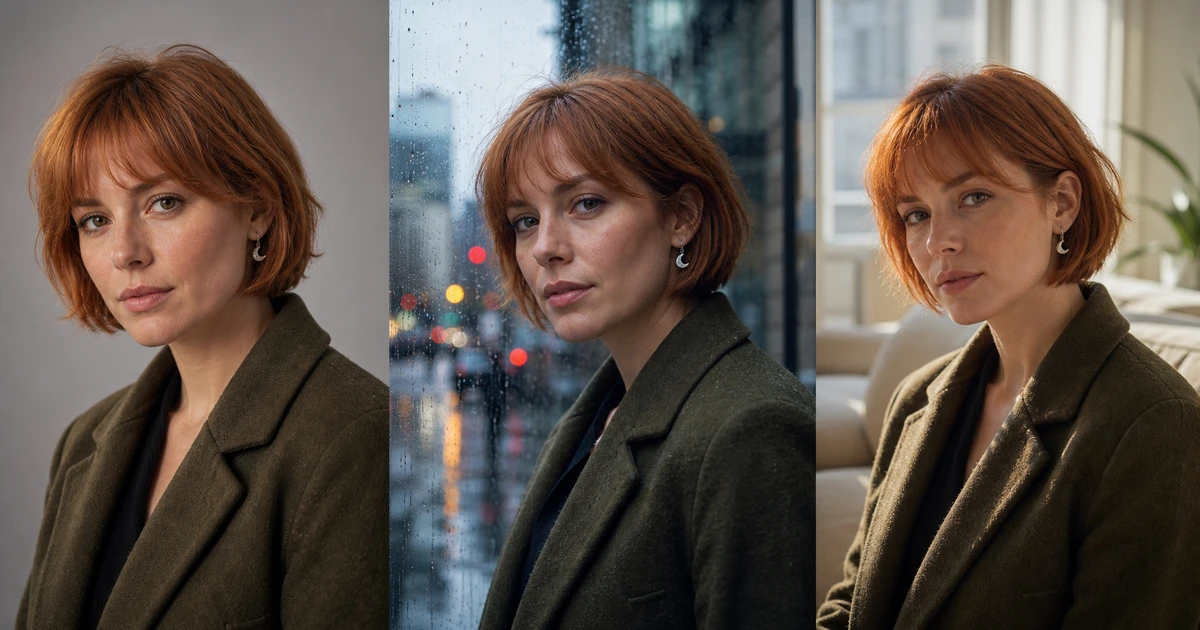
The anchor is the source of truth for identity, product, or scene. Write what is visible and stable: face landmarks, haircut, crescent earring, coat construction, camera height, window placement, and light direction. Avoid sensitive inferences or personality descriptions that cannot be verified from the image.
Supporting references should not compete with the anchor. A garment image controls fabric and construction; an environment image controls the new background; a lighting frame controls contrast. State that these references must not redesign the anchor identity.
Write the edit in five clauses
- Action: change, replace, remove, add, relight, or restyle.
- Target: the exact object, region, surface, or environmental property.
- Desired state: concrete appearance, material, position, or light.
- Preservation contract: the approved facts that remain unchanged.
- Destination: aspect ratio, crop, and production use.
Weak: Put her in a rainy city and make it cinematic.
Controlled: “Using the authorized portrait as the identity anchor, change only the neutral studio background into a believable rainy city window at blue hour. Preserve the exact face geometry, apparent adult age, short copper bob, crescent earring, olive coat construction, three-quarter pose, camera height, crop, and natural skin texture. Add cool window reflections and small distant practical lights behind the subject; keep the original soft key direction on the face. Output a 4:5 editorial portrait with clean separation around hair and coat.”
Use a change budget
Classify an edit as small, medium, or structural. A small edit changes color, one object, or localized light. A medium edit changes wardrobe, background, or pose while preserving identity. A structural edit changes camera angle, body position, environment, and style together. Structural requests have more opportunities for drift and should be decomposed.
Start with the smallest edit that proves the model can preserve the anchor. If a background change passes, test wardrobe separately. Combine accepted changes only after each component is understood. This creates a repair path when the combined version fails.
Inspect identity by landmarks
Compare eye spacing, brow shape, nose bridge and width, lip line, jaw, ears, hairline, marks, apparent age, and distinctive accessories. Do not approve identity from mood or hair color alone. Put the anchor and edit side by side at matched scale, then overlay them when the pose is comparable.
Expressions may move facial muscles without redesigning the skull or eyes. Light may change perceived contrast without changing the actual mark or skin tone. If identity matters commercially, have the depicted person or authorized owner review the result.
Inspect the unrequested regions
| Edit request | Primary review | Common collateral drift |
|---|---|---|
| Change background | Edges, perspective, light integration | Hair, face, clothing, pose |
| Change wardrobe | Construction, fit, folds, contact | Body proportions, hands, jewelry |
| Relight scene | Source direction, shadows, reflections | Material color, facial features, time of day |
| Replace product color | Approved swatch and finish | Logo, shape, cap, label text |
| Change text | Every character and alignment | Font, nearby layout, background detail |
An edit is rejected when an unrequested fact changes materially, even if the requested region looks better. Save the rejected output and reason; it tells you which preservation clause needs more weight.
Use one-variable repairs
If the face changes, reduce competing references and strengthen the identity anchor. If the new background looks pasted in, describe perspective, depth, light direction, and edge interaction. If clothing alters body shape, define the garment construction and preserve proportions. If an exact word fails, generate a clean layout and finish verified typography separately.
Do not answer drift by adding twenty preservation sentences at once. Change one clause, render the same comparison, and retain it only if the collateral damage decreases.
Example: build three campaign variants safely
Suppose an approved creator portrait must become a studio profile image, a rainy editorial cover, and a warm indoor newsletter hero. First approve the neutral anchor. Generate the rainy background as one edit while preserving identity, coat, crop, and face light. Return to the anchor—not the rainy derivative—to generate the warm interior. This prevents each version's small errors from becoming the next version's truth.
Create a comparison sheet at matched scale. The subject owner checks identity; the creative reviewer checks composition and light; the publisher checks crop and destination. Record which anchor and instruction produced each file. If one variant requires a different pose, treat that as a new medium edit with its own approval instead of quietly folding it into a background request.
Seedream 4 approval checklist
- Every source and depicted identity is authorized for the intended use.
- The anchor and each supporting reference have one documented role.
- The requested target changed to the specified state.
- Identity, product truth, camera, and unrelated scene facts remain stable.
- Edges, hands, reflections, perspective, and materials survive detail review.
- Exact text, logos, colors, prices, and claims are verified independently.
- The final crop works at its destination size.
- Source, instruction, version, rejection reasons, and approval are recorded.
Start with one bounded edit in QuestStudio Character Forge. ByteDance's official Seedream 4 page demonstrates the model's generation and editing patterns; the contract above turns those patterns into a repeatable approval process.
Frequently asked questions
What makes a good Seedream 4 edit prompt?
Name the action, exact target, desired state, facts to preserve, destination, and observable pass conditions.
How many reference images should I use?
Use the smallest authorized set that controls the required facts, and assign every reference one role.
How do I prevent identity drift?
Keep one approved anchor, list visible identity landmarks, reduce competing references, and inspect at matched scale.
Should I edit several things at once?
Start with one bounded change. Test larger structural edits only after the smaller components pass independently.
Can Seedream 4 change exact text?
It can edit text, but every character, font treatment, alignment, and nearby element still require human verification.