
Product photography pricing becomes easier to compare when the quote describes a complete usable image set. A low capture fee can become expensive after preparation, retouching, revisions and missing views. Start with the required deliverables, then calculate the full cost per approved image for that same scope.
All dollar figures in the examples below are hypothetical US-dollar scenarios. They are not market averages, current vendor quotes or promises of savings. Use the worksheet to compare your own requirements and actual written estimates.
Define what you need before asking for a price
List the products, sale variants and views. Separate a clean main image from a detail, a scale view, a parts photograph and a styled campaign frame. A job containing twenty simple packshots is different from a job containing twenty elaborate scenes.
Specify the destinations and final files as well. Record the required crops, dimensions, background treatment and whether layered working files are part of the handoff. A provider cannot price a clear scope when “some images for the website” could mean several different jobs.
Use the product photography shot-list guide to create that scope first. It gives the cost conversation a concrete output instead of an arbitrary image count.
Compare pricing models against the same deliverable
A quote may charge by image, product, hour, day or a defined package. Ask what each unit includes. A per-product fee may cover one view or several, while a day rate may still require separate retouching and usage terms.
Shopify's pricing guide identifies factors such as shot complexity, equipment, experience and turnaround. Use those categories to ask better scope questions rather than copying a headline range into your own budget.
Keep the unit price visible, but do not let it replace the complete estimate. Two quotes can have different structures and still be comparable once they cover the same products, approved views and delivery requirements.
Add the work around the camera
Include preparation, product cleaning, assembly, styling, shipping and return handling where relevant. Record retouching, revision limits, additional crops and the agreed image uses. Ask which assumptions change the fee if the product or brief changes.
Count your own time when it is part of the decision. Preparing references, reviewing outputs and fixing filenames can take meaningful effort even when the capture or generation fee is small. Use a clearly labeled internal rate for that planning calculation rather than presenting it as a market wage.
Separate costs you know from costs you are estimating. An unknown revision charge belongs in an unresolved column, not a zero-cost cell. That makes it easier to see what you must clarify before accepting the estimate.
Work through two complete quote scenarios
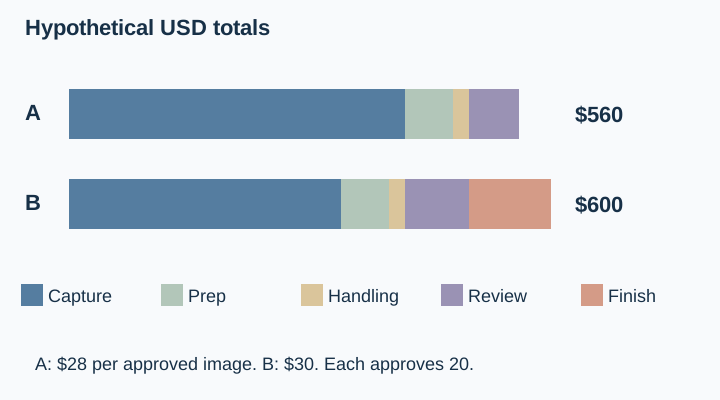
Suppose the scope is twenty approved product images. In hypothetical Quote A, capture and retouching cost $420, preparation $60, handling $20 and your review time $60. The total is $560. If all twenty required images are approved, the cost is $28 per approved image.
In hypothetical Quote B, the headline capture fee is $340. Preparation adds $60, handling $20, review time $80 and the planned additional finishing work $100. The complete total is $600, or $30 for each of the same twenty approved deliverables.
Quote B looks cheaper if you compare only $340 with $420. It costs more under these particular full-scope assumptions. The conclusion changes if the actual scope, approval count or additional work changes, which is why the inputs belong beside the calculation.
Keep arithmetic and judgment separate. A cheaper approved image is not automatically a better decision if the gallery misses an important product detail or arrives too late for its intended use.
Count approved deliverables, not attempts
For an AI-assisted workflow, generation attempts are an input cost. The output count that matters is the number of images accepted for the required uses. Ten rejected variations do not complete another row in the listing gallery.
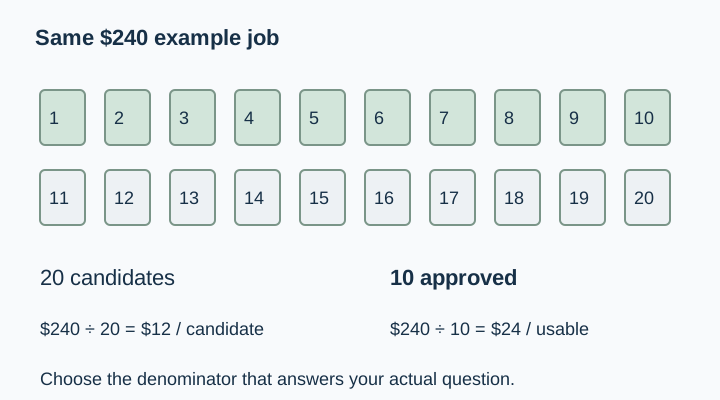
For example, $240 of hypothetical total work divided by ten approved images is $24 per approved image. Dividing the same cost by twenty generated candidates would produce $12, but that number describes candidates rather than usable deliverables.
The product approval checklist helps define acceptance before you compare those counts. A gallery with the wrong label or missing hardware should not receive a pass merely because another attempt would increase the average cost.
Compare DIY, commissioned and AI-assisted routes fairly
A DIY route may use equipment you already own, but preparation, capture, editing and review still take time. A commissioned route may include work that your DIY estimate forgot. An AI-assisted route may need high-quality source photographs and several rounds of accuracy review.
Write a complete scope for each route. Keep the same required views and approval criteria so you are comparing ways to finish the job rather than different amounts of work. If one route cannot produce a trustworthy interior or measurement view, plan the real capture that fills that gap.
Use the AI product photography tools guide when you need to understand the broader workflow choices. Confirm current service prices and included allowances directly when preparing an actual budget; this article's hypothetical figures do not replace those terms.
Ask questions that remove ambiguity
Before approving a quote, ask which views, retouching tasks, revision rounds, file types and image uses are included. Clarify who prepares the products, how optional props are handled and what happens when a product arrives damaged or the supplied reference is incomplete.
Ask how a scope change will be priced. A new colorway, extra detail view or different background can be a new task even when the original job seemed small. Keep the approved brief and later changes in one record so the final invoice can be compared with the agreed work.
Download the pricing worksheet and leave unresolved items visibly unresolved. The best next step may be one clarification, not a longer spreadsheet filled with invented estimates.
For creators, calculate a cost floor before a selling price
If you are quoting the work, estimate the time and direct costs required to deliver the approved scope. Include the parts that happen after capture, such as selection, corrections, export and client review. That gives you an internal planning floor.
Your selling price also depends on the project, usage, business position and agreed terms. This worksheet does not establish a universal fair rate or tell you what every client will pay. It helps you see whether the proposed fee covers the work you are actually promising.
Organize the brief in QuestStudio
Use Prompt Lab to turn the approved products, views and acceptance criteria into a clear production brief. If you explore supporting scenes in Image Lab, record attempts and approved outputs separately.
A useful budget follows the job from source preparation to final acceptance. Once the scope and assumptions are visible, the pricing comparison becomes easier to discuss and much harder to misread.
Download the approved-image-cost worksheet and replace its fictional example entries with your own approved sources.
Frequently asked questions
Is there one standard price for a product photograph?
No single figure describes every scope. Shot complexity, preparation, finishing, turnaround and agreed uses can differ. Compare actual estimates for the same deliverables.
Should I divide the quote by generated or approved images?
Use approved images when measuring the cost of usable deliverables. Keep the attempt count as a separate workflow input.
Are the prices in this guide current market rates?
No. They are explicitly hypothetical USD scenarios for demonstrating the calculation. Replace them with your own actual quotes and assumptions.
Is AI-assisted photography always cheaper?
Do not assume that. Include source capture, attempts, review, corrections and the real views still needed to complete the gallery.
What if a quote leaves revision costs unclear?
Mark that item unresolved and request clarification. An unknown cost should not silently become zero in the comparison.