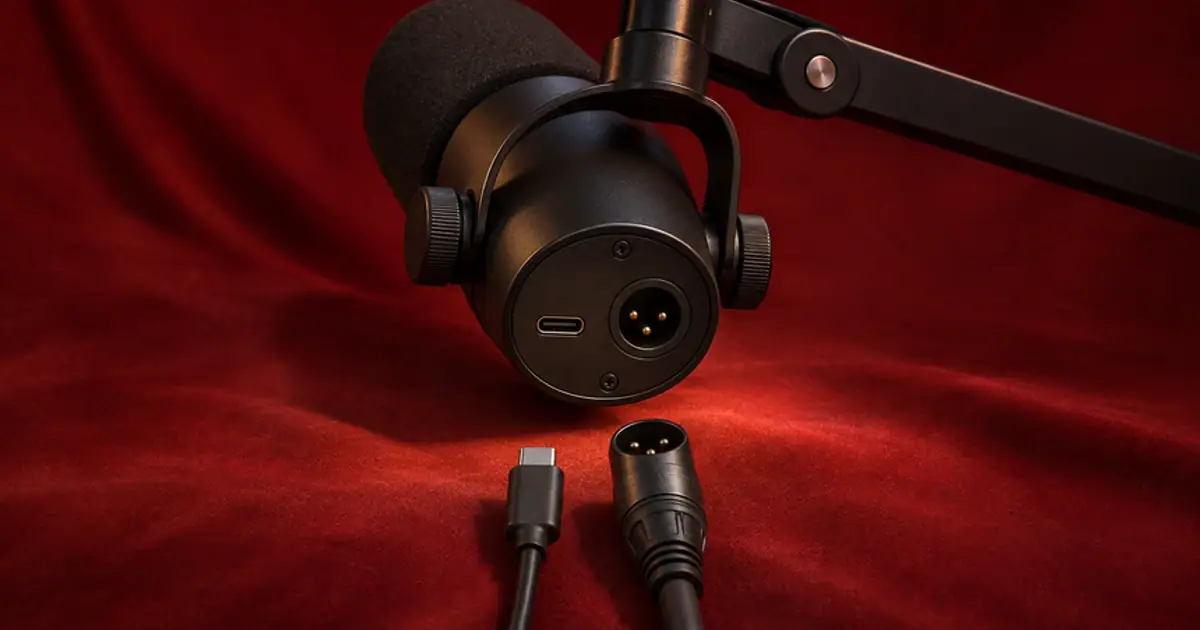

Use the Shure MV7+ over USB if you record one voice into a computer and want access to its onboard digital controls. Use XLR when the microphone needs to join an audio interface, mixer, or recorder. I would make that choice based on the signal path I need in the next session. There is little reason to buy an interface merely because the mic has a three-pin socket.
My gear pick for this setup
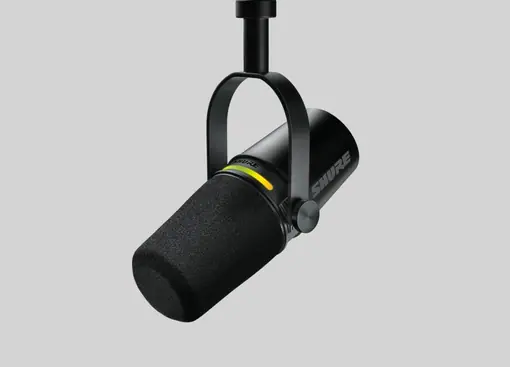
Shure MV7+ microphone only
For solo creators who want a USB-first mic with an XLR connection available for an interface later.
I’d start this mic over USB for a single-voice desk. I’d budget for an interface when the recording needs more mic inputs or routing the USB connection cannot provide.
Follow the signal through each connection
On USB, the microphone's converter sends digital audio straight to the recording device. The Shure software controls that affect the digital signal belong to this path. If you plan to process your recording in an editor later, save or note the settings you used. A de-noised or heavily leveled take can sound convenient during a live call and make a different starting point for a voiceover edit. Check which processing is applied to the saved file before deciding it suits both jobs.
On XLR, the mic sends an analog signal to the input of an interface or recorder. Set the recording gain at that device and select its input in your app. Shure says its software settings do not change the XLR audio. If you are moving from USB because you want to join two people on an interface, plan where the second mic plugs in and how each speaker will hear the cue. Count actual microphone inputs before you pay for the interface. A box with several sockets can still have only one mic preamp.
Decide how you want to hear the take
Plug your headphones into the device that is handling monitoring for the route you are using. For a USB-only setup, check the microphone's headphone monitor and the computer playback balance. For XLR into an interface, test the interface's headphone path. Say one short sentence and stop. If you hear a distinct second copy, listen to the direct path and software monitoring one at a time. There is a separate direct-monitoring walkthrough if the cue still echoes.
Use a single mono channel for a single mic. A stereo interface input pair can put the voice on one side, and changing connector type will not fix that channel selection. Confirm the voice is centered in the export using headphones with the recording app closed. I like this check because it tests what the listener hears after all the monitoring choices have been taken out of the equation.
Compare saved takes at similar loudness
Mark the chair position and the mic mount so the distance and angle stay consistent. Record a quiet line, a normal sentence, and one louder word on USB. Keep a few seconds of room tone. Switch to XLR and repeat with the same placement. If you change digital processing on USB, name it in the take label. A comparison between an automatically processed take and an unprocessed one can be useful for your workflow, provided you know which difference you are hearing.
Match the playback levels in the editor before switching between files. Use the normal sentence as the reference, then listen to the quiet line and louder word. Check the sound of the room between phrases, the handling of a strong consonant, and whether a level change masks a breath or the end of a word. If you hear a meaningful difference, write down which setting or piece of equipment plausibly caused it. A new cable changes the route. Placement, preamp gain, and processing can all change the result independently.
Buy for the session you can describe
For one speaker recording on a laptop, I’d budget for a stable mount and comfortable headphones before adding a second recording device. For a two-person interview, count one mic input per speaker and test an isolated track per input. If you already own a compatible interface, you can compare both routes with what you have. The USB mic buying guide is a better next stop if you are still comparing the MV7+ with a different microphone.
When auditioning an authorized voice in Voice Lab, retain one clean source and a labeled processed reference from the chosen route. Listen for pauses, clipped syllables, and consistent distance. Use the same short script so the comparison tells you more about the recording setup than a different delivery would.
Plan the inputs for a guest
For a remote guest, you may only need one local mic and a separately recorded remote track. For two people in the same room, use a setup that can capture both voices independently so you can repair an interruption or adjust their levels later. Check the app's recording source as well as the interface. Make a short file with one person speaking at a time and verify that each voice is assigned to the intended track. That test can settle the purchase faster than debating connector quality.
A five-minute USB and XLR comparison
Record “The next shipment leaves on Friday” twice per route. Read it once at normal level and once more quietly. Leave a three-second gap after each pair. Match the level of the first sentence across files and label the monitors you heard when recording. In the export, compare the start of “shipment,” the tail of “Friday,” and the room noise in the pause. If the USB file sounds ready for a call and you prefer the XLR file for editing, keep those two presets with the project. If both are equally usable, choose the route with fewer setup steps.
Download the usb and xlr voice recording worksheet (CSV)
Frequently asked questions
Do I need an audio interface to use the MV7+?
No. The USB output connects to a compatible recording device. You need a mic input on an interface, recorder, or mixer to use XLR.
Do Shure's software settings change the XLR recording?
Shure documents that the XLR output is unaffected by those settings. Set gain and any processing at the interface, mixer, or recording application.
Does XLR automatically improve sound?
It changes the analog and conversion path. Compare the actual saved takes at matched playback levels before attributing a difference to the connector.
Where should I connect my headphones?
Use the monitor output on the device carrying your selected recording path and check whether software monitoring is adding a second copy.
Sources and further reading
Affiliate disclosure
As an Amazon Associate I earn from qualifying purchases.
Continue with a useful next step
 Voice
USB Microphones for Voice Cloning and Clean Narration
Choose a USB microphone for narration and voice-clone samples. Compare Shure MV7+ and RØDE PodMic USB, then check room noise, monitoring and processing.
 Voice
Audio Interfaces for Voiceover: Is Scarlett Solo Enough?
Choose an audio interface for one XLR voiceover microphone. Review Scarlett Solo input limits, direct monitoring and setup, then test a clean mono recording.
 Voice
Direct Monitoring for Voiceover Without the Echo
Use direct monitoring for voiceover when your headphones play your voice late. Separate the listening and recording paths and test for doubled monitoring.